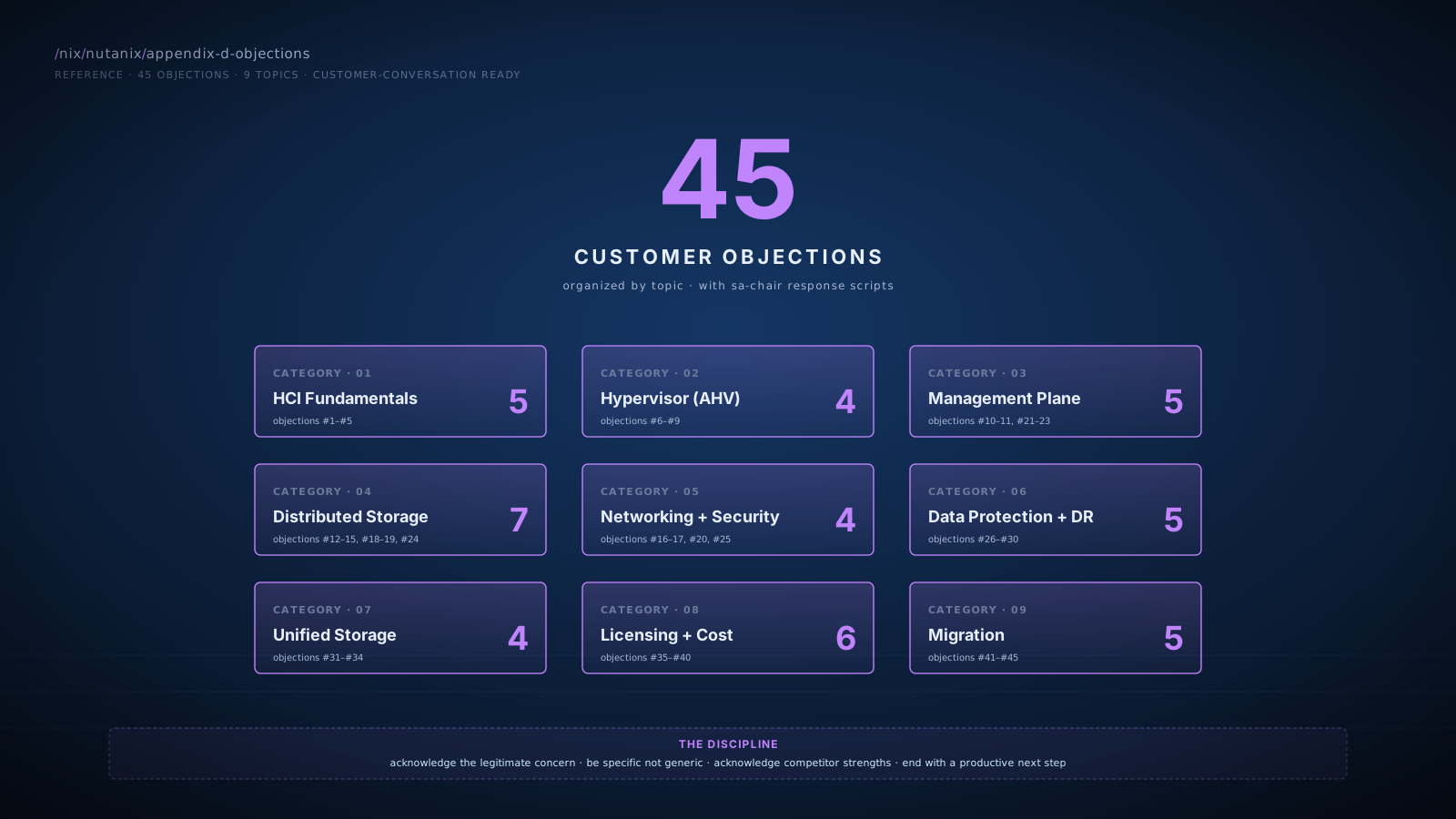
HCI Fundamentals
#1"HCI is just for small workloads. We're an enterprise."
Module: Module 1 · HCI Foundations
"HCI started in mid-market but has been running enterprise workloads for years. Some of the largest financial services, healthcare, and government deployments in the world are on Nutanix specifically. The architecture scales horizontally; large customers run dozens of clusters with hundreds of thousands of cores. Where HCI is genuinely not the right answer is at the very specific extremes: hyperscale parallel filesystems, certain HPC workloads. For typical enterprise compute and general-purpose storage, HCI competes well at every scale. What's the specific workload pattern you're worried about?"
See also:Comparison Matrix · HCI Platforms
#2"We tried HCI and it didn't work."
Module: Module 1 · HCI Foundations
"What was the specific issue? HCI is a category, and platforms within the category have very different operational characteristics. vSAN, HyperFlex, Nutanix, and others have different design choices that produce different real-world outcomes. If your past experience was with a specific platform, the lessons learned are valuable but they don't necessarily transfer. Walk me through what didn't work, and I'll tell you honestly whether it's a Nutanix issue too."
#3"We need dedicated storage for our database. HCI can't handle it."
Module: Module 5 · DSF Deep Dive
"For most database workloads, all-NVMe DSF performs well within the latency and IOPS envelope dedicated arrays provide. The exceptions are at specific extremes: ultra-low-latency p99 requirements, certain very-high-IOPS patterns. Tell me your database workload: what's the IOPS profile, the read/write split, the p99 latency requirement? With that data, I can tell you whether DSF fits or whether you genuinely need a dedicated array. We can run a POC with your actual workload if numbers matter."
#4"HCI's CVM tax is wasteful. I'm paying for hardware just to run management."
Module: Module 2 · Architecture
"The CVM consumes resources, that's accurate. Typically 8-16 vCPU and 32-64 GB RAM per node, depending on platform. That's the price of running distributed storage as a software layer on commodity hardware. Compared to a dedicated storage array: you're trading the array's controller hardware (which you also paid for) for CVM resources running on your compute nodes. Compared to vSAN's kernel-mode integration: yes, vSAN has lower overhead per node. The math that matters is total platform cost and operational simplicity, not per-node resource overhead in isolation. For your specific config, what matters is the workload-density math: can the cluster run your VMs after the CVM tax. Most customers find the answer is yes with margin."
See also:Comparison Matrix · DSF vs vSAN
#5"We're already happy with three-tier. Why change?"
Module: Module 1 · HCI Foundations
"You may not need to change. If three-tier serves you well and your refresh economics are favorable, staying is a legitimate decision. The question to answer is what your refresh-cycle economics look like over the next five years: are you happy with three separate refresh cycles, three vendor relationships, three management surfaces? If yes, stay. If you've been quietly wishing those could consolidate, this conversation is worth having. What does your next 36 months look like for compute, storage, and networking refresh?"
See also:Module 9 · TCO methodology
Hypervisor (AHV)
#6"Why isn't this just vCenter?"
Module: Module 4 · Prism (Element and Central)
"It's not vCenter, but it's close to vCenter plus Aria Operations plus Aria Automation plus vSphere Lifecycle Manager, in one product, with one upgrade cadence. The pieces you currently glue together are integrated by default. Your existing vCenter mental model transfers; the new piece is recognizing that capacity analytics, automation, and lifecycle management are in the same UI rather than in separate Aria products. The learning curve is real but bounded; most VMware admins find it familiar within a few weeks of hands-on time."
#7"Has anyone really run AHV at scale in production?"
Module: Module 3 · AHV
"Yes, including some of the largest enterprises in financial services, healthcare, and government. Nutanix has tens of thousands of customers running AHV in production at scale. The KVM core has been in Linux for over a decade and runs much of public cloud underneath. AHV's specific operational maturity has accelerated significantly since 2020. I can connect you with reference customers in your industry if it would help. What specific concerns are you weighing?"
See also:Comparison Matrix · AHV vs ESXi
#8"We rely on VMware Fault Tolerance for our critical VMs. AHV doesn't have that."
Module: Module 3 · AHV
"You're right that AHV doesn't have a direct FT equivalent. For workloads that genuinely require zero-downtime VM-level fault tolerance, that gap is real. Two questions: how many VMs are using FT today, and what's the actual recovery requirement those VMs have? In my experience, many VMs configured with FT could meet their actual SLA with HA (which AHV has) plus application-level redundancy. For the ones that genuinely need FT, the options are: keep them on ESXi-on-Nutanix, redesign with application HA, or accept the gap. Which scenario applies to your specific FT users?"
#9"What about our PowerCLI scripts? We've built years of automation."
Module: Module 4 · Prism
"The PowerShell scripts that target VMware-specific operations stay where they are; they continue to manage your remaining VMware footprint. For Nutanix-targeted automation, there's a Nutanix PowerShell module that exposes the v4 API in PowerShell-native form. The translation pattern is: VMware-specific PowerCLI stays PowerCLI; cross-platform automation gets rewritten in either updated PowerShell with the Nutanix module or in Terraform if you're moving toward declarative IaC. Plan a workflow inventory; many scripts translate cleanly, some require rewrite, some are obsolete now anyway."
Management Plane
#10"What about my Aria investment? We have 5 years of dashboards and policies."
Module: Module 4 · Prism
"You don't have to throw it away. Aria can continue to monitor your existing VMware infrastructure. For new Nutanix workloads, NCM Intelligent Operations gives you Nutanix-native analytics. Many customers run them in parallel during transition. Some keep Aria for cross-vendor analytics indefinitely. The dashboards and policies you've built are valuable; they don't transfer cleanly but they inform what NCM dashboards you'd build. Walk me through your most-used Aria reports and I'll show you the NCM equivalent."
#11"Single-vendor lock-in is the long-term cost. I want flexibility."
Module: Module 4 · Prism
"Lock-in is a real architectural decision. The honest framing: you're currently locked into VMware for the hypervisor and locked into multiple vendors for storage. Aria's cross-vendor scope helps with management abstraction but doesn't eliminate hypervisor or storage lock-in. Every enterprise platform creates lock-in somewhere; the question is where. Some customers run hybrid: Aria for cross-vendor reporting, Nutanix for the consolidation benefits where Nutanix wins. That preserves flexibility while capturing consolidation value. Let's walk through your specific multi-vendor ambitions and decide what level of management abstraction you actually need."
#21"Our compliance team won't approve a new platform."
Module: Module 7 · Data Protection · Scenario 4
"Compliance approval is a real workstream and worth scoping early. Nutanix has SOC 2, HIPAA, FedRAMP, PCI DSS, and other certifications; the specific framework matters. What's your specific compliance scope? With that, we can map our certifications against your requirements and identify any gaps that need attention. Often the conversation with compliance is shorter than expected once they see the certification documentation; sometimes there are real items requiring attention. Let me get the relevant attestation documents to your compliance team."
#22"Our team standardized on PowerCLI. We can't switch."
Module: Module 4 · Prism
"You don't have to switch. PowerShell remains valid for Nutanix automation; the Nutanix PowerShell module exposes the v4 API in PowerShell-native form. The script you'd write for Nutanix VM provisioning looks similar in shape to the PowerCLI script for VMware. Your team's PowerShell expertise transfers. The cmdlet names differ; the patterns don't. Want me to show you a side-by-side: same operation in PowerCLI for VMware, then in the Nutanix PowerShell module?"
See also:Objection #9
#23"Our ServiceNow integration will break. That's not acceptable."
Module: Module 4 · Prism
"ServiceNow integration with Prism Central is supported via the v4 REST API plus X-Play webhooks. The patterns you have for ServiceNow against vCenter (CMDB updates, change tickets, catalog provisioning) all have equivalents on Nutanix. The work is replicating the integration logic; the technical capability is there. We can dry-run the integration in a non-production environment and validate before cutover. What specific ServiceNow flows are you worried about: CMDB, change management, catalog, or something else?"
Distributed Storage (DSF)
#12"Tail latency on distributed storage will hurt our database. We need an all-flash array."
Module: Module 5 · DSF Deep Dive
"DSF on all-NVMe nodes typically delivers sub-millisecond p99 reads for cached data and low-single-digit-ms p99 for cold reads. Whether that meets your specific requirement depends on your workload pattern, working set size, network topology, and cluster scale. The right answer is to run a POC with your actual workload and measure. If your p99 requirement is 5ms or higher, DSF almost certainly fits. If it's under 1ms p99 at extreme percentiles, we need to validate carefully. What's your specific latency requirement?"
See also:Objection #3
#13"We don't trust software-defined storage with our critical data."
Module: Module 5 · DSF
"That's a fair concern that deserves a specific answer. DSF runs on the same primitives as the public cloud's storage layers: distributed metadata, replicated data, self-healing, scrubbing. AWS, Azure, GCP all run software-defined distributed storage at hyperscale. Nutanix has been doing this in production at thousands of enterprises since around 2012. The architectural risks are real but well-understood: replication factor protects against drive and node failure, encryption protects against unauthorized access, snapshots protect against logical corruption. What's the specific failure scenario you're worried about? Let me address it concretely rather than abstractly."
#14"Compression and dedup don't actually save much in real life."
Module: Module 5 · DSF
"You're right that the marketing 4-6x ratios are best-case. Real-world ratios on mixed enterprise workloads are typically 1.5-2.5x for compression. Dedup is workload-specific: VDI persistent profiles can hit 2-3x, general-purpose VMs typically don't. We always plan capacity using conservative ratios and let actual results inform adjustments. Your data type matters: text and OS images compress well, already-compressed data doesn't. What's your data profile? With that, I can give you a realistic capacity-savings range, not a marketing number."
#15"What's the rebuild time when a node fails? My array does it in hours."
Module: Module 5 · DSF
"Rebuild time depends on cluster size and data volume on the failed node. A larger cluster rebuilds faster because more nodes share the work. For a typical 8-12 node cluster carrying 100-200 TB, expect rebuild in 2-8 hours after a node loss. During rebuild, the cluster runs at reduced redundancy: a second failure during the window can cause data loss for RF2. RF3 tolerates an additional failure during rebuild. We model this for your specific cluster size during the design phase. What's your specific resilience requirement?"
#18"Switching costs eat any savings. Why bother?"
Module: Module 9 · Licensing · Module 10 · Migration
"Switching costs are real and worth quantifying explicitly. Migration services, parallel-running, training, decommissioning. For typical mid-market environments those are six-figure costs concentrated in year 1. Whether they're recouped depends on your run-rate savings; for most customers running multiple separate storage tiers and post-Broadcom VMware subscriptions, the math works in 24-36 months. For some customers it doesn't. The right answer is your specific TCO model with all categories included. If switching cost exceeds savings over 5 years, I'll tell you to stay. Let's run the numbers with your actuals."
See also:Scenario 7 · CFO Defense
#19"Capacity efficiency on my array is better. We don't need HCI."
Module: Module 5 · DSF
"For specific workloads, your array probably has the edge on capacity efficiency, especially if you're running NetApp's deep dedup or Pure's data-reduction features. For mixed enterprise workloads, the gap is smaller than the marketing suggests. The bigger question is platform total cost: when you factor compute consolidation, you may net-save even with slightly less efficient storage. Send me your current array's actual reported reduction ratio, and I'll model an honest comparison against DSF on your workload profile."
#24"If you consolidate storage, my storage admin role goes away."
Module: Module 5 · DSF · Module 8 · Unified Storage
"Your expertise stays valuable. The consolidation removes the appliances you spend time maintaining, not the storage knowledge you bring. You become the architect for one platform instead of the operator of four. Your team gets back the hours that go into vendor escalations, firmware compatibility matrices, and quarterly upgrade dances. The role evolves; it doesn't disappear. The senior storage architects who go through these consolidations typically end up with more interesting work, not less."
Networking and Microsegmentation
#16"What about NSX-T? We have it deployed and tuned."
Module: Module 6 · Networking
"NSX-T continues to work on Nutanix-on-ESXi. You don't have to migrate. For new AHV workloads, Flow Network Security provides VM-tier microsegmentation that's competitive with NSX-T's distributed firewall, licensed via NCI Ultimate or as a Security Add-On for NCI Pro (per usable TiB; bundles Data-at-Rest Encryption). For your established NSX-T deployments, keep them. The platforms coexist. Let me understand your specific NSX-T use cases and we can decide where Flow fits and where NSX-T should remain."
#17"Our Cisco fabric is tuned for our network. Software-defined networking won't match."
Module: Module 6 · Networking
"Your Cisco fabric continues to do what it does well. AHV's networking sits on top of your physical fabric, not replacing it. The software-defined piece is the virtual switching, microsegmentation, and (optionally) overlay networking on top of your existing L2/L3 infrastructure. Your Cisco team continues to own the physical fabric; the AHV team owns the virtual layer. Most customers find the operational boundary clean. What's your specific concern: performance, reliability, integration?"
#20"We've already invested in microsegmentation. We're not starting over."
Module: Module 6 · Networking
"You shouldn't start over. If your microsegmentation is working, keep it. For workloads moving to AHV, the question is whether to re-implement on Flow or keep the workload on ESXi-on-Nutanix where NSX-T continues to work. Many customers do both: Flow for new AHV deployments, NSX-T for existing. The decision is per-workload, not platform-wide. Walk me through your microsegmentation policy structure and I'll tell you which translates cleanly to Flow and which is better staying on NSX-T."
See also:Objection #16
#25"We don't trust software-defined networking. Hardware is more reliable."
Module: Module 6 · Networking
"The hardware fabric still does its job. Open vSwitch in AHV is a kernel-mode software switch that's been in production in OpenStack and many Linux platforms for over a decade. It's not experimental code. The reliability story for the virtual layer is mature; the reliability story for your physical fabric is unchanged. The new piece is the policy layer (Flow) that runs on top, which is where customers most often have questions. What specific reliability concern are you weighing?"
Data Protection and DR
#26"What about SRM? We've spent 10 years on the runbooks."
Module: Module 7 · Data Protection
"SRM continues to work on Nutanix-on-ESXi. You don't have to migrate. For AHV workloads, Recovery Plans (the runbook construct inside Nutanix Disaster Recovery, formerly branded Leap) provides orchestrated DR with VM startup order, network mapping, IP remapping, test failover. It's not as feature-rich as SRM at the deepest customization level, but it handles typical enterprise DR cleanly. Replication itself rides on the platform: Async ships with NCI baseline, NearSync and Metro Availability are NCI Ultimate features, Recovery Plans is included with Nutanix Disaster Recovery in Prism Central. The pattern most customers find: keep SRM for the workloads it orchestrates well, use Recovery Plans for new AHV workloads. Coexist for the foreseeable future."
#27"We have array-based replication. Why would we use Nutanix?"
Module: Module 7 · Data Protection
"Array-based replication works well within its scope. It replicates at the storage layer, often with mature features and tight integration with vendor-specific tools. Nutanix replication is platform-native: snapshots, async, NearSync, Metro all in one product, integrated with Recovery Plans. For customers consolidating onto Nutanix, having replication built into the platform simplifies operations. For customers keeping arrays for specific workloads, keep array-based replication for those. Decision is per-workload. What's your replication topology today?"
#28"Migrating DR is too complex. We can't risk it."
Module: Module 7 · Data Protection · Module 10 · Migration
"DR migration is real work and worth being careful about. The pattern that works: migrate workloads to Nutanix first, with their existing array-based or vSphere-Replication-based DR continuing to work. Build the new Nutanix-native DR in parallel. Test failover into the new system before relying on it. Cut over the DR mechanism when you have confidence. The original DR remains as a fallback during the transition. We've done this many times; the methodology is well-understood."
#29"Cloud DR isn't for us. Compliance requires data on-prem."
Module: Module 7 · Data Protection
"Compliance constraints around data residency are real and worth respecting. NC2 cloud DR makes sense for customers without those constraints; for customers with strict data-locality requirements, on-prem-to-on-prem replication is the right design. Your second site can be a smaller dedicated DR datacenter, a colo facility, or a hybrid with some workloads in cloud and others not. What's the specific compliance constraint? Some are absolute; others have nuance that allows certain workloads in cloud."
#30"Test failover is too disruptive. We can't do it quarterly."
Module: Module 7 · Data Protection
"Recovery Plans test failover runs into an isolated network at the DR site. Production VMs continue running normally; the test happens at DR with no production-side impact. Test results are reported, then the test environment is torn down. The whole exercise is typically 1-2 hours per workload group, scheduled during normal business hours, with no end-user impact. That's different from old-style DR tests that required real failovers. Your concern is valid for that older model; Recovery Plans was designed specifically to address it."
Unified Storage
#31"We have NetApp. Why would we add Files?"
Module: Module 8 · Unified Storage
"You may not need to add Files; you may not need to migrate from NetApp at all if your filer is serving you well. Where Files becomes interesting is at NetApp refresh time, or when you're consolidating onto Nutanix and the file-services consolidation makes sense alongside compute. For specific ONTAP workflows (FlexClone, FlexCache, advanced policies), NetApp retains advantages. For typical enterprise file workloads, Files is competitive. Workload-by-workload decision; not all-or-nothing."
#32"Why use Objects instead of AWS S3?"
Module: Module 8 · Unified Storage
"AWS S3 wins for hyperscale and elastic cloud-native workloads. Objects wins for steady-state high-volume workloads where data sovereignty, latency, or egress economics favor on-prem: especially backup repositories, on-prem analytics intermediate storage, regulated archives. Most enterprises end up with both. They complement each other. What's your specific object workload: backup target, archive, application data?"
#33"Our backup target is fine. Why consolidate?"
Module: Module 8 · Unified Storage
"If your backup target is at the start of its lifecycle and serving you well, no rush. The conversation gets interesting at refresh time, or when you're consolidating onto Nutanix anyway. Replacing a Data Domain or similar dedup appliance with Objects on the same Nutanix cluster eliminates a separate appliance, refresh cycle, and support contract. Veeam, Commvault, Rubrik, Cohesity, and HYCU all support S3-compatible targets, so the workflow stays the same. When does your backup target refresh? That's typically when this conversation makes sense."
#34"We have iSCSI consumers that aren't moving. They need a real array."
Module: Module 8 · Unified Storage
"Volumes provides iSCSI block to external consumers, including bare-metal Linux/Windows servers, Oracle RAC, and ESXi clusters not on Nutanix. Multi-pathing via multiple portal IPs. For typical iSCSI consumer use cases, Volumes is operationally clean. For workloads requiring sub-millisecond p99 at extreme IOPS, dedicated block arrays still have an edge. What are the specific iSCSI consumers and their performance requirements?"
Licensing and Cost
#35"Sticker price comparison is roughly the same. Why migrate?"
Module: Module 9 · Licensing
"Sticker is rarely the right comparison. The story is in categories beyond hardware-and-license. Storage consolidation eliminates separate filer + Data Domain + iSCSI array support contracts. Refresh cycles align (one cluster refresh in 5 years instead of three or four). Operational simplification reduces vendor coordination time. Your team's hours on firmware compatibility matrices and quarterly upgrade dances become recoverable time. Run the 5-year TCO with all categories. If it nets to less than $200-300K savings on your scale, I'll tell you to stay; the migration disruption isn't worth marginal savings. Let me build the customer-specific TCO."
See also:Scenario 7 · CFO Defense
#36"We prefer perpetual licensing. Subscription doesn't work for us."
Module: Module 9 · Licensing
"Subscription is the standard model for both Nutanix and post-Broadcom VMware now; perpetual options are limited or unavailable for new customers across most enterprise infrastructure. The accounting question is real: subscriptions are typically opex while hardware is capex. Some CFOs strongly prefer one or the other. Multi-year subscriptions can be accounted differently depending on your auditor. What's the specific accounting concern: budget cycle, depreciation alignment, balance-sheet impact? We can structure the deal to fit your accounting policy as much as possible."
#37"Migration is six figures. That's real cash out the door."
Module: Module 9 · Licensing · Module 10 · Migration
"Migration services are real cash and worth scrutinizing. For typical mid-market environments, services run $150-400K depending on complexity. They're year-1 costs that are recouped through years 2-5 if the savings story is real. If your 5-year savings are only $300K and migration is $250K, the math doesn't work; I'd recommend staying. If 5-year savings are $1M and migration is $300K, the math is clear. Your specific numbers matter. Let me model both scenarios with your actuals."
#38"We just renewed VMware for 3 years. Bad timing."
Module: Module 9 · Licensing
"Renewal timing matters for the financial story, but doesn't have to block evaluation. Three options: (1) wait until renewal end; the conversation is cleaner financially. (2) start now with a pilot; learn the platform during your VMware term so you're ready at renewal. (3) evaluate workload-by-workload; some workloads may make sense to migrate early even with overlapping VMware spend if the workload's specific economics favor it. Recommendation depends on your specific situation. When does your VMware term end?"
#39"Hardware vendor lock-in is the real cost. We need flexibility."
Module: Module 9 · Licensing
"Nutanix is hardware-flexible by design. Three sourcing options: NX (Nutanix-branded, single-vendor support), OEM (Dell XC, Lenovo HX, HPE DX, Cisco UCS, preserves your hardware-vendor relationship), or HCIR (commodity hardware on the HCL, you source separately). Most enterprise customers run OEM, which preserves their existing Dell/HPE/Lenovo/Cisco relationship and negotiating leverage. The Nutanix decision doesn't lock you out of your hardware vendor; it's complementary. What's your current server-vendor relationship?"
#40"TCO claims always feel inflated. I don't trust the numbers."
Module: Module 9 · Licensing
"Reasonable skepticism. Many TCO models are aggressive in ways that don't survive scrutiny. The way I build them: every assumption is stated explicitly, sensitivity analysis shows ranges not point estimates, all cost categories are present (including the ones vendors usually skip: migration, training, parallel-running, decommissioning), and the comparison uses your actual current run-rate, not industry averages. If a TCO doesn't include those, it's not a real model. Send me your actual current run-rate and your VMware quote, and I'll build a TCO that holds up under audit."
See also:Scenario 7 · CFO Defense
Migration
#41"Migration is too risky. We can't afford an outage."
Module: Module 10 · Migration
"Migration risk is real and managed by the methodology. The 7-phase framework specifically reduces risk wave by wave: pilot validates the platform, low-tier production validates scale, Tier-1 production validates application-aware patterns, mission-critical comes last because by then we've done it 100 times in your environment. Each cutover has a rollback plan tested in the pilot wave. The risk profile is far lower than 'big bang' migration. What's your specific concern: data loss, downtime, or something else?"
#42"We don't have time for an 18-month project."
Module: Module 10 · Migration
"I appreciate the urgency. A 3-month timeline for a typical enterprise environment is unrealistic and would carry serious risk. Realistic timelines for environments of typical scale are 12-18 months. What I can offer in 3 months: pilot wave complete, Wave 1 well underway (100-200 VMs migrated), and clear progress to demonstrate. Let me walk through what's realistic for your fiscal-year pressure point and we'll find a story you can tell that's both ambitious and credible."
#43"Our team is already overloaded. They can't take on a migration."
Module: Module 10 · Migration
"That concern is exactly right. Migrations layered on normal operations cause team burnout and project failure. The realistic answer is one or more of: BlueAlly augmentation for migration work, phasing that respects team bandwidth (slower migration if team is thin), temporary contract help, reassigning some operations work, or accepting longer timelines. Let's plan capacity honestly. What's your team's available bandwidth for migration work per week?"
See also:Scenario 8 · Mid-Engagement Crisis
#44"What if Move fails on our complex VMs?"
Module: Module 10 · Migration
"Move handles VM disk migration, configuration translation, and brief cutover for the vast majority of VMs cleanly. Some VMs have edge cases requiring manual handling: complex network configurations, application-specific dependencies, vSAN-specific storage policies, NSX-T microsegmentation. We identify those during Phase 0 discovery; they get a manual migration plan rather than relying on Move alone. The pilot wave specifically validates Move on representative complexity before scaling. If Move can't migrate a specific VM cleanly, we have a backup plan. We don't discover that during Wave 3."
#45"Can we just do hybrid permanently?"
Module: Module 10 · Migration
"Yes, and often that's the right answer. Hybrid steady-state is a successful outcome, not a project failure. Many enterprise customers end up with 70-90% on Nutanix and the remaining 10-30% on VMware for legitimate reasons: NSX-T routing complexity, NetApp ONTAP-specific workflows, vendor-certified-only-on-ESXi applications, regulatory constraints. We design for hybrid where it makes sense from the start, not as a fallback. Let me understand your specific constraints and we'll figure out where the right line is."
See also:Scenario 2 · Enterprise Multi-Site
How to Use This Handbook
Before a customer call
- Identify the customer's likely objection profile (heavy NetApp shop = storage objections; recently renewed VMware = licensing; deep NSX-T = networking).
- Read the relevant 3-5 entries.
- Note the language in the strong responses.
- Adapt to the customer's specific context.
During the call
- Listen for the underlying concern, not just the literal statement. The "What's really being asked" line captures the actual concern.
- Acknowledge first, respond second. Customers know when they're being listened to.
- Use the responses as starting points; speak in your voice, not the script's.
- End with a productive next step (POC, modeling exercise, follow-up call).
After the call
- Note which objections came up.
- Note which responses landed and which fell flat.
- Adapt the responses based on what worked. The handbook is a starting point; your version of it grows with experience.
The objections handbook is a living document. As you encounter customer objections that aren't here, add them. As your responses improve through customer feedback, refine them.
References
The objection responses in this appendix lean on technical claims sourced and verified in the per-module References sections. The responses that touch the most-volatile material (Broadcom pricing, Flow licensing, Leap rename, NCI/NCM tiers) cite the same authorities used in those modules:
- Module 3 · Broadcom-era VMware pricing. vSphere Foundation $190/core, VCF $350/core, 16-core CPU min, 72-core order min.
- Module 6 · Flow Network Security licensing. NCI Ultimate or Security Add-On for NCI Pro (per usable TiB).
- Module 7 · Nutanix Disaster Recovery (formerly Leap). Recovery Plans architecture and the rename history.
- Module 9 · NCI / NCM / NCP licensing. The current paid-tier structure that replaced AOS Pro / Ultimate.
- Appendix B · HyperFlex EOL dates. Used in the past-bad-HCI-experience response.
Cross-References
- Modules: Each entry links back to the module where the topic is taught in depth.
- Glossary: Appendix A defines the terms used in the responses.
- Comparison Matrix: Appendix B provides the technical comparisons that support the responses.
- Scenarios: Appendix C has full design exercises for the deeper variations of these objections.
- Discovery Questions: Appendix E has the kickoff-call questions that often surface these objections naturally. live now
- POC Playbook: Appendix J has the demo flows that often resolve technical objections faster than discussion.