The Promise
By the end of this module you will:
- Distinguish Prism Element from Prism Central in 30 seconds, with the right examples. This is the most-confused pair of names in the Nutanix vocabulary. NCA tests this directly. Customer confusion on the call costs you credibility.
- Map Prism to the VMware management stack precisely. Prism is closer to vCenter plus Aria Operations plus Aria Automation plus vSphere Lifecycle Manager, in one product, with one upgrade cadence.
- Pass roughly 28% of NCA and 22% of NCP-MCI. The NCA is a Prism-navigation exam in many ways. NCP-MCA is heavier: 40% of that exam is automation built on Prism Central.
- Demonstrate the categories model and explain why it is more powerful than vSphere tags. Customers who understand them think about policy differently.
- Walk a customer through the v4 REST API and X-Play playbook automation. Demo a one-line curl call and a three-step playbook in five minutes total.
- Make the honest licensing case for NCM features. Some Prism functionality is included with NCI baseline; some sits behind NCM tiers. Knowing what is bundled and what is added is sales-critical.
Foundation: What You Already Know
You manage VMware infrastructure through a stack of products that has accumulated over two decades:
- vCenter Server for VM lifecycle, host management, HA and DRS configuration, distributed switches.
- vSphere Lifecycle Manager (formerly Update Manager) for ESXi and firmware updates.
- Aria Operations (formerly vRealize Operations) for capacity analytics, performance monitoring, right-sizing.
- Aria Automation (formerly vRealize Automation) for self-service catalogs, blueprints, workflow automation.
- Aria Operations for Logs (formerly vRealize Log Insight) for log aggregation.
- PowerCLI for scripted operations and automation.
That is roughly six products from a single vendor, each with its own UI, API surface, upgrade cadence, version compatibility matrix, and licensing model. It works. Decades of muscle memory exist around it. It is also a lot of products to manage.
Prism takes the responsibilities of vCenter, Aria Operations, Aria Automation, vSphere Lifecycle Manager, and Aria Operations for Logs (in part) and unifies them into one product with two deployment forms.
Core Content
Prism Element: The Per-Cluster Management UI
Prism Element is the management interface for a single Nutanix cluster. It runs inside the cluster's CVMs (no separate appliance to deploy). You access it at the Cluster Virtual IP (VIP) on port 9440 over HTTPS.
What Prism Element does:
- VM lifecycle (create, clone, migrate, snapshot, delete, configure)
- Host and node management
- Storage container and storage pool management
- Networking configuration on AHV (bridges, VLANs, virtual networks)
- Cluster-level monitoring (capacity, performance, alerts)
- Local user and role management
- LCM (Life Cycle Manager) for upgrades
- Health and NCC integration
If you only have one Nutanix cluster, you can run on Prism Element alone. Many small and ROBO deployments do exactly this. There is no requirement to deploy Prism Central if you have a single cluster.
Prism Central: The Multi-Cluster Pane
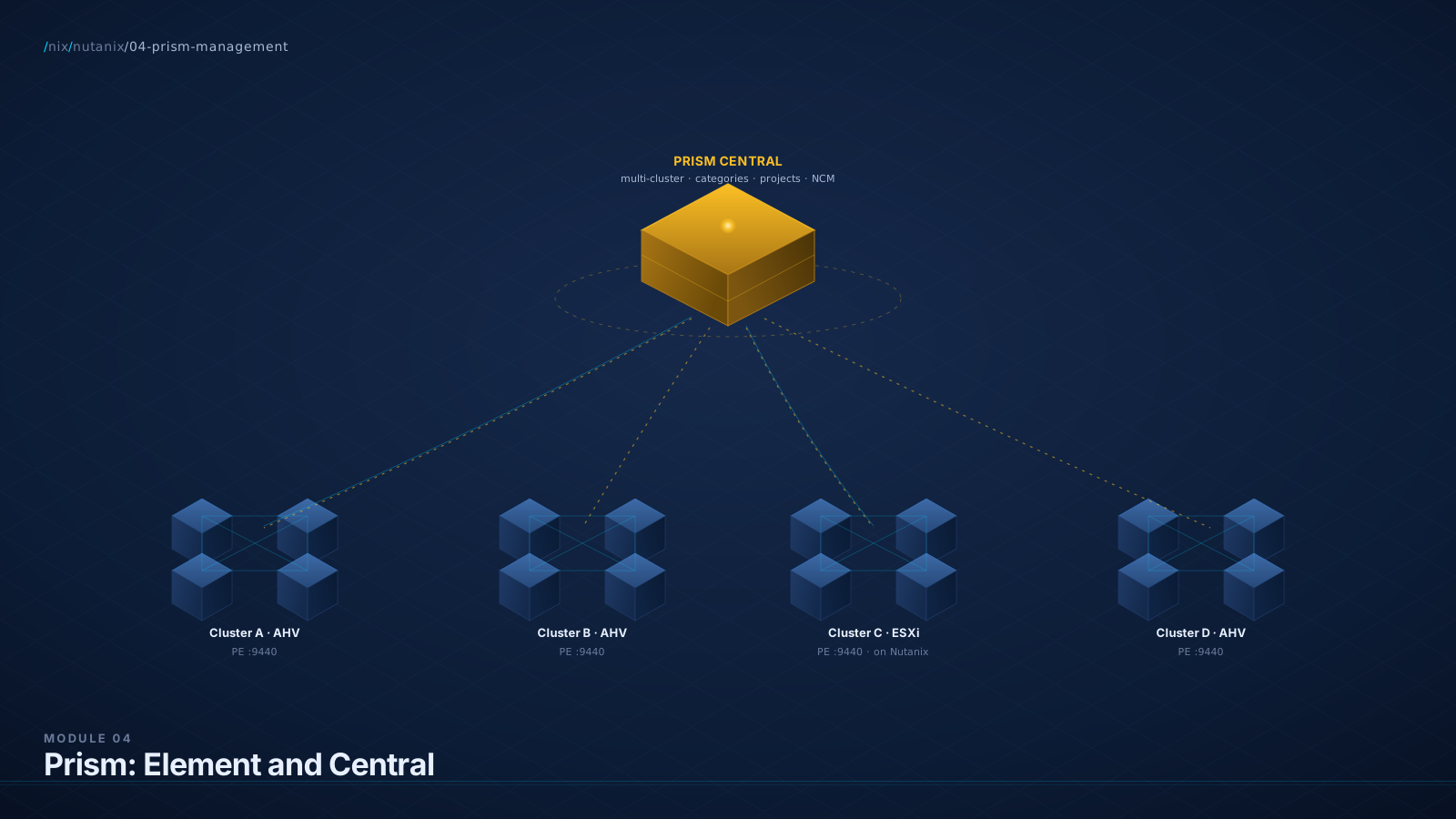
Prism Central is a separately-deployed VM (or scale-out set of VMs) that provides multi-cluster management. You deploy it once for your environment, register multiple Nutanix clusters to it, and manage them all from one UI.
What Prism Central adds beyond Prism Element:
- Multi-cluster visibility. One pane for many clusters across many sites.
- Categories. A tagging system that drives policies across clusters.
- Projects and multi-tenancy. Logical containers for VMs, users, and quotas.
- NCM Self-Service (formerly Calm). Application blueprint automation.
- X-Play. Event-driven automation playbooks.
- Intelligent Operations. AIOps capacity and anomaly analytics.
- Recovery Plans (Nutanix Disaster Recovery, formerly Leap). Cross-site DR orchestration. (Module 7 goes deep.)
- Reporting and dashboards beyond per-cluster Prism Element.
- NKE management. Kubernetes cluster lifecycle.
Prism Central comes in multiple sizing tiers: an X-Small option (5 clusters / 50 hosts / 500 VMs), Small for typical mid-market, and a 3-VM scale-out for larger environments. The exact thresholds shift between PC versions; check the current Prism Central sizing guide.
Diagram: Prism Element vs Prism Central Hierarchy
The Cycle, Frame Two: Prism as the Aria Suite, Pre-Integrated
In the VMware world, you might run vCenter for lifecycle, Aria Operations for capacity, Aria Automation for self-service, Aria Operations for Logs for log aggregation, vSphere Lifecycle Manager for upgrades, and PowerCLI for everything else.
In Prism Central with the appropriate NCM tier, you have:
- VM lifecycle and HA: Prism Central native
- Capacity analytics: NCM Intelligent Operations
- Self-service blueprints: NCM Self-Service (formerly Calm)
- Log aggregation: integration with Splunk, Elastic, or syslog forwarding (Prism is not primarily a log-management tool)
- Upgrades: LCM, deeply integrated
- Automation: X-Play playbooks plus the v4 REST API
Five products consolidate to one product (with NCM tier add-ons for the analytics and self-service features). The licensing model is different from buying Aria components separately. The integration story is genuinely simpler.
The Cycle, Frame Three: Prism as the API-First Management Product
The vSphere ecosystem accumulated APIs across two decades: vSphere SOAP, vSphere REST, vSAN APIs, NSX APIs, Aria APIs, PowerCLI, and various REST gateways. Tying them together is real work.
Prism was built API-first. The v4 REST API is unified across compute, storage, networking, and automation. One token, one base URL pattern, one consistent JSON schema. PowerShell, Python, Terraform (Nutanix provider), and Ansible (Nutanix collection) all sit on top of this API.
Categories: The Tagging System That Drives Policy
Categories are the most underappreciated feature in Prism Central. They are also the most exam-relevant feature for NCP-MCI and a foundational feature for NCP-MCA.
A category is a key-value pair. Examples:
Environment: ProductionEnvironment: DevelopmentOwnerTeam: FinanceCompliance: PCIBackupTier: Gold
You define the category keys in Prism Central, then assign values to VMs (and to other entities). Categories are the basis for:
- Protection policies. "All VMs with
Environment: Productionget RF3 plus async DR with 1-hour RPO." - Backup policies. "All VMs with
BackupTier: Goldget hourly snapshots retained 30 days." - Affinity rules. "VMs with
App: AppA-Webkeep affinity with VMs withApp: AppA-DB." - Microsegmentation rules in Flow. Module 6 goes deep.
- Reporting filters. "Show me capacity utilization for
OwnerTeam: Finance." - Quotas in Projects. "Project
FinanceAppscan use up to 200 vCPUs and 800 GB RAM."
Diagram: The Categories Model
X-Play: Event-Driven Automation Playbooks
X-Play is Prism Central's event-driven automation engine. A playbook has two parts:
- Trigger. An event (alert raised, threshold crossed, VM created with a specific category) or a schedule.
- Actions. A sequence of steps that execute when the trigger fires (send a Slack notification, create a ServiceNow ticket, run a REST API call, take a snapshot, run an Ansible playbook).
Common X-Play patterns:
- "When CPU on any production VM exceeds 90% for 10 minutes, post to #platform-alerts in Slack."
- "When a new VM is created with
Compliance: PCI, automatically apply the PCI protection policy and notify the security team." - "Every Friday at 6pm, take an application-consistent snapshot of all VMs with
BackupTier: Gold."
X-Play is included with NCM Ultimate (typically). For customers without that tier, X-Play is not available; they would build similar automation against the v4 API directly.
NCM (Nutanix Cloud Manager): The Tier Question
This is where licensing gets specific. Pay attention.
The Nutanix licensing model has two parallel axes. NCI (Nutanix Cloud Infrastructure) licenses the platform itself: AOS, AHV, the cluster, basic Prism Element and Prism Central management. NCI ships in Pro and Ultimate tiers. NCM (Nutanix Cloud Manager) licenses the advanced management capabilities on top of Prism Central: Intelligent Operations, Self-Service, X-Play, cost governance. NCM also ships in Starter, Pro, and Ultimate tiers and is a separate paid SKU from NCI (do not confuse "NCM Starter" with "included for free"). For convenience, Nutanix also sells NCP (Nutanix Cloud Platform) bundles that combine NCI and NCM at matching tiers.
What is included with basic NCI / Prism Central (no NCM at all): multi-cluster Prism Central management, Categories, Projects, baseline reporting and dashboards, RBAC, identity integration, the v4 REST API surface itself. This is the floor.
| Capability | Where It Lives |
|---|---|
| Per-cluster Prism Element | Included with NCI |
| Multi-cluster Prism Central, Categories, Projects | Included with NCI |
| Baseline reporting, RBAC, v4 API | Included with NCI |
| Intelligent Operations basics | NCM Starter |
| Anomaly detection, what-if, runway | NCM Pro |
| Self-Service blueprints (Calm) | NCM Ultimate |
| X-Play playbooks | NCM Ultimate (typically) |
| Cost governance | NCM Ultimate |
| Flow Network Security | NCI Ultimate, or Security Add-On for NCI Pro (per usable TiB) |
Always check the current licensing matrix before quoting a customer. This is one area where Nutanix product packaging changes more often than the platform underneath.
RBAC, Projects, and Multi-Tenancy
Prism Central supports role-based access control (RBAC) at multiple levels:
- Built-in roles. Super Admin, Cluster Admin, Cluster Viewer, User Admin, etc.
- Custom roles. Define your own role with specific permissions.
- Projects. A logical grouping of VMs, networks, images, and quotas. Users are assigned to projects with specific roles.
- Identity sources. Local users, Active Directory (LDAP), SAML 2.0 (for SSO with providers like Azure AD / Entra ID, Okta, Ping Identity).
Projects are particularly useful for separating environments (Dev / Test / Prod) with quota enforcement, multi-tenancy, and developer-self-service patterns.
Diagram: Prism Central Multi-Cluster Architecture
v4 REST API: The Automation Foundation
The v4 REST API is the unified Nutanix API. Every Prism action has an API equivalent. URL pattern: https://<pc-or-pe-ip>:9440/api/<namespace>/<version>/<path>.
# v4 URL pattern: /api/<namespace>/<version>/<path>

# List all VMs (GET) on the VMM namespace
curl -k -u admin:password \
  https://<pc-ip>:9440/api/vmm/v4.0/ahv/config/vms

# Create a VM (POST)
curl -k -u admin:password \
  -X POST \
  -H "Content-Type: application/json" \
  -d @vm-spec.json \
  https://<pc-ip>:9440/api/vmm/v4.0/ahv/config/vms

# Get cluster information (GET) from the ClusterMgmt namespace
curl -k -u admin:password \
  https://<pc-ip>:9440/api/clustermgmt/v4.0/config/clusters
The full API is documented at developers.nutanix.com. Nutanix also publishes:
- PowerShell module (official Nutanix PowerShell SDK)
- Python SDK (
ntnx-clustermgmt-py-client,ntnx-vmm-py-client, etc.) - Terraform provider (
nutanix/nutanix) - Ansible collection (
nutanix.ansible)
For a BlueAlly SA conversation: lead with the language the customer's team already uses. PowerShell for Windows-shop automation teams. Python for DevOps teams. Terraform for infrastructure-as-code teams. Ansible for config-management teams. The v4 API supports all of them.
Lab Exercise: Deploy Prism Central and Explore
- Download the Prism Central deployment files from your CE-registered MyNutanix account.
- Deploy Prism Central from Prism Element via the "Deploy Prism Central" wizard.
- Register your CE cluster to Prism Central via Settings > Prism Central Registration.
- Log into Prism Central at
https://<pc-ip>:9440. - Create categories. Settings > Categories > New Category. Define
Environment: Production / Development / TestandBackupTier: Gold / Silver / Bronze. - Assign categories to your lab VMs. Assign
Environment: DevelopmentandBackupTier: Bronze. - Filter the VM list by category.
- Try X-Play (if available on your CE PC). Build a simple alert-to-webhook playbook.
- Hit the v4 API directly:
curl -k -u admin:<pw> https://<pc-ip>:9440/api/vmm/v4.0/ahv/config/vms. Inspect the JSON.
Practice Questions
Twelve questions. Six knowledge MCQ, four scenario MCQ, two NCX-style design questions.
What is the relationship between Prism Element and Prism Central?
Why B
Prism Element runs in-cluster (on the CVMs) and manages a single cluster. Prism Central is a separately-deployed VM that provides multi-cluster aggregation, advanced features (Categories, NCM Self-Service, X-Play, NCM analytics), and serves as the centralized management plane for many clusters.
The trap
The names are confusingly similar. Memorize: Element = per-cluster, in-cluster, included. Central = multi-cluster, separate VM, deployed.
True or false: Prism Central is required for any Nutanix deployment.
Why False
Prism Element runs automatically in every cluster and provides full management of that cluster. If you have a single Nutanix cluster, you can run on Prism Element alone with no need to deploy Prism Central.
Which of the following is a defining characteristic of Nutanix Categories that distinguishes them from vSphere Tags?
Why B
Categories are first-class policy keys. Backup policies, DR plans, Flow microsegmentation rules, and quota enforcement all route on categories. vSphere Tags are primarily metadata.
Which of the following features is NOT included in NCI baseline (without NCM tier licensing)?
Why C
NCM Self-Service / Calm requires NCM Ultimate. It is not part of baseline NCI / Prism Central.
What is X-Play?
Why B
X-Play is Prism Central's playbook automation engine. Playbooks have triggers (alerts, events, schedules) and actions (send notifications, run API calls, take snapshots, run external scripts).
A BlueAlly customer has 8 Nutanix clusters across three sites and wants centralized management, capacity analytics, and automated backup policies driven by VM metadata. Which deployment approach is correct?
Why B
Canonical multi-cluster deployment pattern. One Prism Central, all clusters registered, NCM Pro for analytics, Categories driving backup policies declaratively.
A customer's automation team wants to integrate VM provisioning into their existing Terraform-based infrastructure-as-code workflow. What do you recommend?
Why A
Nutanix publishes a first-class Terraform provider. The customer's existing Terraform pattern extends naturally to Nutanix infrastructure: VMs, networks, categories, projects, all declaratively managed via standard .tf files.
A Nutanix admin says: "I have a beautiful Aria Operations dashboard and 5 years of vROps history. I'm not throwing that away." What is the strongest SA response?
Why B
Respects the customer's investment, acknowledges that Aria has value (especially for cross-vendor analytics), and offers a parallel-running pattern that derisks the transition.
Which of the following correctly describes the Nutanix v4 REST API?
Why B
The v4 API is unified across the platform with consistent JSON payloads, single-token authentication, and one base URL. URL pattern is /api/<namespace>/<version>/<path>; namespaces include vmm, clustermgmt, iam, etc.
A customer's identity team requires SSO via Azure AD (Microsoft Entra ID) for all infrastructure consoles. Can Prism Central support this?
Why B
Prism Central supports SAML 2.0 for SSO with major identity providers. AD via LDAP is also supported. Hypervisor-agnostic.
(NCX-style design question) Walk through your recommendation. Cover topology, tier selection, automation migration path, and identity/integration approach.
A customer is consolidating from a legacy three-tier VMware estate (12 ESXi hosts, 3 separate vCenters in three datacenters, separate Aria Operations and Aria Automation deployments per site, custom PowerCLI scripts, ServiceNow CMDB integration via Aria connectors) to a 4-cluster Nutanix deployment. Design the Prism Central deployment, identify the licensing tier, and propose how to migrate existing automation and ServiceNow integration.
A strong answer covers
- PC topology: one Prism Central deployment, scale-out (3-VM) sized for the cluster count and VM count. Place PC on the primary datacenter cluster with Recovery Plans (Module 7) protecting it for DR.
- NCM tier: NCM Pro at minimum (gives Intelligent Operations to replace Aria Operations functionality). NCM Ultimate if heavy investment in Aria Automation blueprints (Self-Service / Calm replaces them).
- Categories design: identify the policy axes (Environment: Prod/Dev/Test, OwnerTeam, BackupTier, Compliance flags). Document the schema upfront.
- Projects: per business unit or per environment, with quotas.
- Automation migration: PowerCLI cluster-aware portions rewritten in PowerShell with Nutanix module or Terraform with Nutanix provider. Aria Automation blueprints rebuilt as Self-Service blueprints. X-Play playbooks for operational automation.
- ServiceNow integration: v4 API + X-Play webhooks. Replicate the existing Aria-to-ServiceNow patterns. Validate CMDB updates. Plan parallel running.
- Identity: confirm AD or SAML setup. Configure PC early. Map roles to AD groups.
- Open questions: Aria Automation blueprint inventory, PowerCLI complexity, ServiceNow integration depth, DR for PC itself, compliance requirements.
(NCX-style architectural defense) Respond to the architect's challenge below.
"Single-vendor lock-in is the real cost here. I have Aria today because I can use it for VMware and for KVM-based environments and for cross-cloud analytics. If I commit to Prism for management, I am committing to Nutanix for everything below. What happens when I want to expand to another vendor? Or when Nutanix gets acquired and the management story shifts? Aria's value is partly that it does not lock me in."
A strong answer covers
- Acknowledge the lock-in concern is real. Single-vendor management is a real architectural cost.
- Reframe: the customer is currently locked into VMware for the hypervisor and locked into Aria for management. Aria's cross-vendor scope helps with management but does not help with hypervisor lock-in. The lock-in question is "where do I want to lock in," not "lock-in vs no lock-in."
- Cross-vendor analytics: if genuinely high-value (heavy mixed-vendor environment, FinOps practice), Aria may be the right choice for that analytics function. Many large customers run Aria on top of Nutanix infrastructure: Aria for cross-vendor analytics, Prism for Nutanix-native operations.
- Acquisition concern: Nutanix has been independent and public since 2016. Standard risk-management answer applies: contract terms, data portability commitments, exit-strategy planning.
- Concrete next step: "Lock-in is a real architectural decision. Let's walk through your specific multi-vendor ambitions and decide what level of management abstraction you actually need. Some customers run both: Aria for cross-vendor reporting, Prism for Nutanix operations."
What You Now Have
You can now distinguish Prism Element from Prism Central in 30 seconds. Element is per-cluster, in-cluster, included with NCI. Central is multi-cluster, separately deployed, with advanced features and tiered licensing.
You know the categories model precisely: key-value pairs that drive backup policies, DR plans, microsegmentation rules, quotas, and reporting. You can explain why categories are more than tags.
You know the licensing model: NCI for the platform, NCM tiers for advanced management, NCP bundles combining the two. You know what's included with NCI baseline (Prism, Categories, Projects, RBAC, v4 API) and what requires paid NCM tiers.
You can demo X-Play in 90 seconds and the v4 REST API in five minutes. You know the language ecosystem (PowerShell, Python, Terraform, Ansible) and can match the customer's existing tooling.
You are now ready for the storage layer. Module 5 goes deep on DSF.
References
Authoritative sources verified during the technical review pass on this module. NCM tier names and packaging are the most volatile area in the curriculum; reverify before quoting.
- Nutanix v4 API User Guide. v4 URL pattern
/api/<namespace>/<version>/<path>; the canonical reference for the curl examples in this module. - Nutanix v4 API Reference. Live VMM, ClusterMgmt, and IAM namespace browsers.
- v3 → v4 REST API Migration Guide. v0.8 / v1 / v2 / v3 are deprecating starting Q4 2026.
- NCM Datasheet. Tier-by-tier feature mapping for Starter, Pro, Ultimate.
- Nutanix Cloud Platform Software Options. NCI vs NCM split and the NCP bundle structure.
- Introducing X-Small Prism Central. PC sizing tiers including X-Small (5 clusters, 50 hosts, 500 VMs).
- Nutanix Terraform Provider on GitHub. Latest is v2.4.2 as of 2026.
- Nutanix Ansible Collection (
nutanix.ansible). Authoritative source for the collection name.
Cross-References
- Previous: Module 3: AHV (The Hypervisor Question)
- Next: Module 5: DSF Deep Dive
- Glossary: Prism Element · Prism Central · Categories · Projects · X-Play · NCM Self-Service · Intelligent Operations · v4 API · NCM see appendix
- Comparison Matrix: Management Plane Row · Automation Row · Identity Row see appendix
- Objections: #6 "Why isn't this just vCenter?" · #10 "What about my Aria investment?" · #11 "Single-vendor lock-in" · #22 "Our team standardized on PowerCLI" see appendix