The Promise
By the end of this module you will:
- Explain AHV to a VMware admin in 60 seconds without sounding defensive. AHV is the most emotionally loaded comparison in the Nutanix conversation. The customer's entire career is built on ESXi. You need a frame for AHV that lands as honest, not as conversion.
- Know exactly what AHV does well, what it lacks, and the comparison to ESXi at a sentence level. No marketing. Specific gaps named. Specific strengths quantified.
- Pass the AHV portions of NCP-MCI. Roughly 28% of the NCP-MCI blueprint touches AHV directly. Master this module and a quarter of NCP-MCI is in your pocket.
- Handle the four most common AHV objections in customer conversations: "why would I switch hypervisors?", "what about FT?", "my backup vendor doesn't support AHV," and "my team has 10 years of ESXi expertise."
- Make the Broadcom math case with specific dollar comparisons. By April 2026, this is the single strongest economic argument in your bag.
- Position the mixed-hypervisor option correctly. The most common deal pattern in 2026 is not "switch from ESXi to AHV." It is "run ESXi on Nutanix today, drift to AHV over time, or stay mixed forever." You should be able to recommend this without sounding like you're hedging.
Foundation: What You Already Know
You know ESXi cold. The VMkernel, the vSphere stack, vCenter as a separate piece of management infrastructure, the licensing tiers (Standard, Enterprise Plus, vSphere Foundation, vCloud Foundation post-Broadcom), VMware Tools, the snapshot mechanics that everyone has been burned by once.
You know what vCenter does. It is the brain. Without it, you have unmanaged ESXi hosts. With it, you have HA, DRS, vMotion, Storage vMotion, distributed switches, content libraries, vRealize integrations, the Update Manager, the whole thing. vCenter is software you have to install, patch, monitor, and license.
Hold that picture. Now switch hypervisors.
AHV reorganizes those vCenter responsibilities. There is no separate management product to install. The control plane lives inside the CVM as a service called Acropolis. HA, Live Migration, scheduling, and VM lifecycle are all handled by Acropolis without any external coordinator. The result is operationally simpler. It is also genuinely different from what you are used to.
Core Content
What AHV Actually Is
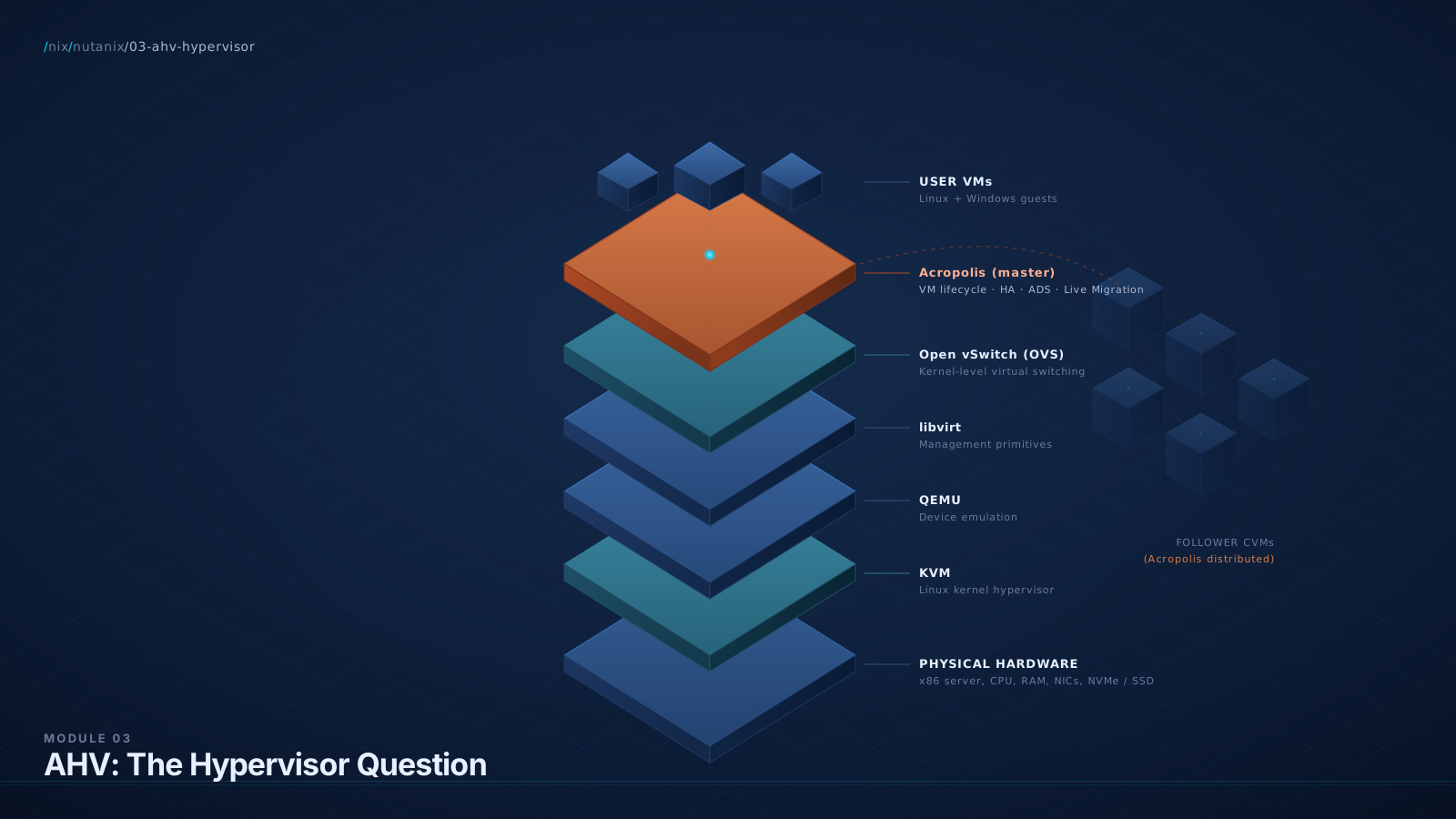
AHV is a Type-1 hypervisor based on KVM (Kernel-based Virtual Machine) with QEMU as the device emulator and libvirt for management primitives. It is bundled into every Nutanix cluster. It is free in the sense that there is no separate AHV license; the cost is part of the AOS (now NCI) subscription.
Read carefully: KVM is a Linux kernel module that turns Linux into a hypervisor. QEMU is the user-space process that emulates devices for guest VMs. libvirt is a management API. AHV is what Nutanix built on top of those open-source pieces: a hardened, opinionated, enterprise-managed hypervisor with the upstream complexity hidden behind Prism and Acropolis.
The lineage matters because customers will ask. The honest framing: "AHV is to KVM what RHEL is to upstream Linux. Nutanix took the open-source kernel-mode hypervisor that Red Hat, IBM, AWS, and Google all use in some form, hardened it for enterprise HCI, integrated it with the rest of the platform, and made it manageable for people who don't want to think about KVM internals."
Acropolis: The Service That Replaces vCenter (For AHV)
This is the architectural insight that changes everything for a VMware admin.
In the VMware world, vCenter is a separate appliance running an entire management stack. It is software you deploy, patch, license, and protect. If vCenter fails, your hosts keep running, but DRS does not work without vCenter; vMotion does not work without vCenter.
AHV does not have a vCenter. The control-plane responsibilities (VM lifecycle, HA, scheduling, Live Migration, host management) are handled by a service called Acropolis, which runs inside every CVM. One Acropolis instance is elected master at any time; the others are followers, ready to take over if the master CVM is lost. The election uses the Zeus / ZooKeeper consensus mechanism we covered in Module 2.
This means three things:
- There is no external management appliance to deploy. AHV is functionally complete out of the box.
- HA, Live Migration, scheduling, and VM lifecycle have no external dependency. They survive the loss of any single CVM (or even multiple) because Acropolis is replicated across CVMs.
- The management surface lives at Prism Element (per-cluster) and Prism Central (multi-cluster). Module 4 goes deep on Prism. For now, treat Prism as the AHV equivalent of the vSphere Web Client, with Acropolis underneath as the equivalent of vCenter Server.
Diagram: AHV Stack vs ESXi Stack
The Cycle, Frame Two: AHV as the Hypervisor Without a Tax
In the ESXi world, you pay for the hypervisor (now subscription-only post-Broadcom) and you pay for vCenter (bundled into the same subscription, but it is its own deployment). Broadcom-era pricing depends heavily on which SKU. vSphere Foundation (vSphere + vCenter + HA / DRS / vMotion) is roughly $190 per core per year MSRP as of 2026 (partner quotes often land at $195+). VMware Cloud Foundation (VCF), the higher-tier SDDC stack including vSAN, NSX, and Aria, is roughly $350 per core per year (down from the $700 announced at the start of the Broadcom transition). Both SKUs require a 16-core minimum per CPU, and Broadcom has a 72-core minimum order for new subscriptions.
For a typical 4-node cluster with 64 cores per node (256 cores cluster-wide), vSphere Foundation lands at roughly $48,000 per year and VCF lands at roughly $90,000 per year, before add-ons, support uplift, or discount. Customers on the original $700/core VCF tier are paying close to $180,000 a year on the same cluster. Always confirm the customer's specific SKU before quoting numbers.
AHV's hypervisor license is bundled into the NCI subscription (formerly AOS). Functionally, the hypervisor is free. The customer pays for NCI, which they would pay for anyway if they buy Nutanix. The hypervisor cost line on the BOM goes to zero.
The Cycle, Frame Three: AHV as KVM Hardened for HCI
For a customer with a Linux-savvy team, the technical lineage matters. AHV is not a science project. KVM is the kernel virtualization layer in Red Hat OpenStack, AWS Nitro (in part), Google Compute Engine (KVM-derived), Oracle Cloud, and many others. It is one of the two hypervisors (alongside ESXi and Hyper-V, three if you count Xen's diminishing presence) that powers production at hyperscale.
What Nutanix added: hardening (security profiles, restricted access, controlled package set), opinionation (one supported configuration per AOS version, no manual KVM tuning), enterprise management (Prism, Acropolis, NGT, NCC integration), and the integration with DSF that makes AHV's snapshot, replication, and DR experience genuinely better than running stock KVM with external storage.
The Cycle, Frame Four: AHV as One Less Thing to Manage
For an operations leader, the durable AHV pitch is not lower licensing or KVM lineage. It is: one less management product to deploy, patch, license, protect, and integrate.
vCenter is software your team manages. It has a database. It has its own upgrade cadence. It has a backup story. It has its own HA story (vCenter HA, which is its own thing). It has a Tomcat instance and a Postgres database and an LDAP integration and a certificate refresh cycle. None of this is hard, individually. All of it adds up to a thing your team owns.
AHV does not have any of that. The Acropolis service auto-starts on every CVM. The master election is automatic. There is no database to back up because state lives in Cassandra and Zeus. The customer does not get a free hypervisor; the customer gets a hypervisor that does not require a parallel management infrastructure.
Live Migration (the vMotion Equivalent)
AHV's Live Migration is functionally equivalent to vMotion. It moves a running VM from one host to another with sub-second user-visible disruption. The mechanism is the same kind of memory-copy plus iterative dirty-page tracking that vMotion uses, with a final stun-and-switch when the dirty rate is low enough.
What it does:
- Live migration of running VMs between hosts in the same cluster.
- No interruption visible to the guest OS or the application (for typical workloads).
- Storage stays in DSF; only memory and execution state move.
What it does not do:
- Cross-cluster live migration. (For this, you use Nutanix Move, which is async, not live.)
- Cross-hypervisor live migration. (You cannot live-migrate from ESXi to AHV; you migrate VMs cold or use Move.)
HA in AHV (No vCenter Required)
When a node fails in an AHV cluster, here is what happens:
- The remaining CVMs detect the loss via cluster heartbeat (Zeus / Cassandra mechanisms).
- Acropolis (the master, on a surviving CVM) inventories the VMs that were on the failed node.
- Acropolis selects target hosts for those VMs based on resource availability and any affinity rules in effect.
- The VMs are restarted on surviving hosts.
End to end this is on the order of 30-90 seconds, similar to vSphere HA. The key difference: there is no vCenter dependency. AHV does not have this dependency because the equivalent of vCenter (Acropolis) lives in the surviving cluster.
ADS: The DRS Equivalent
ADS (Acropolis Dynamic Scheduling, sometimes written as the Acropolis Dynamic Scheduler) is the AHV equivalent of vSphere DRS. It periodically rebalances VMs across hosts to address resource pressure. The internal service that runs this is called Lazan; you will see the name in logs and acli output.
ADS is genuinely simpler than DRS. DRS has decades of tuning for aggressive placement, pre-emptive load balancing, and granular policy options. ADS does the practical 80% of what DRS does with a fraction of the configuration surface. Specifically:
- ADS runs every 15 minutes by default and evaluates host CPU and memory pressure.
- When pressure exceeds thresholds, ADS recommends or executes Live Migrations to rebalance.
- VM-host affinity, VM-VM affinity, and anti-affinity rules are honored.
- ADS does not micromanage at the granularity DRS does; it acts on persistent pressure, not transient spikes.
Diagram: Acropolis Control Plane
Snapshots: The Genuine AHV Win
Here is where AHV (in fact, AOS, since it works on ESXi-on-Nutanix too) has a real advantage: snapshots are native to DSF, not the hypervisor.
In the ESXi world, a VM snapshot creates a delta vmdk. The hypervisor redirects writes to the delta. Read performance can degrade as the snapshot tree grows. Removing a snapshot triggers a consolidation operation that can be slow and can actually pause I/O for noticeable periods on large VMs. Anyone who has accidentally run with a months-old snapshot on a database VM has felt this pain.
In Nutanix, snapshots are a DSF operation. They are:
- Instant. Snapshot creation takes milliseconds, regardless of VM size.
- Space-efficient. DSF uses redirect-on-write with metadata pointers; the snapshot consumes only the changed blocks.
- No I/O penalty. Reads and writes to the active VM continue at native speed; the snapshot is a metadata reference, not a delta file in the VM's I/O path.
- Consolidation-free. Removing a snapshot is a metadata operation. No multi-hour consolidation that pauses your VM.
Console Access and NGT
NGT (Nutanix Guest Tools) is the analog of VMware Tools. It provides:
- Time synchronization between host and guest
- IP address detection and reporting (so Prism shows guest IPs)
- VirtIO drivers for paravirtualized I/O (storage, network)
- VSS-aware snapshots for Windows (application-consistent snapshots)
- File-Level Recovery (FLR) for guest file recovery from a Nutanix snapshot
- Self-service file restore utilities
NGT is required for VSS-consistent snapshots on Windows guests, for accurate IP reporting in Prism, and for FLR. Install it on every production VM as a matter of course.
What AHV Genuinely Lacks (The Honest Gap List)
Read this twice. As a BlueAlly SA, naming the gap honestly is what wins customer trust.
- FT (Fault Tolerance, lockstep CPU mirroring). No equivalent in AHV. If a customer has a workload that requires lockstep failover, that workload stays on ESXi.
- Mature third-party ISV ecosystem. ESXi has 20+ years of ISV support. AHV's ecosystem is meaningful and growing (Veeam, Commvault, Rubrik, HYCU, Cohesity, others all support AHV; major monitoring tools support AHV via APIs), but ESXi is broader. Specific niche ISVs may not yet certify AHV. Always check.
- Some advanced networking features that NSX-T provides on ESXi. Distributed firewall sophistication, advanced routing patterns, gateway services. Module 6 covers this in detail.
- DRS-level scheduling sophistication. ADS does the practical work; it does not match DRS's tuning surface.
- vSphere with Tanzu / native Kubernetes integration in the way VMware ships it. AHV has NKE (Nutanix Kubernetes Engine, branded "Kubernetes Management" in current PC versions), which is genuinely good, but it is a different product with a different operational model.
- Hot-add CPU and memory limits. AHV supports hot-add but with tighter limits than ESXi in some scenarios. Check current AOS version specifics.
- Console UX parity with VMRC. Prism's in-browser VNC console is functional but not as feature-rich as the VMware Remote Console.
What AHV Has That ESXi Does Not
- No separate hypervisor licensing line item. Bundled with NCI.
- No vCenter dependency. Acropolis lives in the cluster.
- DSF-native snapshots. Instant, space-efficient, no I/O penalty, no consolidation.
- One-click rolling upgrades via LCM. AOS, AHV, BIOS, BMC, NIC firmware, drive firmware in one orchestrated workflow.
- Tight integration with Nutanix DR (Recovery Plans, NearSync, Metro). Module 7 goes deep.
- Open Virtual Switch (OVS) underneath networking. Module 6 covers this; for SDN-friendly customers, OVS is a meaningful technical asset.
- Single API surface (Nutanix v4). No need to glue together vSphere API + array API + network API. Automation is genuinely simpler.
The Mixed-Hypervisor Reality (Read This Carefully)
This is the section that wins more BlueAlly deals than any feature comparison.
The customer does not have to choose AHV or ESXi. They can run both. Specifically:
- ESXi on Nutanix is a fully supported, common deployment pattern. The customer keeps vCenter, keeps ESXi, keeps every piece of their VMware tooling, and gets the HCI platform benefits underneath. They still pay VMware for vSphere licensing.
- AHV on Nutanix is the alternative. Same hardware, different hypervisor, no VMware bill.
- Mixed clusters within a single Prism Central are supported. You can have an ESXi cluster and an AHV cluster, both Nutanix, both managed from the same Prism Central.
- Migration from ESXi to AHV is a controlled process using Nutanix Move (free tool). Module 10 walks the migration end to end.
The most common 2026 deal pattern at BlueAlly is not "switch from ESXi to AHV." It is:
- Deploy Nutanix with ESXi on it. Customer keeps everything they know.
- Get HCI benefits immediately (snapshots, DR, scale-out, lifecycle management).
- Over 12-36 months, drift workloads to AHV at the customer's pace, starting with low-risk workloads (dev/test, monitoring, file/print, internal apps).
- Maybe converge fully to AHV. Maybe stay mixed forever. Either is fine.
Diagram: Mixed-Hypervisor Cluster Topology
Nutanix Move: The Migration Tool
Move is Nutanix's free VM migration tool. It is delivered as a small VM you deploy on your Nutanix cluster. It supports migration from:
- VMware ESXi (most common)
- Microsoft Hyper-V
- AWS EC2
- Microsoft Azure
- Google Cloud Platform
- Other Nutanix clusters
The Move workflow:
- Deploy Move (download an OVA / qcow2; run it on your Nutanix cluster).
- Add source environment (e.g., point Move at your vCenter and provide credentials).
- Add target (your Nutanix cluster's Prism Element or Central).
- Create a migration plan: select VMs, set network mappings, set scheduling.
- Run the plan. Move performs the bulk of the data copy while the VM continues running on the source (using CBT-equivalent change tracking).
- At the cutover, the VM is briefly powered off, the final delta is copied, drivers are swapped (VMware Tools out, NGT in), and the VM powers up on AHV.
Total downtime per VM is typically 5-15 minutes for the cutover. Bulk data copy happens in the background and can take hours per terabyte depending on network and source array performance.
Lab Exercise: Live Migration and a VM on AHV
Steps:
- Log into Prism Element at
https://<cluster-vip>:9440. - Navigate to VM > Create VM. Provision a small Linux VM (2 vCPU, 4 GB RAM, 20 GB disk on the default storage container, default network, boot from a Linux ISO).
- Power on, install the OS, then power off. Take note of which physical host the VM landed on.
- Power the VM back on. Note the host placement again.
- Live Migrate the VM. Right-click the VM in Prism, choose "Migrate," select a different host. Watch the migration. Confirm the guest OS is unaffected.
- Take a snapshot. Right-click VM > "Take Snapshot." Note that this is instant. Take three more in quick succession to build a snapshot tree.
- Restore the VM from a snapshot. Note that this is also fast.
- Open an SSH session to the cluster (
ssh nutanix@<any-cvm-ip>). Runacli vm.listto see all VMs from the CLI. Runacli vm.get lab-vm-01to see detailed VM properties. - Optional: simulate a host failure. If you have a non-production cluster, you can power off the host running your VM. Watch HA restart the VM on a surviving host.
- Check Acropolis master. Run
acliinteractive mode and look at cluster state.
Practice Questions
Twelve questions. Six knowledge MCQ, four scenario MCQ, two NCX-style design questions.
What is AHV?
Why B
AHV is built on KVM (a Type-1 hypervisor at the kernel level), uses QEMU for device emulation, libvirt for management primitives, Open vSwitch for networking, and adds Acropolis as the distributed control plane.
The trap
D is the seductive distractor for someone who knows VMware history. Xen has nothing to do with AHV; it is KVM-based.
Which Nutanix service is responsible for VM lifecycle, HA, and Live Migration on an AHV cluster?
Why B
Acropolis is the distributed control plane that handles VM lifecycle, HA, ADS scheduling, and Live Migration. It runs as a service inside every CVM. One Acropolis is master; the others are followers.
True or false: AHV requires an external management appliance similar to vCenter for HA, Live Migration, and VM lifecycle management to function.
Why False
AHV does not require any external management appliance. The control plane (Acropolis) lives inside the CVMs as a distributed service. HA, Live Migration, scheduling, and VM lifecycle all work without an external coordinator. Prism Element provides the user-facing management UI and runs in-cluster as well.
A VM running on AHV node-A is live-migrated to node-B. What happens to the VM's storage during the migration?
Why B
DSF is a distributed storage fabric. The VM's storage is already accessible from any node in the cluster. Live Migration moves only the memory pages and execution state, not storage. Data locality is a separate, eventually-consistent optimization that happens after migration.
The trap
A is the classic VMware-mental-model trap. In a non-HCI world, moving a VM might involve moving its storage. In AHV, DSF makes that unnecessary by design.
Which of the following is NOT a feature provided by NGT (Nutanix Guest Tools)?
Why C
Fault Tolerance (lockstep CPU mirroring) does not exist in AHV. It is an ESXi feature with no AHV equivalent. NGT cannot provide it.
Approximately how long does it take to create a snapshot of a 1 TB VM on Nutanix?
Why C
DSF snapshots are metadata operations using redirect-on-write semantics. They are instant regardless of VM size. There is no data-copy step at snapshot creation.
A customer is running 4 ESXi nodes (16 cores per CPU, 2 CPUs per node, so 128 cores cluster-wide). They are evaluating Nutanix and considering whether to stay on ESXi-on-Nutanix or switch to AHV. With current Broadcom-era subscription pricing, approximately what is the annual VMware licensing they could eliminate by moving to AHV?
Why C
This question assumes the customer is on VCF (the higher tier with vSAN, NSX, and Aria) at roughly $350 per core per year as of 2026, with full support uplift and the 72-core order minimum already met. 128 cores × $350 = $44,800 per year, plus support uplift and any add-ons typically pushes the line item into the $50-70k range. Customers on vSphere Foundation only (the lower tier, ~$190 per core) would land closer to answer B. Customers still on the original $700/core VCF pricing would be closer to $90,000+. The point is the order of magnitude and the doing-the-math discipline; the precise number depends on SKU and the SA should always confirm before quoting.
The trap
D is the trap for someone who hasn't internalized the AHV pricing model. AHV is bundled with NCI subscription; no separate hypervisor licensing fee.
A customer's VMware admin says: "I have ten years of ESXi expertise. I'm not retraining my team for AHV." What is the strongest SA response?
Why B
This response respects the admin's expertise, removes the false binary (HCI requires hypervisor switch), names the real path forward (mixed deployment, time-based decision), and points to the durable economic driver (licensing math).
Which of the following workloads is least likely to be a good fit for migration from ESXi to AHV?
Why C
AHV does not support Fault Tolerance (lockstep CPU mirroring). Workloads that genuinely require zero-downtime failover at the hypervisor level are the rare cases that should stay on ESXi.
A customer's environment has 50 VMs on ESXi. They want to migrate to AHV. What tool do you use, and what is the typical per-VM downtime during cutover?
Why A
Nutanix Move is the supported, free tool for ESXi-to-AHV migration. It performs change-tracked bulk copy in the background while the VM continues running, then a brief cutover (5-15 minutes typical) to swap drivers and restart on AHV.
The trap
B is intuitive ("I know vMotion"); but vMotion only moves VMs between ESXi hosts. It cannot cross hypervisors.
(NCX-style design question) Walk through your recommendation. Cover the financial case, the technical migration plan, the risk assessment, and the human/political dimension.
A customer environment: 12 ESXi hosts, 600 VMs, mixed workloads (no FT requirements anywhere, no real-time requirements, several SQL Server databases with Always On clusters, ~150 VDI desktops, the rest general-purpose). VMware Foundation renewal in 6 months. Annual VMware licensing currently $180,000. Storage refresh on the existing FlashArray due in 9 months ($350,000 quoted refresh). Two infrastructure engineers who are skeptical of AHV but open-minded if shown the numbers. CTO has asked for a five-year cost comparison and a risk-assessment recommendation.
A strong answer covers
- Five-year licensing math: $180k/year → conservatively $200-250k/year over 5 years with Broadcom escalations, total VMware spend ~$1.0-1.25M if they stay on ESXi. AHV eliminates this. Net savings ~$1M over 5 years.
- Storage refresh comparison: the $350k FlashArray refresh becomes Nutanix node spend instead. Apples-to-apples is not 1-to-1 (you're getting compute + storage), but the storage refresh budget alone covers a substantial portion of the Nutanix purchase.
- Migration plan recommendation: Phase 1 (months 1-6): deploy Nutanix with ESXi, migrate VMs onto Nutanix-on-ESXi, use the FlashArray refresh budget to fund this. Phase 2 (months 6-18): migrate low-risk workloads to AHV using Move (general-purpose, then VDI, then file/print). Phase 3 (months 18-36): migrate SQL Server VMs to AHV after the team has confidence. Stop migrating when the customer wants; mixed steady-state is fine.
- Risk assessment: the platform risk is low. The team risk is the real risk: the two skeptical engineers need to be brought along, not overridden. Recommend dedicated training budget and lab time. Ideally one becomes the AHV champion.
- Workload-specific notes: SQL Server with Always On is fully supported on AHV; Always On replicas provide application-level HA so FT is not required. VDI on AHV is a strong use case.
- Honest gaps to flag: if any niche ISV product explicitly requires ESXi certification, those workloads stay on ESXi.
- Recommended structure: financial case, phased migration plan, training plan, risk register, workload-by-workload disposition matrix.
(NCX-style architectural defense) Respond to the architect's challenge below.
"AHV is fine for greenfield workloads, but my mature ESXi environment has 15 years of integration: vROps, Aria Automation, Aria Operations for Logs, our SOAR pipeline reading vCenter events, our backup vendor's vCenter integration, our chargeback system pulling from vCenter APIs, our PAM/identity integration with vCenter SSO, our compliance scanners reading vCenter inventory. Switching hypervisors means rebuilding all of that. The licensing savings don't cover the integration cost."
A strong answer covers
- Acknowledge the integration cost is real and not trivial. A mature ESXi environment with 15 years of tooling has real switching cost.
- Reframe by integration category:
- Infrastructure monitoring (vROps, Aria Operations): Prism Central provides equivalent functionality natively. Many customers find Prism's experience cleaner than Aria's. There is migration work but the destination is functional.
- Automation (Aria Automation): Nutanix v4 REST API is well-documented and clean; NCM Self-Service (formerly Calm) replaces blueprint-style automation. Migration is real work but the platform is API-first.
- Backup vendor integration: Veeam, Commvault, Rubrik, Cohesity, HYCU all support AHV. Confirm with the specific vendor and version.
- SOAR / event pipelines: Nutanix exposes events via API and via syslog-equivalent forwarding. The existing event consumers can usually be repointed; not a rewrite.
- Identity / PAM: Nutanix supports SAML, LDAP, AD integration. Existing identity infrastructure usually plugs into Prism with reasonable effort.
- Compliance scanners: if the scanner uses VMware-specific APIs, that's real rework. If it uses inventory APIs at a higher abstraction (CMDB), the change is smaller.
- Stage the answer: integration cost is bounded. Total integration migration cost is real but typically in the $100-300k range for a mature enterprise environment.
- Reframe against the licensing savings: if VMware licensing is $200k/year, the integration migration cost pays back in 1-2 years.
- Offer a hybrid approach: the architect's environment can stay on ESXi-on-Nutanix indefinitely. New workloads go to AHV. Drift over time.
- Close with a concrete next step: "Let me build a workload-by-workload integration map with you. We'll mark which integrations are Nutanix-equivalent ready, which need re-pointing, and which would require rework."
What You Now Have
You can now explain AHV to a VMware admin in 60 seconds without sounding defensive. You know it is KVM-based, with QEMU and libvirt and Open vSwitch underneath, and Acropolis as the Nutanix-specific control plane.
You have four mental frames for AHV: the hypervisor without a vCenter, the hypervisor without a tax, KVM hardened for HCI, and one less management product to maintain. When a customer pushes from any of those angles, you have a frame ready.
You know what AHV genuinely lacks: FT, mature niche-ISV ecosystem in some categories, DRS-level scheduling sophistication, console UX parity in heavy desktop scenarios. You can name those gaps without flinching.
You know the mixed-hypervisor story cold: they don't have to switch hypervisors to get the platform benefits. That sentence wins meetings.
You know the Broadcom math: vSphere Foundation ~$190/core, VCF ~$350/core, 16-core CPU minimum, 72-core order minimum. AHV bundles into NCI; that line goes to zero.
You are now ready for the management plane. AHV's control plane lives inside the cluster (Acropolis), but the user-facing experience lives in Prism Element and Prism Central. Module 4 makes that concrete.
References
Authoritative sources verified during the technical review pass on this module. The licensing math is the most volatile section; reverify against current Broadcom and Nutanix price lists before quoting numbers in front of a customer.
- Nutanix Bible · AHV Architecture. KVM/QEMU/libvirt/OVS lineage, Acropolis service description, ADS internals (Lazan service, 15-minute polling interval, 30-minute backoff after rebalance).
- Acropolis Dynamic Scheduling in AHV (AHV Admin Guide v6.8). Authoritative reference confirming the "Dynamic" expansion (not "Distributed").
- Nutanix Move Product Page. Confirms supported sources (ESXi, Hyper-V, AWS, Azure, GCP) and that Move is free.
- Nutanix Bible · VM Migration Architecture. Move's CBT-equivalent change-tracking, cutover semantics, downtime envelope.
- NCM Self-Service (formerly Calm). Confirms the 2022 Calm-to-NCM-Self-Service rename.
- Nutanix Kubernetes Engine (formerly Karbon). NKE is the current branding (with current PC versions surfacing it as "Kubernetes Management").
- VCF Licensing Guide 2026 (Redress Compliance). VCF reduced to $350/core/year (was $700); 16-core CPU minimum; 72-core order minimum.
- vSphere Foundation vs Standard 2026. vSphere Foundation MSRP ~$190/core; partner quotes ~$195+.
Cross-References
- Previous: Module 2: The Nutanix Stack
- Next: Module 4: Prism (Element and Central)
- Glossary: AHV · KVM · Acropolis · Live Migration · ADS · NGT · Nutanix Move · Open vSwitch · VirtIO see appendix
- Comparison Matrix: Hypervisor Row · Management Plane Row · Snapshots Row see appendix
- Objections: #4 "Why switch hypervisors?" · #5 "What about FT?" · #9 "My backup vendor doesn't support AHV" · #21 "My team has 10 years of ESXi expertise" see appendix