The Promise
By the end of this module you will:
- Design a multi-site DR architecture in 30 minutes. Pick the replication mode (Async, NearSync, Metro), define RPO and RTO targets, choose between Protection Domains and Protection Policies, and produce a sized bandwidth requirement. One of the highest-leverage SA conversations.
- Pass roughly 22% of NCP-MCI and 25% of NCM-MCI. Data protection is one of the heaviest single-topic weights on these exams. NCM-MCI labs frequently include configure-a-policy / set-up-replication / test-failover / troubleshoot-a-stalled-job DR scenarios.
- Defend Recovery Plans against an SRM-loyal customer. SRM has 15+ years of polish. Recovery Plans is younger. The honest comparison is that for AHV-native deployments Recovery Plans is integrated and capable; for established SRM shops, the migration is real work and coexistence is often the right answer.
- Make the cloud-DR case using NC2 (Nutanix Cloud Clusters on AWS or Azure) for customers who want a DR site without a second datacenter. By 2026, this is one of the more compelling Nutanix-specific stories.
- Walk the snapshot, replication, and recovery sequence end-to-end. When DR breaks, the customer's first call is to you. Know where to look: snapshot schedule status, replication queue depth, Recovery Plan validation, network path between sites.
- Make RPO/RTO/cost tradeoffs explicit. The customer who wants 1-minute RPO and 30-minute RTO and zero cost increase is asking for something that does not exist. Translate business requirements into the right product mix at a real budget.
DR is the dimension that decides enterprise deals. Customers who survived a real outage have opinions; customers who haven't are about to. Either way, when DR comes up, you need to know this material cold.
Foundation: What You Already Know
You have built or maintained DR for VMware. The pieces:
- VMware snapshots for point-in-time recovery (with the consolidation pain Module 3 already covered).
- vSphere Replication for VM-level replication to a secondary site.
- Storage array replication (NetApp SnapMirror, EMC RecoverPoint, Pure ActiveCluster) for storage-level replication, often with better RPO than VR.
- Site Recovery Manager (SRM) for orchestrating failover: VM boot order, IP remapping, runbook automation, test recovery.
- Backup tooling (Veeam, Commvault, Rubrik, Cohesity) layered on top for longer-retention backup and granular recovery.
You know the operational realities. RPO depends on the replication mechanism. RTO depends on how fast you can boot VMs at the DR site, with what network reconfiguration, with what application checks. SRM runbook tests are the only thing that proves DR works, and most customers do not run them as often as they should.
Hold that experience. Nutanix's data protection stack reorganizes those pieces. Replication is built into the platform (no separate appliance). Orchestration is integrated (no separate SRM purchase). Snapshots are DSF-native (no consolidation pain). Cloud DR is NC2 (no need to build a second datacenter). The pieces are different but the operational concepts transfer.
Core Content
Snapshots Revisited: Crash-Consistent vs Application-Consistent
Module 3 covered DSF snapshots as a DSF-native, instant, no-I/O-penalty operation. Layer the consistency dimension on top.
Crash-consistent snapshots. Capture the state of the vDisk at a moment in time. From a guest's perspective this is equivalent to pulling the power cord and the system coming back up: file systems may need recovery on first boot, in-memory data is lost, transactional databases may roll back recent transactions. For most workloads, crash-consistent recovery is sufficient.
Application-consistent snapshots. The snapshot is taken after the application has flushed its in-memory state to disk. On Windows, this requires VSS (Volume Shadow Copy Service) coordination, which Nutanix Guest Tools (NGT) provides. On Linux, application-consistent snapshots typically rely on application-level mechanisms (a database's quiesce command) coordinated through NGT.
When does the distinction matter?
- Database VMs (SQL Server, Oracle, PostgreSQL). Application-consistent snapshots are strongly preferred for direct restoration. Crash-consistent recovery requires the database's startup recovery to succeed, which usually works but is slower and occasionally messy.
- File servers. Crash-consistent is fine for general SMB/NFS workloads.
- Application servers (web, app tier). Crash-consistent is fine if the application is stateless or has its state in a backed-up database.
- Active Directory domain controllers. AD has its own consistency protocols; crash-consistent is acceptable but Microsoft's preferred approach involves database-aware snapshots.
Protection Domains vs Protection Policies
This is the architectural shift that matters operationally and exam-wise. Read carefully.
Protection Domains (PDs). The legacy construct, configured in Prism Element. A PD is a group of VMs (and/or vDisks) that share a single replication and snapshot schedule. You create a PD, add VMs to it, attach a remote site, configure the schedule (e.g., snapshot every hour, replicate every 4 hours), and the PD enforces it. PDs have been the workhorse of Nutanix DR for years.
Protection Policies. The modern construct, configured in Prism Central. Policies are category-driven (Module 4). A Protection Policy says: "All VMs with Environment: Production get hourly snapshots retained for 7 days, with NearSync replication to the DR site." VMs are assigned to the policy by their categories, not by manual addition. Policies are tied to Recovery Plans (Nutanix Disaster Recovery, formerly Leap) for orchestrated failover.
| Dimension | Protection Domain | Protection Policy |
|---|---|---|
| Where configured | Prism Element | Prism Central |
| Membership model | Manual VM addition | Category-driven (auto) |
| Failover orchestration | Native PD failover (basic) | Recovery Plans (rich orchestration) |
| Multi-site management | Per-PD, per-cluster | Centralized in PC |
| Recommended for new deployments | No | Yes |
Existing customers: PDs continue to work. There is no forced migration. Many production environments still run PDs because the migration to Policies is a project that requires planning. New deployments should start with Policies.
Async Replication: The Default Workhorse
Async replication is the bread-and-butter Nutanix DR mechanism. The pattern:
- Take a snapshot at the source cluster on schedule (e.g., hourly).
- Compute the delta between this snapshot and the previous replicated one.
- Send the delta over the network to the destination cluster.
- The destination cluster materializes the new snapshot.
- Retain snapshots per the configured retention policy.
Characteristics:
- Minimum RPO: typically 1 hour, configurable down to 15 minutes in some scenarios. RPO is governed by the snapshot/replication interval, not by inherent technology limits.
- Bandwidth efficiency: delta-based, so steady-state bandwidth scales with change rate, not with total data size.
- Network requirements: any IP-routable connection between sites. Latency is forgiving (works fine over WAN with hundreds of milliseconds RTT).
- Cost: lowest of the three replication modes. Suitable for most workloads.
Topology options:
- One-to-one. Single primary, single DR site.
- One-to-many. Single primary replicating to multiple DR sites (different RPOs to each).
- Many-to-one. Multiple production clusters replicating to a consolidated DR site (common for ROBO consolidation).
- Bi-directional. Two clusters protecting each other.
Most customers start here. Most stay here for the bulk of their workloads.
NearSync Replication: When 1-Hour RPO Isn't Enough
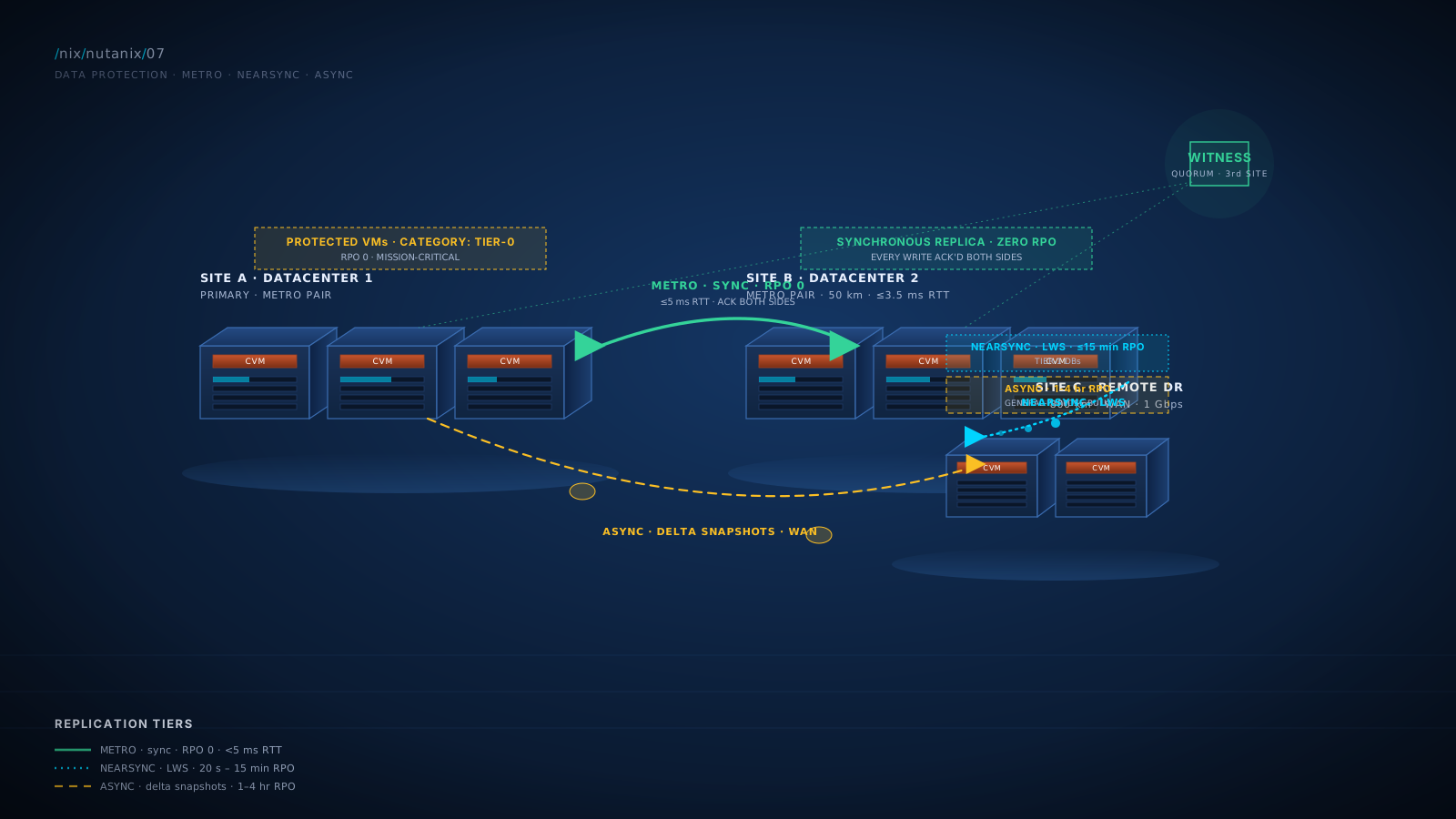
NearSync is Nutanix's "almost-synchronous" replication mode. It uses LWS (Light-Weight Snapshots) under the hood, taking very frequent (sub-minute) metadata-level micro-snapshots and continuously replicating them. The LWS store is allocated on the cluster's SSD tier; that is where every NearSync-protected change lands first, before propagating to the destination cluster.
Characteristics:
- RPO: as low as 20 seconds in optimal configurations; commonly designed for 1-15 minute RPO.
- Bandwidth requirements: higher than Async. The replication is more continuous and less coalesced. Plan for sustained bandwidth roughly proportional to the workload's write rate.
- Network requirements: typically <5 ms RTT to the destination, though specific platform versions vary. Some configurations relax this.
- Cluster overhead: higher than Async. NearSync places more load on Stargate and Curator at the source cluster.
- Cost: higher than Async, lower than Metro.
When to use NearSync:
- Tier-1 production databases where 1-hour RPO is too long.
- Compliance-driven workloads with sub-15-minute RPO mandates.
- Customers with adequate bandwidth and acceptable latency between sites.
The honest gotcha: NearSync's resource cost on the cluster is real. Customers who try to NearSync-protect their entire estate often find they need bigger CVMs or face cluster headroom issues. Use NearSync for the workloads that genuinely need it; leave the rest on Async.
Metro Availability: Synchronous, Zero RPO
Metro Availability is true synchronous replication: every write at the source is replicated to the destination before it is acknowledged. RPO is zero (no data loss on any single-site failure).
Characteristics:
- RPO: zero. Synchronous replication.
- Latency requirement: ≤5 ms RTT is the documented hard ceiling. Production design targets typically aim for ≤3.5 ms RTT under load, with the 5 ms number reserved as the headroom ceiling. P99.9 latency under concurrent I/O matters more than the average; sustained micro-bursts can push average-3 ms links over the 5 ms threshold during peak load. Real-world deployments are metro-area distances (campus, dual-datacenter within a city).
- Topology: active-standby (typical) or active-active (advanced configurations).
- Witness VM: required for split-brain protection. Witness runs on a third site (a small cluster, a separate Nutanix instance, or sometimes a public-cloud VM) and provides quorum during partition events.
- Cost: highest of the three modes. Bandwidth + tightly-coupled networking + witness infrastructure.
When to use Metro:
- Mission-critical workloads with zero-data-loss requirements.
- Active-active datacenter architectures where workloads run in both sites simultaneously.
- Compliance frameworks that mandate synchronous replication (less common, but exists).
Important constraint: Metro is only useful within metro-area latency (typically <100 km). It is not a long-distance DR solution. For wide-area DR, you combine Metro (between two close sites) with Async or NearSync to a third remote site for full geographic resilience.
Diagram: Replication Topologies (Async / NearSync / Metro)
The Cycle, Frame Two: DR as RPO/RTO Mapped to Products
For an operations leader, the durable DR frame is mapping business requirements to technology choices.
| Application Tier | Business RPO | Business RTO | Recommended Approach |
|---|---|---|---|
| Mission-critical, zero-data-loss | 0 | <30 min | Metro Availability (campus) + Async to third site |
| Tier-1 production DB | 1-15 min | 1-2 hours | NearSync to DR cluster + Recovery Plan |
| Production general-purpose | 1-4 hours | 2-4 hours | Async + Recovery Plan |
| Test / Dev | 8-24 hours | 4-8 hours | Async with longer interval, or no DR |
| Ephemeral / stateless | n/a | redeploy | No replication; redeploy from source-of-truth |
This is the design conversation in 15 minutes. Walk the customer through their tiers, agree on RPO/RTO targets, map to the technology, and the architecture writes itself.
The Cycle, Frame Three: Recovery Plans (NDR) as the SRM Replacement
Recovery Plans are the runbook construct inside Nutanix Disaster Recovery (the current product name; formerly branded Leap). The product was renamed from Leap to Nutanix Disaster Recovery a few years back; you will still see "Leap" in older docs, in customer vocabulary, and in some current-day Nutanix product surfaces. Recovery Plans live in Prism Central and define:
- What VMs are protected (via category membership).
- The startup order (which VMs come up first, second, third).
- Network mapping (production VLAN 100 maps to DR VLAN 200).
- IP address remapping (or DHCP-based reassignment at the DR site).
- Pre-checks and post-checks (run a script before failover, run a script after).
- Test failover capability (run a failover into an isolated network, validate, tear down).
- Manual or automated failover triggers.
This is the SRM equivalent. The functional comparison:
| Feature | Site Recovery Manager (SRM) | Recovery Plans (NDR / Leap) |
|---|---|---|
| Hypervisor support | ESXi only | AHV native; ESXi-on-Nutanix supported via integration |
| Replication source | vSphere Replication or array-based | Native Nutanix (Async, NearSync, Metro) |
| Licensing | Separate VMware product | Bundled with Nutanix Cloud Manager (varies by tier) |
| Test failover | Yes, mature | Yes |
| Runbook orchestration | Mature, deeply customizable | Capable, less customizable in advanced edge cases |
| IP remapping / DHCP | Yes | Yes |
| Pre/post-failover scripts | Yes | Yes |
| Multi-site planning | Yes | Yes |
| Maturity | 15+ years | 5+ years, rapidly improving |
| Cross-site management | vCenter-driven | Prism Central |
The honest comparison: SRM is more mature and has more advanced runbook customization for complex scenarios. Recovery Plans is integrated, free or bundled, and simpler to operate. For most enterprise DR requirements, Recovery Plans is sufficient. For customers with established SRM deployments, the migration is real work and the coexistence pattern (SRM on ESXi-on-Nutanix, Recovery Plans for AHV workloads) is often the right answer.
Diagram: Protection Policies and Categories
Production, it is protected within minutes. No manual addition. No forgotten VMs. Recovery Plans orchestrate the failover of category-protected VMs.NC2: DR to the Cloud Without a Second Datacenter
NC2 (Nutanix Cloud Clusters) runs the Nutanix platform on AWS or Azure bare-metal hosts. From the platform's perspective, an NC2 cluster looks like any other Nutanix cluster: AOS, AHV, CVMs, DSF, Prism. From the customer's perspective, it is Nutanix infrastructure they pay for as a cloud-consumption model rather than as on-premises hardware.
For DR specifically, NC2 enables:
- Replicate from on-prem Nutanix to NC2 in cloud. Use the same Async, NearSync (where supported), or Metro mechanisms.
- Failover to cloud without a second datacenter. When primary fails, VMs come up on NC2 in the cloud region.
- Variable cost. Pay for cloud capacity continuously (active replication target) or with hibernation patterns (cluster spun down most of the time, spun up on failover or DR test).
- Fast scaling. Add NC2 capacity in cloud at the rate of cloud provisioning, not at the rate of physical hardware procurement.
The economics: NC2 is meaningfully cheaper than building and maintaining a second physical datacenter for many mid-market customers. For large customers, the math depends on workload size, retention requirements, and whether they have existing colo space they would otherwise consolidate.
The honest constraints:
- Cloud bare-metal pricing varies. Some workloads are cheap in cloud; some are expensive.
- Replication bandwidth from on-prem to cloud is real cost (egress fees apply on failback in some models).
- Failover RTO depends on whether the NC2 cluster is hot, warm, or cold.
- Some workloads have data-sovereignty constraints that prevent cloud DR.
Diagram: Recovery Plan Failover Flow
Test Failover: The Feature That Customers Actually Use
The most important DR feature is the one customers neglect: testing.
Recovery Plans support test failover: run the entire failover sequence into an isolated network at the DR site, validate that everything comes up correctly, and tear down without affecting production. The test creates an isolated VLAN at the DR site, brings VMs up there, runs the configured checks, and reports.
Why this matters: DR runbooks that have not been tested in 12+ months frequently do not work when a real failover comes. The state of the world changes: VMs are added, network configurations drift, IP allocations change, application dependencies shift. The runbook decays.
Recommended customer cadence: quarterly test failovers minimum, monthly for critical workloads. The test takes 1-2 hours typically. The customer's DR program is real if and only if they actually run these.
What DR Genuinely Lacks vs Mature SRM Deployments
Honest gap list. Read it twice.
- Some advanced runbook customization. SRM has 15+ years of accumulated capabilities for very complex orchestration patterns (cross-vendor app integration, complex pre-checks, vendor-specific scripted callouts). Recovery Plans handles the typical cases well; some advanced edge cases require scripted extensions.
- Cross-vendor replication source flexibility. SRM can use array-based replication from a wide range of arrays. Recovery Plans is tied to Nutanix's native replication. For customers who want to keep their array's replication and orchestrate failover via SRM, that's a reason to keep SRM-on-ESXi-on-Nutanix.
- Reporting depth. SRM's reporting around DR readiness, test history, and compliance posture has had more time to mature. Prism's reporting is increasingly capable but younger.
- Cross-environment scope. SRM deployments often span heterogeneous infrastructure that includes non-Nutanix elements; Recovery Plans is Nutanix-centric.
For typical mid-market and enterprise general-purpose DR requirements, none of these are deal-breakers. For customers with established SRM and complex multi-vendor DR, the coexistence pattern is the durable answer.
What Nutanix DR Has That SRM Does Not
- Integrated platform. DR is part of the platform, not a separate purchased product.
- DSF-native snapshots underneath. No I/O penalty, no consolidation, instant.
- Category-driven protection policies. New VMs auto-enroll based on tagging.
- NC2 cloud DR option. SRM has cloud-DR via VMware Cloud, but the integration is more recent and the licensing is separate.
- Single management plane. Replication, recovery plans, and DR test in the same UI as compute and storage.
- Bundled licensing for basic capabilities. Recovery Plans and basic replication included; advanced features in NCM tiers.
Lab Exercise: Build a Protection Policy and Recovery Plan
- Take a manual VM snapshot. From Prism Central, select a VM, choose "Take Snapshot." Note the type options: crash-consistent (default) or application-consistent (requires NGT in the guest, which lab VMs may not have).
- Install NGT on a Linux VM. SSH in, then mount and install:
sudo mount /dev/cdrom /mnt/cdrom
sudo /mnt/cdrom/installer/linux/install_ngt.py
- Take an application-consistent snapshot. With NGT installed, the snapshot UI offers application-consistent. Take one. Verify it succeeds.
- Create categories if you haven't already (Module 4 lab):
- Key:
Environment, Values:Production,Development,Test - Key:
BackupTier, Values:Gold,Silver,Bronze
- Key:
- Tag VMs with categories. Apply
Environment: ProductionandBackupTier: Goldto your lab VM. - Create a Protection Policy in Prism Central: Name
Lab-Production-Policy, match VMs with categoryEnvironment: Production, snapshot every 1 hour retain 7 days, replication disabled (single-cluster lab) or to a second cluster if available. - Verify policy enrollment. Confirm the VM is automatically included based on category.
- Tag a second VM with
Environment: Production. Confirm it auto-enrolls without manual addition. - (Multi-cluster, if available) Pair two clusters. Configure replication. Validate snapshots transfer.
- Create a Recovery Plan. Recovery Plans > Create. Define name, source/target, VMs (via category), startup order (DB > App > Web), network mapping, optional scripts.
- Run a test failover (multi-cluster, optional). The platform spins up VMs at the DR site in an isolated network, runs your defined checks, and reports.
- Inspect Curator's role in protection. From a CVM:
curator_cli get_curator_state
Note the protection-related background tasks: snapshot reclamation, replication queue management, retention enforcement.
What this teaches you:
- The snapshot-consistency distinction in practice.
- Category-driven Protection Policy enrollment.
- Recovery Plan structure and configuration.
- The CLI surface for protection diagnostics.
Customer-demo angle: Steps 4-7 are the customer-demo flow for category-driven protection. Show a customer how tagging a VM with Environment: Production automatically enrolls it. The "no manual addition" insight lands viscerally.
Practice Questions
Twelve questions. Six knowledge MCQ, four scenario MCQ, two NCX-style design questions. Read each, answer in your head, then click to reveal.
What is required for an application-consistent snapshot of a Windows VM running on AHV?
Why this answer
Application-consistent snapshots on Windows require VSS coordination, which NGT provides. The application must be VSS-aware (most major applications including SQL Server, Exchange, AD are).
Why not the others
- A) Default snapshots are crash-consistent; application-consistent requires NGT.
- C) Power-off would be cold backup, not application-consistent in the live sense.
- D) NGT and the platform handle this natively; external products may use the same NGT integration but are not required.
The trap
A is the default-mental-model trap. Snapshot consistency is a configuration, not a default behavior.
Which of the following correctly describes the relationship between Protection Domains and Protection Policies?
Why this answer
PDs (PE-based, manual) and Policies (PC-based, category-driven) are both supported. Policies are recommended for new deployments; PDs continue to work for existing deployments.
Why not the others
- A) PDs continue to be supported.
- C) They are distinct constructs with different membership models and management surfaces.
- D) Both can do snapshots and replication.
The trap
A is tempting if you assume "newer must have replaced older." Nutanix maintains both for compatibility with existing deployments.
What is the minimum typical RPO for Async replication?
Why this answer
Async replication's typical minimum RPO is 1 hour, configurable down to 15 minutes in some scenarios. Async is the default for general-purpose DR.
Why not the others
- A) That is Metro Availability.
- B) That is NearSync's territory.
- D) Async can certainly do 24 hours, but the minimum is much shorter.
The trap
B is the seductive answer for someone who confuses Async and NearSync. Memorize: Async = 1 hour typical (15 min minimum); NearSync = 20 seconds to 15 minutes; Metro = 0.
Metro Availability requires which of the following?
Why this answer
Metro is synchronous, so it requires very low latency (typically <5 ms RTT, metro-area distance). Witness VM at a third site provides quorum during partition events.
Why not the others
- A) WAN distance is incompatible with synchronous replication; Metro is metro-area only.
- C) Hardware compatibility is general but not specifically a Metro requirement.
- D) NC2 is unrelated to the Metro requirement.
The trap
A reflects a misunderstanding of Metro's purpose. Metro is for short-distance, zero-RPO requirements. Long-distance DR uses Async or NearSync.
A customer needs DR with 1-minute RPO for a critical SQL Server. Which replication mode should you recommend?
Why this answer
NearSync's RPO range (20 seconds to 15 minutes) fits the 1-minute target. It does not require Metro's strict latency budget but provides much tighter RPO than Async.
Why not the others
- A) Async typically tops out at 15-minute minimum RPO; 1-minute is below its operational range.
- C) Metro provides zero RPO but requires <5 ms latency, which is not specified or required for 1-minute RPO. Metro is overkill and constrains the deployment.
- D) Not a real option for any production deployment.
The trap
C is the temptation to "use the strongest option." Metro's constraints (latency, witness, cost) are real and unwarranted for a 1-minute RPO that NearSync can meet.
A customer running SRM on ESXi for DR is moving to Nutanix. What is the recommended approach?
Why this answer
This is the operationally correct approach. SRM continues to work on ESXi-on-Nutanix. Recovery Plans is recommended for AHV deployments and new workloads. Migration is a project, not a single event.
Why not the others
- A) Forced migration ignores the customer's installed base and operational continuity.
- C) Scripts are not a replacement for an orchestration product.
- D) Recovery Plans does not manage SRM.
The trap
A reflects the impulse to consolidate immediately. The right answer respects existing investment and migrates at the customer's pace.
What does NC2 provide for DR scenarios?
Why this answer
NC2 (Nutanix Cloud Clusters) runs the Nutanix platform on cloud bare-metal hardware (AWS or Azure). It enables DR-to-cloud without a second physical datacenter, with the same operational platform on both sides.
Why not the others
- A) NC2 has real costs (cloud bare-metal pricing, bandwidth); not free.
- C) NC2 is not a backup product; it is infrastructure.
- D) NC2 is the destination for replication, not a replication product.
The trap
A reflects a marketing-flavored mental model. NC2 has costs but the economics often beat building physical DR.
A customer has 200 VMs: 30 Tier-1 databases (5-min RPO, 30-min RTO), 70 Tier-2 apps (1-hour RPO, 2-hour RTO), 100 Tier-3 general (4-hour RPO, 4-hour RTO). What replication architecture do you recommend?
Why this answer
Match the replication mode to the RPO target. NearSync handles 5-minute RPO for Tier-1. Async handles the longer RPOs for Tier-2 and Tier-3 with appropriate intervals. Recovery Plans orchestrate failover for each tier.
Why not the others
- A) Metro is overkill (and infeasible at WAN distances) for most workloads. Tier-3's 4-hour RPO does not need Metro.
- C) Manual snapshots are not a DR strategy.
- D) NC2 is a destination option, not a replication mode answer.
The trap
A demonstrates the "use the strongest option" failure mode. Right-sizing to RPO/RTO requirements is the SA-chair discipline.
Which of the following is correct about test failover in Recovery Plans?
Why this answer
This is exactly what test failover is designed for: validate the runbook, in an isolated network, without affecting production. The platform isolates DR-site VMs from the production network during the test.
Why not the others
- A) Test failover is a core platform feature.
- C) Production VMs continue running normally; the test happens at the DR site.
- D) Test and real failovers differ specifically in network isolation and the post-test teardown step.
The trap
C is the misconception that any DR action affects production. Recovery Plans were designed to enable testing without disruption.
Which DR feature is NOT included in Nutanix's baseline platform (without Pro / Ultimate NCM tiers)?
Why this answer
Recovery Plans / NDR with advanced orchestration features sits at NCM Pro tier or higher. Basic replication, snapshots, and Protection Domains are part of the platform baseline.
Why not the others
- A) DSF snapshots are core to the platform.
- B) Async replication via PDs has been included for many AOS versions.
- D) Snapshot scheduling is included.
The trap
A and B sound like they should be tier-gated, but they are platform baseline. Recovery Plans' advanced features are the licensed add-on.
NCX-style design question. There is no single correct answer; there are stronger and weaker frames. Write your reasoning, then click to compare against the strong-answer outline.
A customer is consolidating their VMware environment onto Nutanix. They have:
- Two physical datacenters in the same metro area (50 km apart, 2-3 ms RTT, 10 GbE link)
- One co-located DR datacenter 800 km away (35-40 ms RTT, 1 Gbps WAN)
- 1,200 VMs total: ~50 mission-critical (zero-RPO, financial systems), ~250 Tier-1 production (5-15 min RPO, mostly databases), ~900 general-purpose (4-hour RPO acceptable)
- Existing investment in SRM with about 300 VMs orchestrated through it
- Compliance mandate for monthly DR test attestations
Design the data protection architecture: replication mode per tier, Protection Policy structure, Recovery Plan design, the SRM transition approach, DR test cadence.
A strong answer covers
- Multi-site architecture. Datacenters A and B (metro pair): Metro Availability between them for the 50 mission-critical VMs (zero RPO, 2-3 ms RTT well within Metro's 5 ms budget). Witness VM hosted at the third (DR) datacenter to provide quorum for the metro pair. DR datacenter (800 km): Async replication target for all tiers, NearSync for Tier-1 if bandwidth permits.
- Protection Policy structure (in Prism Central). Policy 1 "Mission-Critical-Metro": match VMs with
Tier: Mission-Critical, Metro replication between A and B, hourly snapshots retained 14 days, replication to remote DR via Async. Policy 2 "Tier1-NearSync": matchTier: Tier1, NearSync to DR datacenter (verify capacity), 5-minute RPO target. Policy 3 "GeneralPurpose-Async": matchTier: General, Async replication to DR at 4-hour interval. - Recovery Plans. One per tier, defining startup order (DB > App > Web), network mappings (DC A VLANs to DR DC VLANs), IP remapping or DHCP reassignment, pre/post checks. Test cadence: monthly for mission-critical (compliance-driven), quarterly for Tier-1, semi-annual for general-purpose.
- SRM transition. SRM continues on ESXi-on-Nutanix for the 300 currently-orchestrated VMs (no forced migration). As workloads migrate to AHV they move to Recovery Plans. Plan a 12-18 month phased transition, prioritizing simpler workloads first.
- Bandwidth math. Verify 1 Gbps WAN supports sustained replication for the workload mix. NearSync for 250 VMs requires careful sizing; if bandwidth is constrained, drop to Async with 15-min intervals for Tier-1.
- DR test cadence. Monthly mission-critical full failover (compliance attestation), quarterly Tier-1, semi-annual general-purpose (rotating subset). Document each result in the audit log.
- Operational considerations. Witness VM availability is critical. Categories drive policy enrollment; new VMs must be properly tagged at creation. Use Prism Central RBAC to give the DR team appropriate access without broader admin rights.
- What you still need to know. WAN bandwidth profile (full 1 Gbps available, or shared?). Specific compliance framework (PCI DSS? SOX?). Application dependencies for startup order. SRM's current runbook complexity (scripted callouts that don't translate cleanly?). Should NC2 be considered as an additional or alternative DR option?
A weak answer misses
- Defaulting to Metro for all mission-critical without acknowledging Witness VM placement.
- Forgetting to plan Tier-1 NearSync bandwidth feasibility on a 1 Gbps WAN.
- Forced SRM migration timeline rather than coexistence.
- Missing the test cadence (compliance-driven monthly is the customer's specific requirement).
- Not naming category hygiene as an operational requirement.
Why this matters for NCX
NCX panels probe multi-site DR designs. The right answer integrates replication topology, orchestration, transition strategy, operational rhythm, and identifies the constraints that need validation. Pure-feature answers fail.
NCX-style architectural defense. Respond to the customer's senior DR architect. He is making a real argument; address it.
You are in front of a customer's senior DR architect, who has run SRM-based DR for 14 years. He says:
"SRM has 14 years of runbook customization, deep VMware integration, mature reporting, and a clear escalation path with VMware. Recovery Plans is younger, less feature-rich, and tied to Nutanix. Why would I move my proven DR practice to a less mature product?"
A strong answer covers
- Acknowledge SRM's maturity directly. SRM is mature. Recovery Plans is younger. Pretending otherwise loses credibility.
- Reframe the comparison precisely. Maturity vs integration. SRM's maturity is real. Recovery Plans' integration is also real: part of the platform, no separate purchase. The comparison is "mature standalone vs integrated platform feature," not "mature vs less mature in isolation."
- Runbook customization. SRM has more advanced scripted-callout customization. For typical enterprise DR, this is rarely the differentiator. Walk through what customization the customer actually uses; if it is simple ordering and IP remapping, Recovery Plans handles it; if there are complex scripted callouts, map those carefully.
- VMware integration. SRM's tight VMware integration is a feature when the entire stack is VMware. As workloads move to AHV the integration value diminishes (the workloads are no longer VMware). For ESXi-on-Nutanix, SRM continues to work; you don't lose the integration where it matters.
- Reporting maturity. SRM has more reporting depth. Prism's DR reporting is improving. For compliance-driven reporting, both can typically meet requirements; for nuanced operational dashboards, SRM has more polish today.
- Escalation path with vendor. Real. VMware's DR support is mature; Nutanix's is also mature. Evaluate via reference customers.
- Reframe the migration question. "You don't have to migrate. SRM continues to work on ESXi-on-Nutanix; your existing investment is preserved. New workloads on AHV use Recovery Plans. Evaluate Recovery Plans on its merits over time, not under migration pressure."
- Concrete validation step. "Run a test failover with Recovery Plans on a non-critical AHV workload. Compare the experience to SRM. Decision will be informed by hands-on, not feature-comparison decks."
- Close with the durable framing. "I am not here to replace what works. The right answer is probably hybrid for the next 12-24 months: SRM continues to handle what it orchestrates today; Recovery Plans handles new AHV workloads."
A weak answer misses
- Claiming Recovery Plans matches SRM in every dimension.
- Dismissing the architect's 14 years as outdated.
- Forcing a migration timeline.
- Not naming the coexistence pattern as the durable answer.
- Not offering the hands-on evaluation step.
Why this matters for NCX
Senior DR architects with deep SRM history are common in enterprise. The skill being tested is acknowledging real expertise, naming real gaps, and reframing to coexistence rather than forced migration. This is also the disposition that wins enterprise DR conversations.
What You Now Have
You can distinguish crash-consistent from application-consistent snapshots and know when each is appropriate. You know NGT's role in providing VSS coordination on Windows.
You know the difference between Protection Domains (legacy, Prism Element, manual membership) and Protection Policies (modern, Prism Central, category-driven). You can recommend Policies for new deployments while respecting existing PDs.
You have the three replication modes mapped to RPO and operational characteristics: Async (1-hour typical, WAN-friendly, low overhead), NearSync (sub-15-minute RPO, low-latency required, moderate-high overhead), Metro (zero RPO, <5 ms RTT, witness required, highest cost).
You can map application tiers to the right replication mode in 15 minutes. The matrix is in your hands.
You have Recovery Plans (Nutanix Disaster Recovery, formerly Leap) as the SRM equivalent: orchestrated failover, network mapping, IP remapping, startup order, test failover, all integrated into Prism Central.
You can compare Recovery Plans to SRM honestly: SRM is more mature for advanced runbook customization; Recovery Plans is integrated and capable for typical use; coexistence is the durable answer for established SRM customers.
You have NC2 as the cloud DR option that eliminates the need for a second datacenter. The economics often beat physical DR for mid-market customers.
You know test failover is the feature customers neglect and the durable BlueAlly value: quarterly tests in 1-2 hours each instead of multi-day fire drills with disrupted production.
You are now ready for the unified storage layer. Module 8 covers Files, Objects, and Volumes: storage services that sit on top of DSF and replace separate file storage, object storage, and iSCSI block targets the customer is currently buying as separate appliances.
References
Authoritative sources verified during the technical review pass on this module. RPO numbers, latency thresholds, and product-naming history are validated against current Nutanix documentation; reverify before quoting specifics in a customer architecture proposal.
- Nutanix Bible · AOS Backup and DR. Authoritative source for snapshot semantics, replication modes (Async, NearSync, Metro), and the LWS / LWS-store architecture.
- Nutanix Bible · Disaster Recovery Services. Recovery Plans, Protection Policies, runbook orchestration.
- TN-2027 · NearSync replication powered by Light-Weight Snapshots. Authoritative NearSync technical reference; confirms 20-second RPO floor and LWS-on-SSD storage detail.
- TN-2027 · Metro Availability. Metro Availability technical reference.
- BP-2009 Metro Availability Best Practices. 5 ms RTT ceiling, witness placement, failure-handling configurations.
- Metro Cluster Latency: Microbursts and RTT Risk. Production design guidance: ≤3.5 ms RTT target under load with 5 ms as ceiling, P99.9 vs average latency considerations.
- Migrating a Guest VM from a Protection Domain to a Protection Policy (Nutanix Community). PD-to-Policy migration workflow and disruption considerations.
- Disaster Recovery with Nutanix AOS 6.10 and Prism Central 2024.2 (SOSTechBlog). Walkthrough of the current Nutanix Disaster Recovery (formerly Leap) UX.
- AOS 5.17: NearSync 20-second RPO announcement. Original announcement of the 20-second NearSync RPO milestone.
- NC2 on AWS · Product page. Cloud DR architecture reference for the NC2 section.
- Prism Element Data Protection Guide v7.3. Current Protection Domain documentation in Prism Element.
Cross-References
- Glossary: Crash-consistent · Application-consistent · Protection Domain · Protection Policy · Async Replication · NearSync · Metro Availability · LWS · Recovery Plan · Witness VM · NC2 · SRM · RPO · RTO Look up in Appendix A
- Comparison Matrix: Replication Modes · DR Orchestration · Cloud DR Look up in Appendix B
- Objections: #26 "What about SRM?" · #27 "We have array-based replication" · #28 "DR is too complex to migrate" · #29 "Cloud DR isn't for us" · #30 "Test failover is too disruptive" Look up in Appendix D
- Discovery Questions: Q-DR-01 RPO/RTO targets per tier · Q-DR-02 existing DR infrastructure · Q-DR-03 SRM footprint · Q-DR-04 DR test cadence and history · Q-DR-05 compliance / regulatory drivers Look up in Appendix E
- Sizing Rules: Replication bandwidth math · NearSync cluster overhead · Metro witness placement Look up in Appendix F