The Promise
By the end of this module you will:
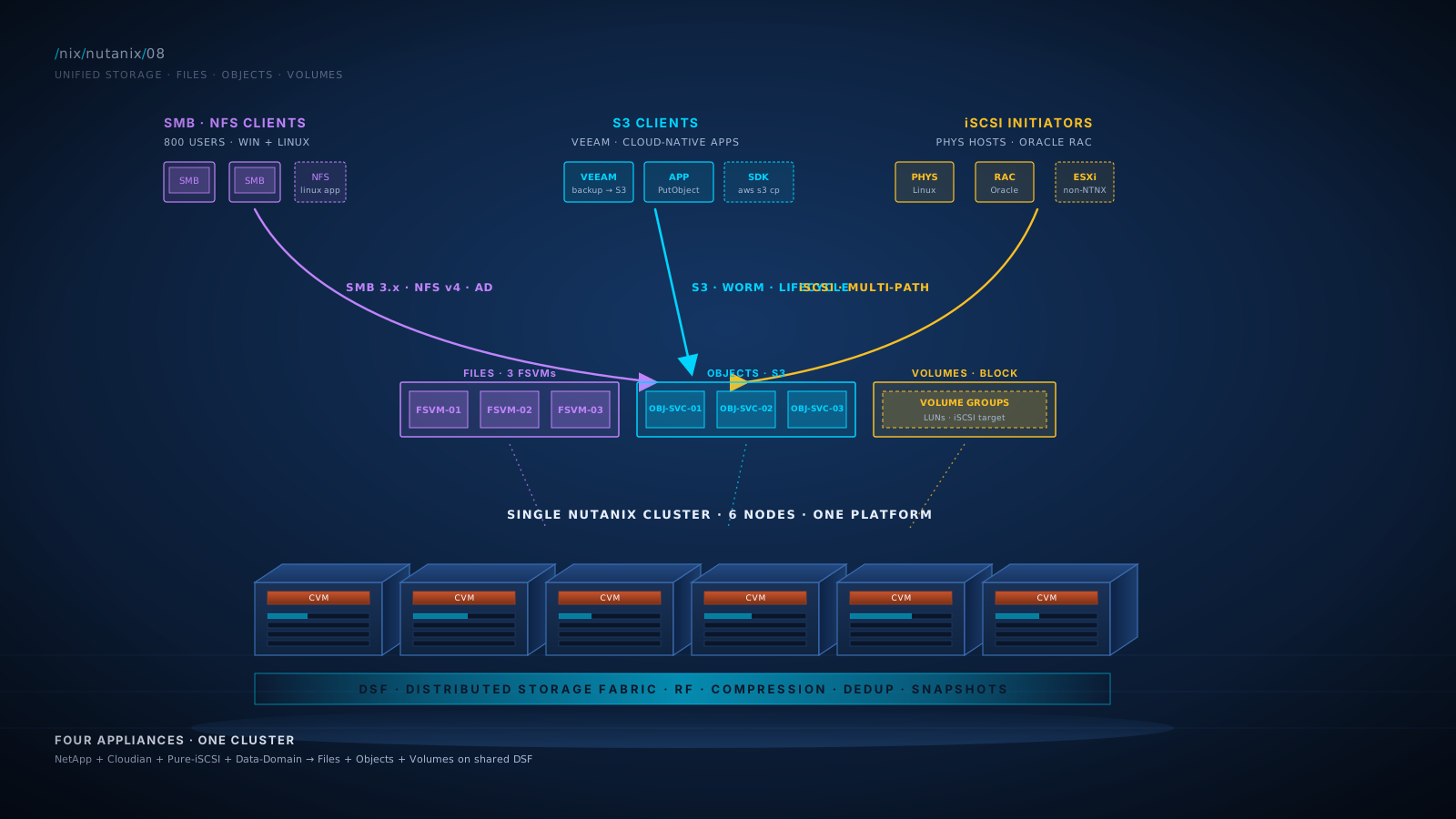
- Make the unified-storage consolidation pitch on a whiteboard in 5 minutes. Replace separate filers (NetApp, Isilon), separate object storage (Cloudian, Scality, on-prem S3), and separate iSCSI arrays with one Nutanix cluster. Three vendor relationships consolidate to one. Three refresh cycles consolidate to one.
- Pass roughly 80% of NCP-US, the Unified Storage specialty cert. This module is the foundation. NCP-US tests Files, Objects, and Volumes architecture, configuration, and operations.
- Position Files, Objects, and Volumes against their incumbent competitors. NetApp ONTAP for files. AWS S3 or on-prem object stores for objects. Pure or Dell arrays for iSCSI block. Each comparison is honest: Nutanix is competitive in 90% of cases, behind in specific niches, with the integration and platform consolidation as the durable win.
- Recognize when unified storage is the wrong answer. Some workloads (extreme-throughput HPC filers, hyperscale object workloads, very specialized SAN block scenarios) are still better served by purpose-built storage. Naming the gap honestly buys customer trust.
- Make the backup-target consolidation case. Nutanix Objects as a Veeam, Commvault, or Rubrik target replaces a separate Data Domain, Quantum, or NetApp StorageGRID appliance. One of the more concrete economic wins in 2026 and one of the easier-to-prove ROI cases.
- Identify which storage service to recommend for which use case. Files for user shares and SMB-aware applications. Objects for backup targets and cloud-native applications. Volumes for non-Nutanix consumers (physical hosts, Oracle RAC on bare metal, legacy apps requiring iSCSI).
This module is the answer to "what other storage problems can Nutanix solve?" The answer, more often than customers expect, is "most of them."
Foundation: What You Already Know
Your customer has multiple storage appliances. Walk into any enterprise datacenter and you find:
- A NetApp filer (or Isilon, Pure FlashBlade, Dell PowerScale) handling user shares, application file storage, and backup targets that need NFS or SMB.
- An object storage tier somewhere: AWS S3 for cloud-resident data, possibly Cloudian or Scality or MinIO on-prem for archive or backup.
- An iSCSI array for workloads that need block storage but aren't on the VMware cluster: physical database servers, legacy applications, bare-metal Linux, sometimes backup targets.
- Possibly a Data Domain or similar dedup appliance for backup repositories.
Each is a separate appliance with its own controller hardware, its own software upgrade cycle, its own support contract, its own management UI, its own replication story, and its own capacity-planning surface. Your customer's storage admin has spent years getting good at this. They are not necessarily happy about it.
The unified-storage story for Nutanix is: those four appliances consolidate to one cluster. Files replaces the filer. Objects replaces the object store and often the dedup appliance. Volumes replaces the iSCSI array. All three run on the same DSF substrate, in the same management plane, with the same lifecycle.
This is consolidation at the storage tier. It is the same operational argument that drove HCI adoption for compute, applied to storage services. The customer who saved one team's effort by collapsing compute-storage-network into HCI saves another team's effort by collapsing file-object-block onto unified storage.
Core Content
Nutanix Files: SMB and NFS at HCI Scale
Nutanix Files is a scale-out file storage service that runs on top of a Nutanix cluster. It provides SMB shares (for Windows clients and applications) and NFS exports (for Linux clients and applications). The architecture:
- A File Server is a logical SMB/NFS service. You can have multiple File Servers per cluster (e.g., one for Production, one for Engineering, one for VDI profiles).
- Each File Server is implemented as a cluster of FSVMs (File Server VMs). FSVMs are dedicated VMs that run the file-services stack on top of Nutanix. Three FSVMs per File Server is the typical deployment for HA and scale-out. Smaller deployments support single-FSVM File Servers (intended for one- and two-node Nutanix clusters or small-environment scenarios), but a single FSVM gives up the HA-across-FSVMs property and limits horizontal scale. Distributed shares and exports require three or more FSVMs.
- FSVMs distribute the file-services workload across the underlying cluster. Adding FSVMs scales capacity and performance horizontally.
- File data sits on DSF with all of DSF's properties: RF, compression, deduplication, snapshots, replication.
Capabilities:
- SMB 2.x and 3.x with full Active Directory integration. Kerberos, ACLs, ABE (Access-Based Enumeration), DFS-N integration. Standard for Windows shares and applications.
- NFS v3 and v4 for Linux clients and applications. Kerberos for v4.
- Multi-protocol shares (SMB and NFS on the same data, with appropriate ACL translation).
- Snapshots at the File Server, share, or path level. Native to DSF; instant; no I/O penalty.
- Self-Service Restore (SSR). End users can restore deleted files from snapshot via the Windows "Previous Versions" tab, without involving IT.
- Files Analytics / Data Lens. Analytics on file usage, access patterns, hot/cold data identification, and ransomware-pattern anomaly detection. The on-cluster product is Files Analytics; the broader unified-storage analytics and ransomware-detection service that evolved from it is Data Lens. Data Lens v2.0 (GA 2026) supports fully on-premises deployment, including air-gapped and dark-site environments.
- Anti-ransomware. Real-time pattern detection on writes; alerts and (optionally) blocks suspicious activity. This has matured significantly in recent AOS releases.
- Replication to another Nutanix cluster (DR for file data).
- Quotas at the share or directory level.
- DFS-N integration for namespace-based access.
When Files is the right tool:
- User home directories and department shares (the canonical SMB use case).
- Application file storage: Windows applications that need an SMB share, Linux apps that need NFS.
- VDI persistent profiles (combined with Citrix or Horizon profile management).
- Web content stores, software distribution shares.
- Backup target for VM-level backups (where SMB/NFS is the protocol).
When Files is not the right tool:
- Extreme-throughput HPC scenarios where you need genuinely thousands of clients hitting one filer at saturation. Dedicated parallel filers (Lustre, GPFS / IBM Spectrum Scale, dedicated Isilon clusters) still win at the very top end.
- Workloads requiring features specific to a particular filer (NetApp FlexClone for file-level cloning, FlexCache for distributed caching, certain ONTAP-specific snapshot policies). Files is competitive but does not match every NetApp feature.
Diagram: Files Architecture
Files Analytics and Data Lens: A Real Differentiator
Most filers have analytics. Files Analytics (the on-cluster service inside Files) and Data Lens (the broader cloud-and-on-prem unified-storage governance product that evolved from Files Analytics) are genuinely good. The pair provides:
- File-system aging. What percentage of data hasn't been accessed in 12+ months? (Often surprising and budget-relevant.)
- Top users by capacity. Who owns the largest file footprints?
- Top users by I/O activity. Who is actively reading/writing the most?
- File type breakdown. PDF, video, log, database files: where is your storage actually going?
- Anomaly detection. A user account that suddenly accesses 10,000x normal volume is flagged. This is the foundation of the anti-ransomware capability.
- Permission audit. Which users have access to which shares; who has elevated permissions; what changed recently.
- Compliance reporting. Standard reports for various compliance frameworks.
Anti-Ransomware: The Security Story for Files
Files (with Files Analytics on-cluster) and Data Lens include real-time ransomware detection that watches file write patterns. Data Lens ships with a constantly-growing library of known ransomware signatures (65,000+ as of 2026) plus behavior-based anomaly detection. The detection-and-block flow watches for encrypt-at-write patterns, mass-rename patterns, and suspicious extension changes, and can trigger:
- Alerts (immediate notification to administrators).
- Optional blocking (refusing the suspicious writes, preventing further damage).
- Snapshot creation at detection time (preserving the pre-attack state).
For customers concerned about ransomware (which by 2026 is essentially every customer), this is a meaningful security story. It is not a complete anti-ransomware strategy by itself; it is a layer that complements endpoint protection, network segmentation, backup hygiene, and user awareness training.
Nutanix Objects: S3 at Cluster Scale
Nutanix Objects is an S3-compatible object storage service running on top of a Nutanix cluster. It provides:
- S3 API compatibility. Standard S3 endpoints, signatures, requests. Most S3-compatible tools work without modification.
- Buckets as the unit of organization, with access policies, IAM-style users, and versioning.
- Object versioning. Multiple versions of an object retained per bucket configuration.
- WORM (Write Once Read Many). Compliance-driven immutability via the S3 Object Lock specification. Once a bucket is marked WORM, there is a 24-hour grace period for testing; after that, no objects within the bucket (or the bucket itself) can be deleted until the date specified by the WORM policy. The retention period can be extended but never reduced. WORM buckets have versioning auto-enabled (versioning cannot be suspended on a WORM bucket). Useful for regulatory archives and some backup retention scenarios.
- Lifecycle policies. Auto-tier or auto-delete objects based on age.
- Replication to other Nutanix Objects deployments or to AWS S3.
- Multi-tenancy. Separate object stores for different tenants, each with their own users and policies.
The architecture is similar in spirit to Files: dedicated VMs (the Objects "Object Service") run the S3 stack on top of DSF. Capacity scales by adding cluster capacity; throughput scales by adding object service VMs.
When Objects is the right tool:
- Backup targets. Veeam, Commvault, Rubrik, Cohesity all support S3 as a target. Objects becomes a Veeam repository, replacing a separate Data Domain or NetApp StorageGRID. One of the most concrete consolidation wins.
- Cloud-native applications. Apps designed against the S3 API (which is most modern apps) work natively against Objects.
- Archives and long-term retention. Use lifecycle policies to age data toward longer retention.
- Compliance archives. WORM mode for regulatory data (financial, healthcare, legal).
- Big data and analytics intermediate storage. Spark, Hadoop, modern data-warehouse staging often use S3-compatible storage.
When Objects is not the right tool:
- Hyperscale workloads at AWS-S3 scale (tens of petabytes, millions of TPS). Objects scales well but is not in the same league as AWS infrastructure.
- Workloads that require AWS-specific features beyond S3 API (S3 Glacier deep archive economics, S3 Select compute pushdown for some specific patterns).
- Workloads where the cloud-economics arbitrage (capex vs cloud-opex) clearly favors public cloud.
Diagram: Objects Architecture
Nutanix Volumes: iSCSI for Non-Nutanix Consumers
Nutanix Volumes is the iSCSI block-storage service. It exposes LUNs (called Virtual Volumes in Nutanix vocabulary) over iSCSI to external consumers: physical servers, non-Nutanix VMs, certain bare-metal database deployments, legacy applications.
The architecture:
- Volume Group: a logical grouping of one or more LUNs that are presented together. Useful for application-aware grouping (e.g., "all the disks for SQL Server cluster instance ABC").
- iSCSI Target: the cluster acts as an iSCSI target. Standard initiator software on Linux, Windows, ESXi, or other consumers connects.
- Multi-pathing: the cluster exposes multiple iSCSI portal IPs for HA. Standard iSCSI multipath software on the consumer handles failover.
- Data resides in DSF: with all DSF properties (RF, compression, snapshots, replication, EC if applicable).
When Volumes is the right tool:
- Physical Linux or Windows servers that need block storage but aren't running on Nutanix as VMs. Examples: standalone database hosts, legacy physical applications, specialized hardware that runs bare metal.
- Oracle RAC or other clustered databases that prefer raw block storage shared across nodes (RAC's ASM works well over iSCSI).
- Legacy iSCSI consumers that the customer hasn't yet migrated.
- VMware ESXi clusters not on Nutanix that want to use Nutanix storage. ESXi can mount Volumes as iSCSI datastores. (Niche but real, often during migrations.)
- Backup targets for backup software that prefers iSCSI over SMB/NFS/S3.
When Volumes is not the right tool:
- Standard VM workloads on AHV. Just use AHV's normal vDisk presentation; you don't need iSCSI on top.
- Workloads where the consumer can use SMB, NFS, or S3 instead. Block protocols are more complex than file or object; only use them where genuinely required.
The Cycle, Frame Two: Unified Storage as Consolidation
For an operations leader or CIO, the durable Unified Storage story is consolidation. Specifically:
| Customer Has Today | Unified Storage Replaces With |
|---|---|
| NetApp / Isilon / FlashBlade for file shares | Nutanix Files (FSVMs on DSF) |
| Cloudian / Scality / MinIO / on-prem S3 | Nutanix Objects (Object Services on DSF) |
| iSCSI array (Pure, NetApp, Dell) for non-Nutanix consumers | Nutanix Volumes (Volume Groups on DSF) |
| Data Domain / Quantum / dedicated dedup appliance | Nutanix Objects with appropriate retention (often paired with backup software's native dedup) |
Four appliances consolidate to one cluster. The customer's BOM gets simpler. Their refresh cycles align. Their support contracts consolidate. Their team's effort goes into one platform instead of four.
The economic argument is real. Run the actual numbers for the specific customer; the savings depend on their deployment size and current depreciation schedule. Typical mid-market deployments save 30-50% over five years compared to maintaining four separate storage tiers.
The Cycle, Frame Three: Unified Storage as DSF Made Consumable
For a technical architect, the architectural frame is more interesting: unified storage is DSF's distributed-storage primitives made consumable through industry-standard protocols.
DSF already does the hard parts: distributed metadata, replication, erasure coding, compression, dedup, snapshots, geographic replication. Files, Objects, and Volumes are protocol layers on top of DSF that translate user requests (SMB/NFS/S3/iSCSI) into DSF operations.
This is why all three services automatically benefit from DSF improvements. When DSF gets better at compression in a future release, Files, Objects, and Volumes all get better at compression. When DSF improves replication, all three services benefit.
The architecture is a single platform with multiple consumption protocols. Compare this to the NetApp world where the filer is purpose-built for files and bolting on object or block requires different products (StorageGRID for object, ONTAP block features for iSCSI), each with their own software lifecycles.
The Cycle, Frame Four: Unified Storage as the Backup-Target Win
For backup teams, the durable frame is specifically about backup repositories. Most enterprise backup deployments today use:
- Primary backup tier: a deduplication appliance (Data Domain, Quantum, NetApp StorageGRID-with-dedup-software).
- Secondary tier: sometimes tape; increasingly cloud (AWS S3, Azure Blob).
- Cloud archive: AWS S3 Glacier or equivalent.
This stack costs real money. The dedup appliance alone is often a six-figure capex item. Software licensing on top of the appliance is more.
Unified Storage's pitch: Nutanix Objects becomes the primary backup repository. The major backup vendors (Veeam, Commvault, Rubrik, Cohesity, HYCU) all support S3-compatible storage as a target. The customer's backup workflow stays the same; the destination changes from Data Domain to Nutanix Objects. Replication to Objects in another datacenter (or to NC2 in cloud) handles geographic redundancy. Lifecycle policies handle long-term retention.
The consolidation: dedup appliance gone, separate cloud-archive billing simplified (depending on retention strategy), one less vendor relationship.
Diagram: Unified Storage Consolidation
What Unified Storage Genuinely Lacks
Honest gap list. Read it carefully.
- Files vs NetApp ONTAP at the high end. ONTAP has 30+ years of file-services maturity: FlexClone for file-level cloning, FlexCache for distributed caching, advanced quotas, ABE policy refinement, ONTAP-specific snapshot policies, deep volume-management semantics. Files is competitive for the bulk of enterprise file workloads. For customers running deep ONTAP workflows, the comparison favors ONTAP.
- Objects vs AWS S3 ecosystem maturity. AWS S3 has the broadest tooling ecosystem and the most niche-feature depth (S3 Select, Glacier Deep Archive economics, S3 Outposts, dozens of S3-native AWS services). Nutanix Objects is S3-compatible at the API level, which works for nearly every common S3 tool, but AWS-specific features beyond S3 are not available.
- Hyperscale object workloads. AWS-scale or Google-scale object workloads (multi-petabyte, millions of operations per second) are out of scope for Nutanix Objects. Use cloud for cloud-scale.
- Specialized HPC filers. Lustre, IBM Spectrum Scale (GPFS), and other parallel filers serve workloads where extreme throughput across thousands of clients is the requirement. Files does not target this segment.
- Volumes vs purpose-built block arrays at the very top end. For block workloads requiring sub-millisecond p99 latency at extreme IOPS, dedicated block arrays still have an edge in some scenarios. Most enterprise block workloads are well-served by Volumes; the very top end is the exception.
These are real. None are deal-breakers for typical mid-market or enterprise workloads. Customers in those niches need targeted purpose-built storage.
What Unified Storage Has That Separates It From Pieces-Bought-Separately
- Single platform. One cluster, one vendor, one upgrade cycle, one support contract.
- Shared DSF foundation. All three services inherit DSF's snapshots, replication, compression, dedup, EC.
- Shared management plane. Files, Objects, and Volumes all configured and monitored from Prism Central.
- Shared identity integration. AD or SAML configured once, applies across all three services.
- Shared replication topology. Files Replication, Objects Replication, and DSF Async all use compatible network paths and policies.
- Shared scaling. Adding cluster capacity adds capacity for VMs, files, objects, and block simultaneously.
- Shared licensing. Bundled into AOS subscriptions; specific tier requirements vary but no separate appliance licensing.
Lab Exercise: Deploy Files, Create a Share, Test Snapshot Recovery
- Verify Files availability on your CE cluster. From Prism Central, navigate to Services > Files. If available, proceed; if not, walk through the deployment workflow conceptually.
- Deploy a File Server. Use the deployment wizard:
- Name:
lab-fs-01 - Number of FSVMs: 3 (the minimum for HA)
- Storage container: default or new
- Network: place FSVMs on an existing virtual network
- Domain: integrate with AD if available; otherwise workgroup
- Name:
- Create an SMB share. Once the File Server is up: name
lab-share-01, type SMB (or NFS), path/lab-data, permissions appropriate for your test environment. - Mount the share from a client. From a Windows VM, map a network drive:
\\<file-server-name>\lab-share-01. From Linux, mount via NFS or SMB. - Generate test data on the share. Copy some files. Create directories. Make the share look "real."
- Take a snapshot of the share. Files > Snapshots > Create. Note that this is instant regardless of share size.
- Test Self-Service Restore. From a Windows client with the share mapped: right-click on a file > Properties > Previous Versions. You should see the snapshot. Restore a previous version. This is the user-facing recovery experience and is genuinely valuable for customers.
- Configure a snapshot schedule. Define an hourly schedule with retention. Confirm snapshots are taken on schedule.
- (Optional) Test Volumes. Create a Volume Group with one or more LUNs. From a Linux VM:
iscsiadm -m discovery -t sendtargets -p <cluster-data-services-ip>
iscsiadm -m node -T <iqn> -p <portal> --login
The new block device should appear; format and mount it. - Inspect Files via CLI. From a CVM:
afs                          # Files CLI (ssh to FSVM if needed)
ncli filesserver list        # List file servers
ncli filesserver status name=<name>
What this teaches you:
- Files deployment workflow and architecture in practice.
- The user-facing Self-Service Restore experience (a key customer-demo moment).
- iSCSI / Volumes consumption pattern from an external-style consumer.
Customer-demo angle: Steps 6-7 are the customer demo for Files SSR. Show how an end user can restore their own deleted files without an IT ticket. Help-desk reductions land emotionally. Time it: 90 seconds total.
Practice Questions
Twelve questions. Six knowledge MCQ, four scenario MCQ, two NCX-style design questions. Read each, answer in your head, then click to reveal.
What is an FSVM in Nutanix Files architecture?
Why this answer
FSVMs (File Server VMs) are dedicated VMs that run the SMB/NFS file-services stack on top of Nutanix. Three FSVMs typically form a File Server (the logical share-serving entity). They are real VMs, not abstractions.
Why not the others
- A) FSVM is an architectural component, not a user account.
- C) Storage pools are DSF-level constructs, unrelated to FSVMs.
- D) Snapshots are a DSF feature; FSVMs do not refer to snapshots.
The trap
A and C reflect partial understanding. FSVMs are the implementation of Files. Memorize: File Server = logical service; FSVMs = the VMs implementing it.
Which Unified Storage service replaces a dedicated S3-compatible object storage appliance (like Cloudian or MinIO) used as a backup target?
Why this answer
Nutanix Objects provides S3-compatible object storage. Backup software (Veeam, Commvault, Rubrik, Cohesity) supports S3 as a target, so Objects is the direct replacement for Cloudian/MinIO/StorageGRID in this role.
Why not the others
- A) Files is for SMB/NFS, not object storage.
- C) Volumes is for iSCSI block, not object.
- D) DSF storage containers are the underlying layer; you don't expose them directly to S3 clients.
The trap
D is technically clever ("just use the underlying storage") but operationally wrong. Customers consume DSF through the appropriate service layer.
What is the primary use case for Nutanix Volumes?
Why this answer
Volumes exposes iSCSI LUNs to external consumers: physical Linux/Windows servers, bare-metal database hosts (Oracle RAC), legacy applications that require block storage and are not running as Nutanix VMs.
Why not the others
- A) AHV's vDisk presentation works natively for VMs on Nutanix; Volumes is for external consumers.
- C) Snapshots are a DSF feature; Volumes is not specifically a snapshot mechanism.
- D) Files data lives on DSF, not on Volumes.
The trap
A reflects misunderstanding the consumer of Volumes. Memorize: Volumes is for clients outside the Nutanix VM context (typically physical or non-Nutanix hosts).
A customer wants to enable end users to recover deleted files from a Files share without involving IT. Which capability provides this?
Why this answer
SSR exposes Files snapshots to end users via the Windows "Previous Versions" tab. Users can restore deleted files or earlier versions without IT involvement. One of Files' most operationally valuable features.
Why not the others
- B) IT-managed restore is the "old way" without SSR; SSR specifically removes IT from the loop for routine recovery.
- C) Recovery Plans are for VM-level DR orchestration, not user-level file recovery.
- D) Files Analytics provides reporting, not recovery.
The trap
B is intuitive ("of course, only IT can restore") and misses the SSR feature. Memorize SSR as the user-facing recovery capability.
Which of the following correctly describes Files Analytics?
Why this answer
Files Analytics is integrated with the Files product. It provides the analytics described, runs as part of the Files infrastructure, and forms the foundation for the anti-ransomware capability.
Why not the others
- A) Files Analytics is integrated, not external.
- C) Files Analytics has its own UI; it is not just a Splunk export (though it can integrate).
- D) Files Analytics is part of Files, not a separate licensed add-on.
The trap
D reflects the fear that "useful features cost extra." Files Analytics is included with Files.
What is WORM in the context of Nutanix Objects?
Why this answer
WORM (Write Once Read Many) provides regulatory-grade immutability. Once written, objects cannot be modified or deleted until the retention period expires. Common compliance use cases: financial records, healthcare data, legal archives. Retention can be extended but not reduced; WORM buckets auto-enable versioning.
Why not the others
- A) Not a diagnostic tool.
- C) Not a programming language.
- D) Not a replication mechanism.
The trap
Test-takers unfamiliar with compliance vocabulary may guess. The retention/immutability use case is specific and important for regulated industries.
A customer with a 6-node Nutanix cluster wants to consolidate their NetApp filer (50 TB used), their Data Domain backup target (200 TB usable after dedup), and their Pure iSCSI array (30 TB used) onto Nutanix. They are concerned about whether one cluster can serve all four roles (compute + Files + Objects + Volumes). What is the recommended approach?
Why this answer
This is exactly the unified-storage use case. One cluster, sized for the combined workload, runs Files + Objects + Volumes alongside the customer's compute. The sizing exercise must account for the additional capacity (50+200+30 TB = 280 TB net, before RF and overhead).
Why not the others
- A) The customer's workload is well within Nutanix's consolidation sweet spot.
- C) Separate clusters defeat the consolidation purpose.
- D) Objects with appropriate sizing combined with backup-software dedup is a credible Data Domain replacement.
The trap
A and D reflect undue conservatism. The sizing is non-trivial but achievable.
A customer's senior storage admin says: "We've spent 12 years building NetApp expertise. Why would we walk away from FlexClone, FlexCache, and ONTAP's snapshot maturity?" What is the strongest SA response?
Why this answer
Honest about the gap, respects the customer's expertise, names a concrete coexistence pattern, and proposes a workload-mapping exercise as the next step. The durable enterprise SA response.
Why not the others
- A) Untrue. NetApp retains real ONTAP-specific advantages; pretending otherwise loses credibility.
- C) Bashing the incumbent loses the room.
- D) Dismissive of a real ONTAP capability that customers genuinely use.
The trap
A and D are confident-defensive. Honesty about the gap is what wins customer trust.
Which backup software products commonly support Nutanix Objects as a backup repository target?
Why this answer
All major enterprise backup vendors support S3-compatible storage as a target. Nutanix Objects is S3-compatible, so it works with the full ecosystem of S3-aware backup tools.
Why not the others
- A) Veeam works, but the support extends well beyond.
- C) Customers use third-party backup with Objects.
- D) Objects is explicitly designed to be a backup target.
The trap
A is a common mental model from heavily Veeam-shop customers. The reality is broader.
A customer wants to deploy a new file share for a department of 200 users. Their NetApp filer is at end-of-life and they are deciding between buying new NetApp or consolidating onto their existing 12-node Nutanix cluster. What is the strongest recommendation?
Why this answer
Textbook unified-storage consolidation. A 200-user department with standard SMB workloads is squarely within Files' capability. Consolidation onto the existing cluster eliminates a future refresh cycle and simplifies management.
Why not the others
- A) Files handles standard departmental file workloads cleanly.
- C) Buying separate small storage defeats the consolidation premise.
- D) Objects is for object workloads (S3), not file shares (SMB/NFS).
The trap
A reflects undue conservatism; D reflects misunderstanding of the protocol differences.
NCX-style design question. There is no single correct answer; there are stronger and weaker frames. Write your reasoning, then click to compare against the strong-answer outline.
A customer's environment:
- 8 ESXi hosts, ~250 VMs
- 200 TB NetApp filer (4 years old, support ends in 8 months) serving SMB shares for ~800 users plus application file storage for several Java/Tomcat apps
- 100 TB Data Domain (5 years old) serving as Veeam backup target
- 50 TB Pure FlashArray serving iSCSI to a small bare-metal Oracle environment
- Annual storage spend: roughly $400K across the three appliances (refresh amortization + support + power/space)
The customer is evaluating consolidation onto a new Nutanix cluster. They want a 5-year cost projection, an architecture proposal, and a phased migration plan.
A strong answer covers
- Consolidated cluster sizing. Total: ~250 VMs (existing compute) + 200 TB Files + 100 TB Objects + 50 TB Volumes + headroom for RF, reservation, growth. Estimate a 12-node Nutanix cluster sized for compute with all-NVMe nodes, accounting for storage role consolidation. Verify networking is 25 or 100 GbE.
- Files deployment. File Server with 3-5 FSVMs initially (scale-out as data grows). AD integration. SMB shares mirroring existing NetApp share structure. Snapshot schedules per existing recovery requirements. Files Analytics for reporting and anti-ransomware.
- Objects deployment. Object Service configured as a Veeam target. Migrate Veeam repositories from Data Domain to Objects in stages: non-critical first, validate, then critical. Lifecycle policies for retention.
- Volumes deployment. Volume Groups for Oracle bare-metal. Multipath iSCSI for HA. Migrate Oracle data via standard techniques (RMAN restore, or careful storage-level copy with downtime window).
- Phased migration plan. Months 1-2: deploy cluster, validate platform. Months 2-3: migrate Veeam target to Objects (lowest risk, highest immediate value). Months 3-6: migrate file shares from NetApp to Files (Robocopy or Files Migration tool); decommission NetApp at end of support. Months 6-9: migrate Oracle from Pure to Volumes (planned downtime window). Months 9-12: validate, optimize, decommission Pure.
- 5-year cost projection. Status quo: $400K/year × 5 = $2M, plus three refresh cycles. Nutanix: cluster capex ($700-900K for 12-node) + 5 years subscription + Files / Objects / Volumes licensing + reduced support overhead = typically $1.0-1.4M for 5 years. Net savings: $600K-$1M, with operational simplification not quantified.
- What you still need to know. Specific application file-storage requirements (some apps may have ONTAP-specific dependencies). Oracle's licensing posture (per-CPU vs per-core). Veeam's specific S3-target version compatibility. RPO/RTO requirements for the file workloads. Growth forecast for each storage tier.
A weak answer misses
- Defaulting to "rip and replace" without phased migration.
- Skipping the cost projection (the customer asked for it).
- Not naming the Veeam migration first (lowest-risk consolidation).
- Forgetting to plan the Oracle migration window (real downtime).
- Treating all three storage tiers as equivalent migration risks.
Why this matters for NCX
NCX panels evaluate multi-tier storage consolidation. Pure-feature answers fail. The right answer integrates platform architecture, migration sequencing, cost analysis, and risk assessment.
NCX-style architectural defense. Respond to the customer's lead storage architect.
You are in front of a customer's lead storage architect, a NetApp NCDA for 12 years. He says:
"Files is fine for general SMB shares, but we have ONTAP-specific workflows: FlexClone for instant SQL test environments from production data, FlexCache for distributed branch-office reads, ABE refinements that took years to tune, custom SnapMirror policies, and integration with Veritas NetBackup that uses ONTAP-specific APIs. Walking away from this means rebuilding workflows that took us a decade. Why is Files the right answer for us?"
A strong answer covers
- Acknowledge the ONTAP capability set is real and the workflow investment is significant. This is a 12-year specialist. Pretending Files matches every ONTAP feature loses the conversation.
- FlexClone. Files snapshots are space-efficient and instant; clone-equivalent workflows can use snapshot-based provisioning with some workflow adaptation. For SQL Server specifically, Nutanix has database-aware cloning patterns (NDB / Era) that handle the test-from-prod use case. Map his specific FlexClone workflows; many translate, some require workflow change.
- FlexCache. Distributed-branch caching is a real ONTAP capability. Files does not have a direct equivalent. For branch-office read patterns, alternatives include small Nutanix Files clusters at branches with replication, or third-party WAN acceleration. Acknowledge this gap.
- ABE. Files supports ABE; the years of refinement on his ONTAP ABE policies translate as workflow-import-and-test rather than feature-loss.
- Custom SnapMirror policies. Files Replication has its own policy model. Migrating SnapMirror policies is migration work, not feature-loss; the destination capabilities are comparable for most use cases.
- NetBackup with ONTAP-specific APIs. Some backup integrations use ONTAP-specific APIs (NDMP variants, snapshot integration). Veritas supports Files at the SMB/NFS protocol level; ONTAP-specific integrations would require switching to standard backup approaches. This is a real cost in some workflows.
- The honest reframe. "You have legitimate ONTAP investment. The question isn't whether to throw it away. The question is whether the consolidation benefits over 5 years justify the workflow migration costs. For workflows like FlexClone and SnapMirror, the cost is real but bounded; for FlexCache, the gap is real and may favor keeping NetApp for specific branch use cases. The right answer is workflow-by-workflow."
- Concrete next step. "Let me build a workflow inventory with you. We mark each workflow as: (1) translates cleanly to Files, (2) translates with workflow change, (3) requires keeping NetApp. The map will tell us whether full consolidation makes sense or whether the right answer is hybrid (Files for the bulk, NetApp for the workflows that don't translate). Either path saves money compared to refreshing all NetApp."
A weak answer misses
- Claiming Files matches every ONTAP feature.
- Dismissing the architect's 12 years of expertise.
- Not naming FlexCache as a real gap.
- Forcing a full migration when hybrid is the better answer.
- Not closing with the workflow-mapping exercise as a concrete proposal.
Why this matters for NCX
Storage architects with deep ONTAP investment are common. The disposition tested is acknowledging real expertise, naming real gaps, and reframing to workflow-by-workflow mapping rather than a binary migration decision.
What You Now Have
You can articulate the unified-storage consolidation pitch in 5 minutes on a whiteboard: NetApp + Cloudian + Pure-iSCSI + Data-Domain consolidate to one Nutanix cluster running Files + Objects + Volumes on shared DSF.
You know each service's purpose: Files for SMB/NFS file workloads, Objects for S3-compatible object storage (especially backup targets and cloud-native apps), Volumes for iSCSI block to non-Nutanix consumers.
You know each service's architecture: Files uses dedicated FSVMs; Objects uses Object Service VMs; Volumes is the cluster acting as iSCSI target. All three sit on DSF and inherit DSF's properties.
You know Files' operational features: Self-Service Restore, Files Analytics, anti-ransomware, multi-protocol shares, replication. You can demo SSR in 90 seconds.
You know Objects' compliance and lifecycle features: versioning, WORM, lifecycle policies, replication. You know which backup vendors support it (Veeam, Commvault, Rubrik, Cohesity, HYCU).
You know Volumes' use cases: physical hosts, bare-metal databases (Oracle RAC), legacy iSCSI consumers, ESXi clusters not on Nutanix that want to consume Nutanix storage.
You have the honest gap list: Files vs ONTAP at the high end (FlexClone, FlexCache, advanced policies); Objects vs AWS S3 ecosystem maturity; hyperscale workloads still cloud-native; specialized HPC filers still purpose-built.
You have the consolidation economics: typical mid-market deployments save 30-50% over 5 years compared to maintaining four separate storage tiers. The backup-target consolidation alone (Objects replacing Data Domain) is one of the easier ROI wins.
You are now ready for licensing. Module 9 covers Nutanix licensing, NCM tiers, AOS subscription models, hardware vs software pricing, and the financial conversation that frequently decides deals. After all the technical depth, this is the dimension that gets things signed.
References
Authoritative sources verified during the technical review pass on this module. Files Analytics is in the middle of being absorbed into the broader Data Lens product; reverify product naming against the current Nutanix portal before quoting in customer proposals.
- Nutanix Bible · Files. Authoritative architecture reference for File Servers, FSVMs, multi-protocol shares, distributed shares.
- TN-2041 Nutanix Files Architecture. Tech note covering FSVM minimum count, single-FSVM exception for small clusters, and protocol support (SMB 2/3, NFS v3/v4).
- Nutanix Bible · Objects. Object Service architecture, S3 API surface.
- TN-2106 Nutanix Objects Buckets. Bucket configuration, WORM (S3 Object Lock), versioning semantics including auto-enabled versioning on WORM buckets and the 24-hour grace period.
- Maintaining Compliance with WORM for Nutanix Objects. WORM operational details (extend-but-never-reduce, grace period).
- Objects 3.2 Bucket Policy Configuration. Current bucket-policy reference.
- Nutanix Data Lens · Product Page. Cloud-and-on-prem unified-storage analytics and ransomware-detection product that evolved from Files Analytics.
- Data Lens v2.0 GA Announcement. Confirms 2026 GA of fully on-prem Data Lens including air-gapped support.
- NCP-US Certification Page. Authoritative source for the NCP-US blueprint covering Files, Objects, and Volumes.
- NCP-US Exam Roadmap (Nutanix Community). Preparation guidance for the specialty cert.
Cross-References
- Glossary: Nutanix Files · FSVM · File Server · Nutanix Objects · Object Store · Bucket · Versioning · WORM · Nutanix Volumes · Volume Group · SMB · NFS · S3 · iSCSI · Files Analytics · Self-Service Restore Look up in Appendix A
- Comparison Matrix: Files vs NetApp · Objects vs S3 · Volumes vs Block Arrays Look up in Appendix B
- Objections: #31 "We have NetApp; why add Files?" · #32 "Objects vs AWS S3" · #33 "Backup-target consolidation" · #34 "iSCSI consumers and Volumes" Look up in Appendix D
- Discovery Questions: Q-STOR-06 file workload inventory · Q-STOR-07 Object/S3 use cases · Q-STOR-08 iSCSI consumer inventory · Q-STOR-09 backup target architecture Look up in Appendix E
- Sizing Rules: Files sizing · Objects sizing · Volumes sizing Look up in Appendix F