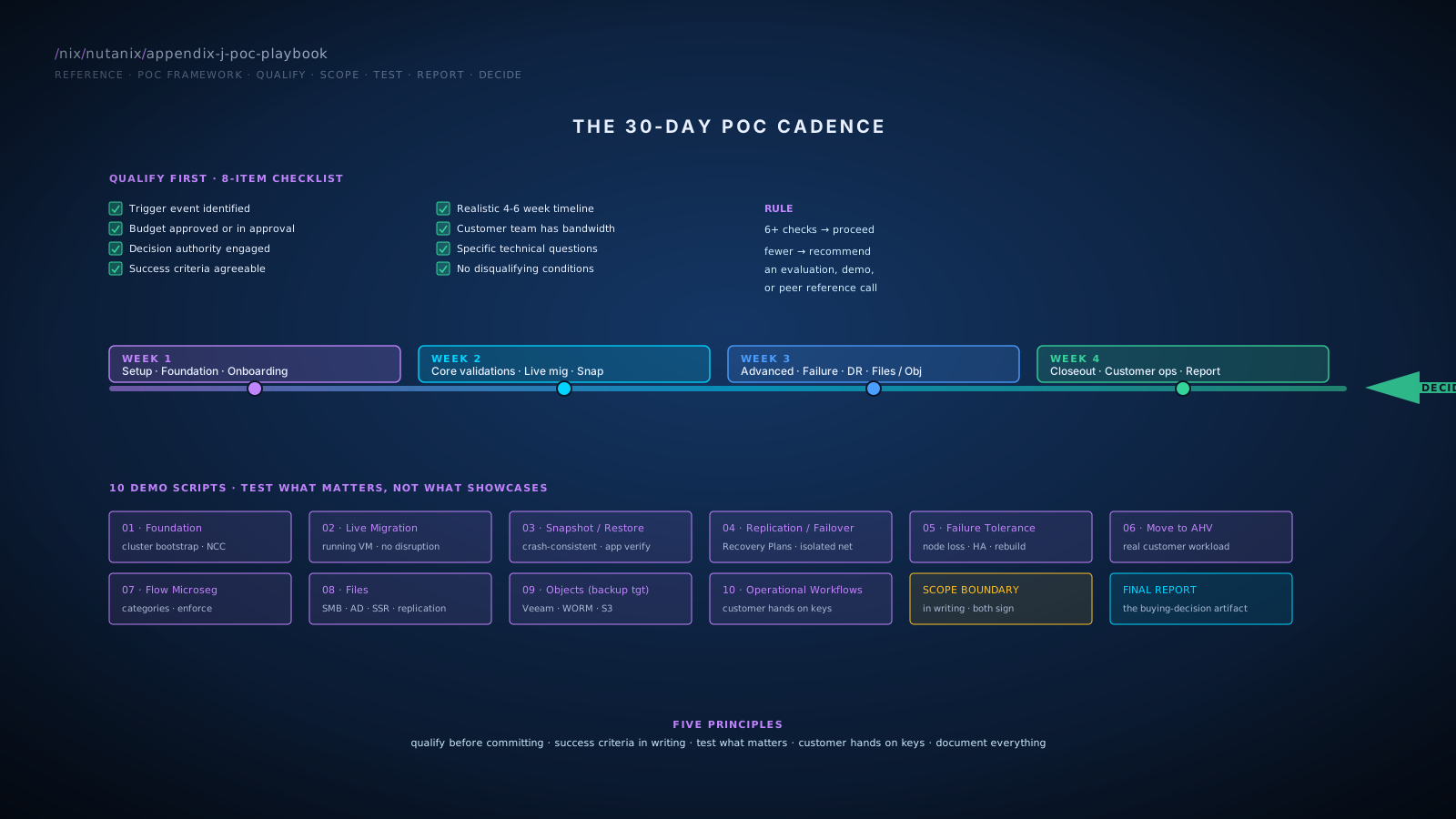
1POC vs Other Engagement Types
POC (Proof of Concept)
Definition: Deploy actual Nutanix hardware (or NC2 cloud cluster) at the customer site or in BlueAlly's lab; customer team participates in deployment, configuration, workload migration, and operational validation; runs typically 2-6 weeks; produces a documented validation against agreed success criteria.
- Customer is in active evaluation with budget and timeline
- Specific technical questions need empirical answers
- Customer team needs hands-on validation before committing
- Decision authority is engaged and ready to act on POC results
- Customer is in early discovery without trigger or budget
- Specific feature questions could be answered in a 2-hour demo
- Decision authority isn't engaged
- Success criteria can't be agreed upon
Evaluation
Definition: Lighter than a POC. Often a guided demo plus customer hands-on time in a BlueAlly-hosted lab; days to a week; doesn't require dedicated hardware deployment.
- Customer wants validation before deciding to invest in a full POC
- Specific feature questions to answer
- Customer team wants familiarity, not full operational validation
Proof of Value (POV)
Definition: Combines technical validation with business outcome demonstration. May include TCO analysis, parallel-running of workloads, or measured operational benefits. Often spans longer than a POC.
- Customer needs financial validation alongside technical
- CFO or executive sponsor needs business case evidence
- Multiple stakeholder groups need different forms of validation
Choosing the right engagement type
| Signal | Recommend |
|---|---|
| Active eval, budget approved, want hands-on | POC |
| Early eval, want to see capability before committing | Evaluation |
| Need financial + technical validation | POV |
| Just shopping; no trigger | Demo, build relationship; no POC |
| Specific feature question | Demo or evaluation |
When in doubt, recommend an evaluation first; upgrade to POC if customer wants deeper validation. Skip the POC entirely if the customer profile suggests it won't produce a decision.
2POC Qualification Checklist
Before committing to a POC, verify each of these. If 6+ items check, proceed with POC scoping. If fewer, recommend a different engagement type or hold the conversation until conditions improve.
- Trigger event identified. Refresh, contract end, performance issue, or strategic initiative driving urgency.
- Budget approved or in approval process. Real budget for the next 12 months covering the in-scope opportunity.
- Decision authority engaged. The person who will sign the contract is involved and aware of the POC.
- Success criteria can be agreed. Customer is willing to define what success looks like in writing.
- Timeline is realistic. 4-6 weeks for typical POC; the customer's timeline accommodates this.
- Customer team has bandwidth. Resources allocated to participate in the POC, not just observe.
- Specific technical questions to answer. Generic "evaluate Nutanix" is not specific enough.
- Disqualifying conditions absent. Customer hasn't already chosen another platform; recent renewal isn't blocking; political dynamics aren't fatal.
3POC Scoping Document
Every POC starts with a written scoping document agreed by both BlueAlly and customer. Both parties sign. This is the contract that bounds the POC.
POC SCOPING DOCUMENT

Customer: <customer name>
BlueAlly SA: <SA name>
Customer Sponsor: <name and role>
Customer Technical Lead: <name and role>
POC Start Date: <date>
POC End Date: <date>
Final Report Due: <date>

OBJECTIVES
1. <specific question to answer>
2. <specific question to answer>
3. <specific question to answer>

SUCCESS CRITERIA
For each objective, define what "success" means:
  - Objective 1: <measurable success definition>
  - Objective 2: <measurable success definition>
  - Objective 3: <measurable success definition>

SCOPE INCLUDED
  - Hardware: <specifics>
  - Software stack: <NCI tier (Pro / Ultimate; formerly AOS Pro / Ultimate),
                     NCM tier (Starter / Pro / Ultimate),
                     Security Add-On for NCI Pro if Flow microsegmentation in scope,
                     Files / Objects / Volumes if in scope>
  - Workloads to test: <specific list>
  - Integrations to validate: <specific list>

SCOPE EXCLUDED
  - <items explicitly not in scope to prevent scope creep>

DELIVERABLES
  - POC environment provisioned and validated
  - Documented test results against success criteria
  - Final POC report with recommendation

CUSTOMER COMMITMENTS
  - Hardware power, cooling, rack space, network drops
  - Customer team time: estimated <hours>/week
  - Test workload data: <specific items>

BLUEALLY COMMITMENTS
  - POC hardware loaner (if applicable)
  - SA on-site or remote support: <hours>/week
  - Final report within <X> days of POC end

DECISION TIMELINE POST-POC
  - Review meeting: <date>
  - Decision target: <date>
4POC Hardware Sourcing
1 · BlueAlly lab POC
POC runs in BlueAlly's lab on BlueAlly hardware. Customer accesses remotely.
- No customer hardware logistics
- Faster to start
- Consistent environment
- Customer can't do real workload migration
- Limited operational validation
- Less applicable to specific customer environment
Evaluations, feature validations, customer team familiarization.
2 · Loaner hardware at customer site
Nutanix-branded NX or OEM partner (Dell, HPE, Lenovo, Cisco) loaner hardware shipped to customer site for the POC duration.
- Real customer environment
- Real workload migration possible
- Full operational validation
- Hardware logistics (rack space, power, cooling, network)
- Coordination with customer's facilities and network teams
- Loaner availability constraints
Full POCs producing buying decisions; customers who need to validate in their environment.
3 · NC2 cloud POC
Spin up a Nutanix cluster in AWS or Azure via NC2 for the POC duration.
- Fast deployment (hours, not weeks)
- No on-site logistics
- Customer pays cloud bare-metal pricing or BlueAlly absorbs as POC cost
- Cloud bare-metal POC costs money
- Not all customers want their workloads in cloud during POC
- Some integrations (specific on-prem systems) may not test cleanly from cloud
Customers evaluating NC2 specifically; customers without lab infrastructure; rapid POCs.
Hardware sizing for POCs
Right-size for the test plan, not the full production deployment:
- 3-4 nodes minimum for any meaningful POC (production minimum + margin for testing failure scenarios)
- All-NVMe unless explicitly testing capacity tiering
- Networking matching customer's intended production setup (25 GbE typical)
POCs that size too small don't validate at relevant scale; POCs that size too large waste loaner inventory and add complexity.
5Test Plan Construction
The test plan operationalizes the success criteria.
TEST PLAN

TEST 1: <NAME OF VALIDATION>
  Maps to Objective: <1, 2, or 3>
  Description: <what we're testing>
  Procedure: <step-by-step>
  Success Criteria: <measurable result that defines pass>
  Customer Participation: <what the customer team does>
  Estimated Time: <hours or days>

TEST 2: ...
TEST 3: ...
A test demonstrates that a specific success criterion is met. "Show snapshots" is a feature demo. "Take an application-consistent snapshot of the customer's SQL Server, restore from snapshot, verify application functionality post-restore" is a test.
A typical POC includes 8-15 tests across:
- Cluster deployment and configuration
- Workload migration (1-3 representative workloads)
- Performance under representative load
- Failure scenarios (node loss, drive failure, network partition)
- Data protection (snapshot, replication, recovery)
- Integration validation (backup software, identity provider, network)
- Operational tasks (cluster expansion, software upgrade, capacity reporting)
6Ten Demo Scripts
Starting points. Adapt to the specific customer environment and tools.
01Cluster Deployment (Foundation)
Objective
Validate the deployment experience.
Procedure
- Customer team observes (or participates in) Foundation-based cluster bootstrap on the loaner hardware
- Cluster comes up; CVMs initialize; storage pool forms
- Validate cluster status:
cluster statusfrom any CVM should show all services UP - Run NCC:
ncc health_checks run_all; capture output
Success criteria
Cluster bootstrapped within expected timeframe (Foundation typically completes in 2-4 hours for typical clusters); all services healthy; NCC clean.
Customer participation
Customer team watches Foundation run; sees the level of automation; experiences first cluster log-in via Prism.
02Live VM Migration (vMotion-Equivalent)
Objective
Validate Live Migration works as expected.
Procedure
- Create a test VM with a sustained workload (e.g., a database with active queries, or a video stream)
- Note the host the VM is running on
- Trigger Live Migration to a different host via Prism
- Observe: VM continues running; brief network blip during switchover; sustained workload continues uninterrupted
- Validate the VM is now on the new host
Success criteria
Live migration completes; workload continues uninterrupted; no data loss; switchover time matches customer expectations.
Customer participation
Customer team selects a VM, triggers the migration, observes the result.
03Snapshot and Restore
Objective
Validate snapshot operations.
Procedure
- Take a snapshot of a test VM (Prism: VMs > select VM > Take Snapshot; or
acli vm.snapshot_create) - Modify data on the VM (write some test data)
- Restore the snapshot
- Verify data state matches the snapshot point
Success criteria
Snapshot completes within expected time (typically seconds for crash-consistent); restore returns VM to snapshot state; no data loss; customer's application functions post-restore.
Customer participation
Customer team takes the snapshot, modifies data, performs the restore.
04Replication and Failover
Objective
Validate replication to DR (cluster-to-cluster, or cluster-to-NC2).
Procedure
- Configure Async replication between primary cluster and DR cluster (or NC2)
- Create a Protection Policy with a test VM as a member
- Initial replication completes; subsequent replications run on schedule
- Trigger a test failover via Recovery Plans (into isolated network)
- Verify VM starts at DR site; application reachable
- Tear down test failover; verify primary cluster unchanged
Success criteria
Replication completes within RPO target; test failover succeeds without affecting primary; VM operational at DR site.
Customer participation
Customer team configures the protection policy, observes replication, triggers and validates the test failover.
05Failure Tolerance
Objective
Validate the cluster handles a node failure.
Procedure
- Note the cluster's current state via
ncli cluster get-domain-fault-tolerance-status type=node(thetype=parameter is required in current AOS) - Simulate a node loss (in a POC environment, this might be done by powering off a node)
- Verify VMs on the failed node restart on surviving nodes (HA event)
- Observe rebuild starting (Curator reconstructing the failed node's data on remaining nodes)
- Power the node back on; verify it rejoins the cluster
- Verify rebuild completes; cluster returns to full redundancy
Success criteria
VMs restart on surviving nodes within expected time (typically 60-90 seconds); rebuild progresses; cluster recovers full redundancy after rebuild.
Customer participation
Customer team triggers the simulated failure (with appropriate caution), observes the recovery.
06Workload Migration with Move
Objective
Validate workload migration from existing VMware environment to AHV.
Procedure
- Deploy Move VM in customer environment (or use cluster-shipped Move)
- Add source environment (vCenter) and target environment (AHV)
- Create a migration plan for 1-3 test VMs (representative of customer workloads)
- Execute initial replication; verify progress
- Schedule cutover; verify VM is shut down at source, started at target
- Validate VM operation at target; customer's application accessible
Success criteria
Move executes initial replication and cutover within expected time; VM is operational at target; data integrity preserved; customer's application validates.
Customer participation
Customer team selects the migration candidates, executes the plan, validates the result.
07Microsegmentation with Flow
Objective
Validate Flow Network Security policy enforcement.
Procedure
- Create a category structure (e.g.,
AppTier: Web,AppTier: App,AppTier: DB) - Tag test VMs with appropriate categories
- Create a Flow policy: Web can talk to App; App can talk to DB; Web cannot talk to DB directly
- Validate from a Web VM: traffic to App VM succeeds; traffic to DB VM fails
- Modify the policy to allow Web-to-DB; revalidate
Success criteria
Flow policies enforce as configured; traffic flows match the policy; policy changes take effect quickly.
Customer participation
Customer team configures the categories and policies, performs the connectivity tests.
08Files Performance and Operations
Objective
Validate Nutanix Files for the customer's file workloads.
Procedure
- Deploy Files cluster with appropriate sizing
- Create a File Server; configure a SMB share with AD integration
- Mount the share from a customer-owned client (Windows or Mac)
- Perform representative file operations (large copy, many-small-files copy, random access)
- Take a snapshot of the share; verify Self-Service Restore works (Previous Versions tab in Windows)
- Configure replication to a second Files cluster
Success criteria
Files performance matches customer expectations for the workload pattern; AD integration works correctly; SSR works as expected; replication completes.
Customer participation
Customer team configures Files, runs the test workloads, validates results.
09Objects as Backup Target
Objective
Validate Objects as backup target for customer's backup software.
Procedure
- Deploy Objects cluster
- Create an Object Store; create a bucket for backup data
- Configure customer's backup software (Veeam, Commvault, Rubrik, etc.) to use the bucket as a backup target
- Run a test backup
- Restore from the backup; verify data integrity
- Optionally: configure WORM on the bucket and verify immutability
Success criteria
Backup completes successfully; restore validates data integrity; backup software treats Objects as functionally equivalent to S3 or other supported targets.
Customer participation
Customer's backup admin configures the backup software, runs the test backup and restore.
10Operational Workflows
Objective
Validate day-2 operations the customer team will perform.
Procedure
Walk the customer team through:
- Adding a new VM via Prism
- Resizing a VM (add CPU, RAM, disk)
- Cloning a VM
- Reviewing performance metrics in Prism Element and Prism Central
- Capacity reporting (Intelligent Operations in NCM Pro)
- Triggering an LCM upgrade dry-run
- Reviewing audit logs
Success criteria
Customer team can perform each operation without difficulty; the operations match (or improve on) the customer's current workflow.
Customer participation
Customer team performs the operations themselves; SA observes and provides guidance.
7The 30-Day POC Cadence
- Day 1-2: Hardware install, network configuration, cluster bootstrap (Foundation)
- Day 3-4: Customer team onboarding to Prism; tour of the platform; initial demos
- Day 5: Test plan walkthrough; refinement of success criteria; agreement on week-by-week milestones
- Live migration, snapshots, basic operational workflows
- First workload migration via Move (small test VM)
- Initial performance baseline establishment
- Failure tolerance testing
- Replication and DR validation
- Files / Objects / Volumes specific testing (whichever are in scope)
- Integration testing (backup software, identity, ServiceNow if applicable)
- Customer team performs operational tasks independently
- Review of test results against success criteria
- Final report drafted and reviewed with customer
- Decision meeting scheduled
For 6-week POCs: add a week between Week 2 and Week 3 for additional workload migration; add a week at the end for extended operational validation.
For shorter POCs (2-3 weeks): trim Week 3 advanced validations to the customer's specific priorities; Week 4 is closeout.
8Success Criteria Templates
Common patterns. Customize per customer.
Performance
- "Database X demonstrates p99 read latency under <X> ms under sustained load of <Y> IOPS"
- "VDI deployment supports <N> sessions with login storm completing within <X> minutes"
- "Backup window for <data set> completes within <X> hours"
Availability
- "Live migration of running VM completes without application-level disruption"
- "Node failure simulation results in VM restart within 90 seconds"
- "Cluster rebuild after node failure completes within <X> hours"
DR
- "Replication of test VMs achieves RPO of <X minutes>"
- "Test failover of <N> VMs completes within <X minutes>"
- "Recovery validates application functionality at DR site"
Operational
- "Customer team can independently perform <listed operations> with limited SA guidance"
- "LCM-managed upgrade of cluster completes without VM downtime"
- "Capacity reporting matches customer's expected metrics"
Integration
- "Backup software successfully writes to and restores from Objects bucket"
- "AD integration enables expected access controls for Files shares"
- "ServiceNow integration creates expected change tickets via X-Play webhooks"
Each criterion is specific, measurable, and binary (passes or fails). Vague criteria like "performance is good" produce arguments at the end of the POC; specific criteria produce decisions.
9The Final POC Report
The report converts POC results into a buying decision document.
POC FINAL REPORT

CUSTOMER: <name>
POC DATES: <start> to <end>
REPORT DATE: <date>
PREPARED BY: <BlueAlly SA name>
REVIEWED WITH CUSTOMER: <date and attendees>

EXECUTIVE SUMMARY
<3-5 sentence summary of POC scope, key findings, and recommendation>

POC OBJECTIVES (from scoping document)
1. <objective 1>: PASSED / PASSED-WITH-CAVEATS / NOT-MET
2. <objective 2>: PASSED / PASSED-WITH-CAVEATS / NOT-MET
3. <objective 3>: PASSED / PASSED-WITH-CAVEATS / NOT-MET

DETAILED FINDINGS
For each objective:
  - What was tested
  - Results (with measurements, screenshots, or output)
  - Comparison to success criteria
  - Any caveats or context

PERFORMANCE OBSERVATIONS
  - Key performance metrics from POC
  - How they compare to customer's current baseline
  - Implications for sizing the production deployment

OPERATIONAL OBSERVATIONS
  - Customer team feedback on platform usability
  - Items that worked well
  - Items that required adjustment or learning

ITEMS NOT VALIDATED IN POC
  - Capabilities or scenarios out of POC scope
  - Recommended next-step validations if applicable

RECOMMENDED NEXT STEPS
  - If POC met objectives: recommended path forward (proposal, sizing, contract)
  - If POC raised concerns: recommended additional validation or alternative paths
  - If POC did not validate Nutanix as the right fit: honest assessment

APPENDICES
  - Raw test results
  - Configuration documentation
  - Photos / screenshots
  - POC team list (BlueAlly + customer)
The report is written for the buying decision meeting. The customer's executive sponsor reads the executive summary; the technical team reads the detailed findings; the CFO reads the performance and operational observations relevant to TCO.
10Common POC Pitfalls
- Skipping the scoping document. POCs without written success criteria drift; the customer remembers different objectives than the SA; results are arguable.
- Letting scope creep. Customer asks for "one more test"; SA agrees; week 4 becomes week 8; POC loses momentum. The scoping document is the boundary; in-scope tests run, out-of-scope tests are documented for follow-up.
- SA-driven, not customer-driven. SA performs all the tests; customer observes. The customer learns the platform but doesn't develop operational confidence. Wrong outcome. The customer needs hands-on experience to commit.
- Testing the platform's strengths, not the customer's needs. SA naturally gravitates to demos that highlight Nutanix's best features. Customer's actual needs may not align. Test plan should target customer needs first.
- No failure scenarios. Customers who haven't seen failure recovery in POC discover it in production. Always include node loss, network partition, and similar tests.
- Generic workloads, not customer workloads. Synthetic benchmarks don't validate the customer's actual workload. Use customer's data and applications where possible (with appropriate copies, not production).
- No final report. POC ends with verbal "looks good"; weeks pass; the buying decision stalls. The written report is the artifact that converts results into decision.
- Pushing for decision before report is reviewed. Asking "ready to buy?" right after the POC ends, before the written report is reviewed, comes across as pressure-selling.
- Underestimating customer team time. POCs require customer team participation; assuming they have unlimited time produces frustrated stakeholders. Realistic time estimates in the scoping document help both sides plan.
- Treating the POC as the sale. The POC validates the platform; the proposal, contract, and decision happen after. Don't confuse them.
11When to Recommend Against a POC
The senior-SA disposition: not every customer should run a POC. Recommend against when:
- Customer has no specific technical questions (a POC won't surface questions they haven't articulated)
- Decision authority is not engaged (POC results won't convert to decision without sponsor)
- Customer's profile genuinely doesn't fit Nutanix (don't run a POC to confirm what should be obvious)
- Recent platform investment makes a buying decision unlikely in the timeframe
- Political dynamics make a fair evaluation impossible (incumbent vendor has executive lock; the POC will be evaluated against rigged criteria)
Tell the customer when a POC isn't the right next step. Recommend an alternative (evaluation, demo, peer reference call, design workshop). Customers respect SAs who decline POCs that won't produce decisions.
12POC Variations by Customer Profile
Mid-market POC
- 4-week duration typical
- 3-4 node loaner cluster
- 5-8 tests focused on consolidation story (compute + storage + DR)
- Customer team of 2-4 participates
- Final report: 10-15 pages
Enterprise POC
- 6-8 week duration typical
- 6-8 node cluster (often customer-procured for the POC and retained for production)
- 10-15 tests covering the full stack including advanced features
- Customer team of 5-15 participates across multiple roles
- Final report: 20-40 pages with detailed appendices
Compliance-heavy POC
- 6-8 week duration typical
- Includes compliance-specific validations (encryption, HSM integration, audit logging, microsegmentation)
- Compliance team participates
- Documentation rigor is higher (audit-grade evidence)
- Final report: 30+ pages with compliance attestation appendices
Cloud DR POC (NC2-focused)
- 4-week duration typical
- NC2 cluster in customer's chosen cloud region
- Tests focused on replication, failover, recovery validation
- Customer's WAN to cloud is part of the test
- Final report includes cloud-cost projections
VDI POC
- 4-6 week duration typical
- All-NVMe cluster sized for representative session count (often a fraction of full production)
- Tests include boot storm, login storm, sustained-load, profile-storage validation
- Citrix or Horizon team participates
- Final report includes performance graphs from representative load
A Final Word
The POC is a high-leverage moment in the sales cycle. Customers commit to vendors who run professional, customer-centered POCs. Customers walk away from vendors who treat POCs as feature shows.
The discipline matters more than the specific demos:
- Qualified scope, not over-broad
- Customer-defined success criteria, not vendor-imposed
- Customer hands on the keys, not just observation
- Honest results, including caveats and items that didn't validate
- Written final report, not verbal "looks good"
- Recommendation that respects what the POC actually showed, not what BlueAlly hoped to show
Run POCs that produce decisions. The customers who say yes after a professionally-run POC become 10-year BlueAlly customers.
References
POC engagement methodology (qualification, scoping, demo scripts, success criteria, final-report structure). Technical content underlying the demos is sourced and verified in the per-module References sections plus Appendix G.
- Module 02 References. Foundation deployment, NCC commands used in Demo 1. Module 2
- Module 03 References. Live Migration semantics, Move tool used in Demo 2 and Demo 6. Module 3
- Module 06 References. Flow Network Security used in Demo 7 (NCI Ultimate or Security Add-On for NCI Pro). Module 6
- Module 07 References. Recovery Plans and replication used in Demo 4. Module 7
- Module 08 References. Files and Objects used in Demos 8 and 9. Module 8
- Module 09 References. NCI / NCM / NCP tier structure for the POC scoping document. Module 9
- Appendix G References. CLI command syntax (ncli, acli, ncc) used across demo procedures, including the corrected
ncli cluster get-domain-fault-tolerance-status type=nodesyntax. Appendix G
Cross-references
- Modules: Each demo script links to the module where the underlying capability is taught.
- Glossary: Appendix A defines the terms used.
- CLI Reference: Appendix G has the commands referenced in demo scripts.
- Discovery Questions: Appendix E has the questions that surface POC scope.
- Sizing Rules: Appendix F for POC hardware sizing.
- Reference Architectures: Appendix I for the production architectures POCs validate against.
- Objections: Appendix D has responses to objections that often surface during POCs.