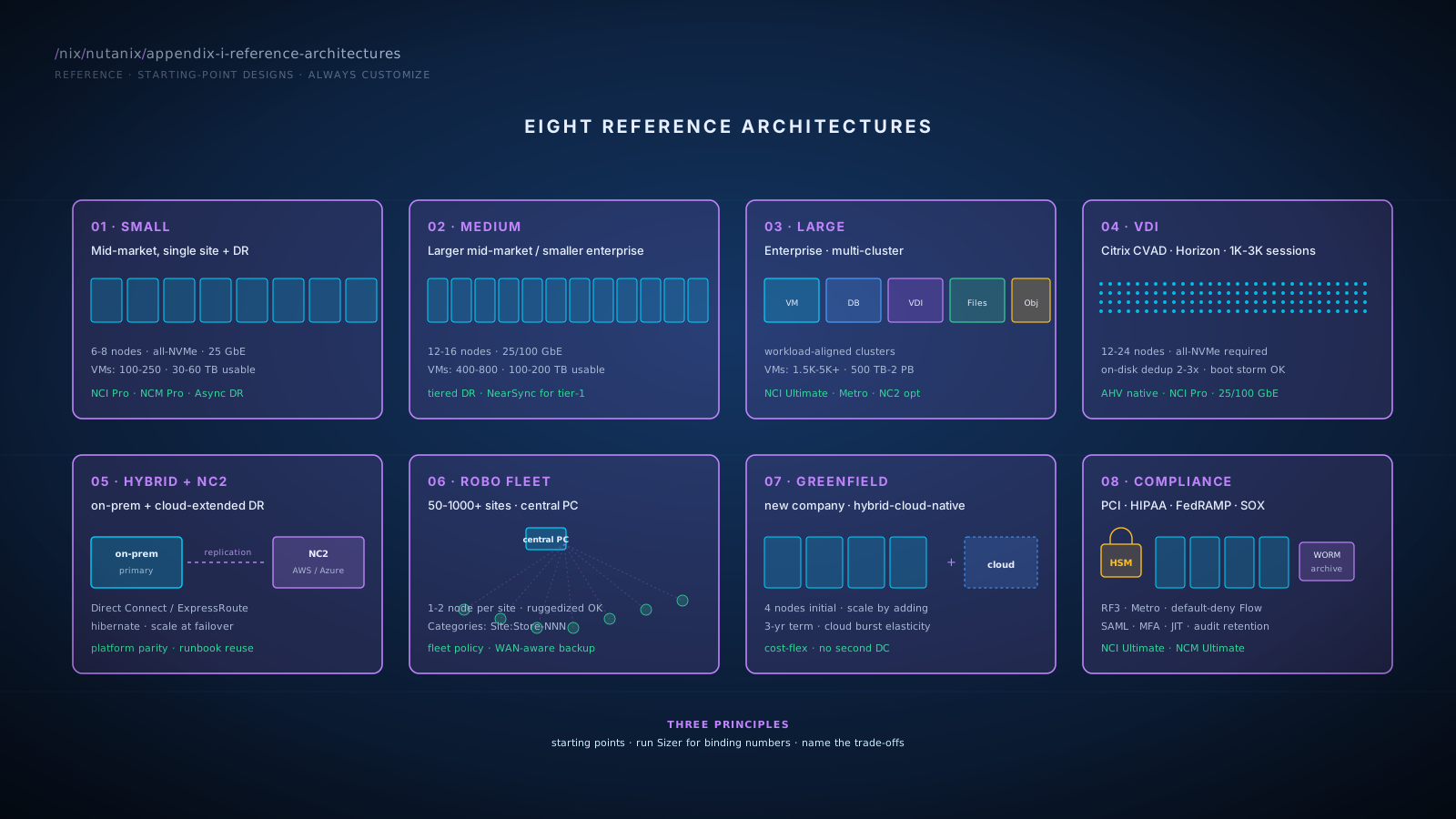
1Small Reference Architecture
Profile
Mid-market, ~150-300 employees in IT-relevant roles, single primary datacenter, secondary site for DR (often a colo or smaller office).
- VM count: 100-250
- Storage: 30-100 TB usable
- Workloads: general-purpose VMs, file shares, perhaps a small VDI deployment
- Compliance: standard (no PCI Level 1, no FedRAMP)
- Team: 3-6 person infrastructure team
- Annual run-rate today: $150-400K across hardware, software, support
Sizing
| Tier | Cluster shape | Hardware | Capacity / network |
|---|---|---|---|
| Production | 6-8 nodes | Dell XC, HPE DX, or NX appliances · all-NVMe · 768 GB-1 TB RAM · 32-48 cores per node | 60-120 TB raw → 30-60 TB usable (RF2 + compression) · 25 GbE · 4 NICs per node minimum |
| DR | 4 nodes | Same node spec for operational consistency | ~70-80% of primary capacity |
Network topology
- Top-of-rack switches: customer's preferred vendor (Cisco Nexus, Arista, Juniper); 2x ToR per cluster for redundancy
- Link speeds: 25 GbE for production data; 10 GbE acceptable for management
- Bond mode: balance-slb or LACP depending on switch capability
- Replication WAN: 200-500 Mbps between sites for typical Async DR
- Hypervisor: AHV (default) or ESXi-on-Nutanix (if customer is mid-VMware-migration)
- NCI: Pro tier (formerly AOS Pro). Add the Security Add-On for NCI Pro if Flow Network Security microsegmentation is in scope (per usable TiB; bundles Data-at-Rest Encryption); otherwise upgrade to NCI Ultimate where Flow is bundled.
- NCM: Pro tier (Intelligent Operations: capacity analytics, anomaly detection, runway analysis)
- Files: sized for existing file workloads (typically 20-50 TB)
- Objects: sized for backup target consolidation (typically 30-80 TB)
- Volumes: as needed for any iSCSI consumers
- Flow Network Security: licensed via the Security Add-On for NCI Pro (or NCI Ultimate); baseline microsegmentation policies
- Async replication to DR site (1-hour RPO typical)
- Recovery Plans for orchestrated failover
- Quarterly test failover into isolated network at DR site
- Backup target replication via Veeam (or equivalent) to Objects at primary, replicated to DR
Calibrated for the BlueAlly mid-market sweet spot. Captures the consolidation story across compute, storage tiers, DR, and management without overprovisioning for enterprise-scale features the customer doesn't need.
8-node primary provides N+1 redundancy with margin during rebuild; supports growth to ~200 VMs comfortably; allows 150-VM workload to run with healthy headroom.
NCM Pro tier is the practical sweet spot for management features: it includes Intelligent Operations (capacity analytics, anomaly detection, runway analysis), which most mid-market customers want. NCM Ultimate is overkill unless the customer specifically needs Self-Service or X-Play depth. Flow Network Security is separately licensed: it ships with NCI Ultimate or as a Security Add-On to NCI Pro (per usable TiB; bundles Data-at-Rest Encryption). Don't conflate the NCM management tiers with the NCI-side Flow licensing; that confusion bites in customer pricing conversations.
- No NearSync or Metro (Async-only DR; sub-15-min RPO not in scope)
- No NCM Ultimate (no Self-Service blueprints, no X-Play automation depth)
- Single-cluster production (no multi-cluster blast-radius management)
- 25 GbE rather than 100 GbE (sufficient for the workload; 100 GbE is overprovisioning)
- Heavily Linux/Containers: add Kubernetes-on-Nutanix consideration; cluster shape unchanged
- Higher RPO: upgrade to NCI Ultimate (formerly AOS Ultimate) for NearSync on Tier-1 workloads. NCI Ultimate also bundles Flow Network Security, which removes the Security Add-On per-TiB cost.
- Starting smaller (50-100 VMs): scale down to 4-5 node primary
SEE ALSO: C · Scenario 1 (Mid-Market Consolidation) · F · Cluster Sizing Fundamentals · M9 · Pricing Construction
2Medium Reference Architecture
Profile
Larger mid-market or smaller enterprise, ~500-1,000 employees in IT-relevant roles, primary datacenter plus dedicated DR site, possibly some ROBO sites.
- VM count: 400-800
- Storage: 100-300 TB usable
- Workloads: general-purpose VMs, file shares, VDI (~500-1,000 sessions), databases, possibly small object storage needs
- Compliance: industry-standard (HIPAA, PCI DSS Level 2, SOC 2)
- Team: 6-12 person infrastructure team
- Annual run-rate today: $400K-1M
Sizing
| Tier | Cluster shape | Hardware | Capacity / network |
|---|---|---|---|
| Production | 12-16 nodes | OEM partner (Dell XC, HPE DX, Lenovo HX, or Cisco UCS) · all-NVMe · 1-1.5 TB RAM · 48-64 cores per node | 200-400 TB raw → 100-200 TB usable · 25 GbE production · 100 GbE optional spine · 4-6 NICs/node |
| DR | 8-10 nodes | Same hardware family | ~75% of primary capacity |
| Files/Objects (optional) | 4-6 nodes | Dedicated cluster for file/object workloads | Tuned independently from general VM workload |
Network topology
- 2x ToR per cluster (redundant)
- 25 GbE production, 100 GbE for spine if east-west traffic justifies
- Bond mode: LACP with switch coordination
- Replication WAN: 500 Mbps-2 Gbps depending on change rate
- Dedicated replication VLAN or QoS lane
- Hypervisor: AHV with possible ESXi-on-Nutanix subset
- NCI: Pro tier for general workloads (NCI Ultimate for tier-1 workloads needing NearSync; NCI Ultimate also bundles Flow Network Security at no incremental per-TiB cost)
- NCM: Pro tier (Intelligent Operations); Ultimate if Self-Service / X-Play depth is needed
- Files: dedicated File Server for user shares + application file storage; 50-150 TB
- Objects: dedicated Object Store for backup targets and on-prem analytics; 100-200 TB
- Volumes: as needed
- Flow Network Security: category-based microsegmentation; PCI scope boundary enforcement
- Flow Virtual Networking: if multi-tenancy is in scope
- Tier-1 (~50-100 VMs): NearSync replication, 15-minute RPO, Recovery Plans orchestration
- Tier-2 (~200-300 VMs): Async hourly, 1-hour RPO
- Tier-3 (~150-300 VMs): Async daily or redeploy from gold image
- Quarterly test failover; SRM coexistence if customer has deep SRM investment
Sized for the consolidation story across compute, file/object/block storage, DR with tiered SLAs, and microsegmentation. The split between general-purpose cluster and dedicated Files/Objects cluster (when warranted) lets each cluster tune for its workload pattern; this is one of Nutanix's strengths over single-cluster-with-everything designs.
NCM Pro is the typical choice; upgrade to Ultimate when the customer needs Self-Service blueprints or X-Play event-driven automation for ServiceNow/SIEM integration.
Tiered DR matches infrastructure investment to workload criticality; not every workload needs NearSync.
- Multi-cluster operational complexity (more clusters means more upgrade coordination, more management surface)
- Some workloads stay on hybrid (ESXi-on-Nutanix subset for NSX-T-deep or SRM-deep workloads)
- Not pursuing extreme-scale features (Metro Availability typically not in scope unless metro-area DR is required)
- Multi-site Metro Availability needed: add witness VM at third site, tune for synchronous replication, network <5ms RTT
- Heavy NSX-T retention: plan permanent ESXi-on-Nutanix subset; map workloads to AHV vs ESXi-on-Nutanix
- Deep SRM customization: keep SRM for SRM-orchestrated workloads, Recovery Plans for new
SEE ALSO: C · Scenario 1 + 2 · M7 · Data Protection
3Large Reference Architecture
Profile
Enterprise customer, 2,000+ employees in IT-relevant roles, multiple datacenters (often 2+ production, 1+ DR, possibly cloud-extended), significant footprint of mixed workloads.
- VM count: 1,500-5,000+
- Storage: 500 TB-2 PB usable
- Workloads: full enterprise mix; tier-0 mission-critical, multi-tenant business units, VDI at scale, large databases, significant file and object storage
- Compliance: heavy (SOX, PCI DSS Level 1, HIPAA, FedRAMP, industry-specific)
- Team: 15-30+ person infrastructure team
- Annual run-rate today: $1M-5M+
Sizing
Multiple production clusters, workload-aligned. Single-cluster-with-everything fails at this scale due to blast radius, upgrade coordination, and workload-specific tuning needs.
| Cluster role | Shape | Notes |
|---|---|---|
| General-purpose | 16-32 nodes each (multiple clusters) | Workload-aligned blast-radius management |
| Database | 8-12 nodes | All-NVMe, sized for database performance specifically |
| VDI | 12-24 nodes | If VDI is significant; tuned for boot-storm patterns |
| Files | 6-12 nodes | Dedicated for file workloads |
| Objects | 6-12 nodes | Dedicated for object storage |
| DR | Mirrored topology at DR site | Full failover capacity for tier-1 / tier-2; tier-3 redeploys |
| NC2 cloud DR (optional) | 8-12 NC2 nodes | Cloud-extended DR; compliance-acceptable workloads |
Cluster splitting rationale: blast-radius management. A 32-node cluster failing causes more impact than 4x 8-node clusters failing one. Multiple smaller clusters also enable independent upgrade cadences.
Network topology
- Spine-leaf architecture with 100 GbE spine
- 25 GbE leaf-to-server (or 100 GbE for high-density)
- Dedicated network fabric for Nutanix replication if change rate justifies
- WAN: 5-20+ Gbps for replication between sites
- Multi-tenant network isolation via VLAN or VPC overlays (Flow Virtual Networking)
- Hypervisor: mixed AHV + ESXi-on-Nutanix; AHV for new workloads; ESXi for NSX-T-deep / SRM-deep
- NCI: Pro for general; Ultimate for tier-1 (NearSync, Metro Availability, bundled Flow Network Security). Many large enterprises standardize on NCI Ultimate cluster-wide for the simpler licensing posture and the Flow bundling.
- NCM: Ultimate (Self-Service blueprints, X-Play, Cost Governance)
- Prism Central: scale-out (3 VMs) for HA and >10K VM management
- Files: multiple File Servers for tenant or workload separation
- Objects: multiple Object Stores for tenant or use-case separation; WORM-enabled buckets for regulatory archives
- Volumes: as needed for bare-metal databases, legacy iSCSI consumers
- Flow Network Security: comprehensive category-based microsegmentation; PCI / SOX scope boundary enforcement
- Flow Virtual Networking: multi-tenant VPC overlays; service insertion for advanced security
- Tier-0 mission-critical: Metro Availability between primary datacenters where applicable; NearSync to remote DR
- Tier-1 production: NearSync replication, 15-min RPO
- Tier-2 production: Async hourly, 1-hour RPO
- Tier-3 / non-production: Async daily or redeploy
- Quarterly test failover at minimum, with audit attestation
- SRM coexistence indefinite; Recovery Plans for new
- Compliance-driven WORM archives in Objects with multi-year retention
Multi-cluster architecture is the differentiator for large enterprise. Single-cluster-with-everything fails at this scale due to blast radius, upgrade coordination, and workload-specific tuning needs. Workload-aligned clusters allow each to be tuned for its pattern (database, VDI, file/object) while the central Prism Central provides the unified management view.
NCM Ultimate enables the platform-level value (Self-Service for tenant onboarding, X-Play for event-driven automation, Cost Governance for chargeback) that large enterprise environments require.
Mixed-hypervisor architecture is the honest answer at this scale. Pure AHV migration is rare for enterprise customers with deep NSX-T / SRM / specific-application investments. Hybrid steady-state is the typical successful end state, possibly indefinite.
- Multi-cluster operational complexity is unavoidable; addressed via Prism Central centralization and disciplined upgrade-coordination
- Multi-vendor (Nutanix + remaining VMware) is the steady state; full consolidation rarely achieved
- Highest licensing cost tier (Ultimate everywhere); justified by enterprise feature needs
- Significant network investment (spine-leaf, 100 GbE)
- NC2 cloud DR in scope: add cloud cluster as third site; align replication topology
- Financial-services compliance: add HSM integration, more rigorous audit logging, more frequent test failover
- Multi-region (international): plan cross-region replication carefully; bandwidth and latency become critical design constraints
SEE ALSO: C · Scenario 2 + 4 · M9 · Licensing Tier Selection
4VDI Reference Architecture
Profile
VDI-centric deployment for healthcare, financial services, education, or contact centers. VDI is the primary workload (not a side use case).
- Sessions: 1,000-3,000 typical; can extend to 5,000+
- VDI broker: Citrix CVAD or VMware Horizon
- Profile: persistent or non-persistent depending on use case
- Compliance: typically HIPAA (healthcare), PCI (financial), or FERPA (education)
- Team: dedicated VDI team plus infrastructure support
Sizing
| Tier | Cluster shape | Hardware / capacity |
|---|---|---|
| VDI primary | 12-24 nodes (by session count) | All-NVMe required (boot-storm I/O); high RAM density (1-1.5 TB/node) for VM density; 25 GbE minimum / 100 GbE for >2K sessions |
| Capacity (persistent) | 30-80 GB per user before dedup | On-disk dedup typically 2-3x for similar-OS profiles |
| Capacity (non-persistent) | Smaller per-user | Higher density |
| VDI DR | Smaller than primary | Broker-tier first; profiles second; rebuild from gold image |
Network topology
- Dedicated VDI VLAN with appropriate microsegmentation
- 25 GbE minimum; 100 GbE recommended for boot storm
- Multi-pathing for storage traffic
- WAN to DR sized for profile replication (typically modest)
- Hypervisor: AHV (Citrix CVAD has good AHV support)
- NCI: Pro tier (formerly AOS Pro). Add Security Add-On for Flow if VDI-tier microsegmentation is in scope, or upgrade to NCI Ultimate for the bundled Flow + DARE.
- NCM: Pro tier (Intelligent Operations)
- Files: dedicated File Server for persistent profile storage if not using broker-managed profile management
- Volumes: as needed for VDI infrastructure components
- Flow Network Security: category-based microsegmentation isolating VDI tier from back-end services (licensed via NCI Ultimate or Security Add-On for NCI Pro)
- Broker tier: Async replication, fast recovery (RTO 30-60 min)
- Persistent profiles: Async replication daily; restore from backup if lost
- VDI sessions are not preserved across DR; users re-authenticate on DR site
VDI is one of Nutanix's strongest sweet spots. The architectural advantages of distributed I/O (boot storms handled gracefully across all nodes vs centralized array bottleneck) plus on-disk dedup (significant capacity savings on similar OS images) plus AHV included in AOS (no separate hypervisor licensing) combine to win VDI deals consistently.
All-NVMe is non-negotiable. Spinning-disk VDI causes boot-storm pain that no amount of caching fully solves.
- Higher per-node hardware cost (all-NVMe, high RAM density) than general-purpose clusters
- Dedicated VDI cluster vs general-purpose blend (purposeful, for tuning)
- VDI DR is "infrastructure DR" not "session DR"; users restart sessions
- Non-persistent / pooled deployment: lower capacity needs; higher density per node
- Extreme scale (5,000+ sessions): multi-cluster VDI; partition by department or region
- GPU-enabled (engineering / design): add GPU-equipped nodes; AHV supports GPU passthrough
SEE ALSO: C · Scenario 3 (VDI) · F · VDI Sizing · M5 · DSF Performance
5Hybrid Nutanix + NC2 Reference Architecture
Profile
Customer with on-prem Nutanix and cloud-extended capabilities via NC2. Use cases: cloud DR (no second physical datacenter), cloud burst capacity, hybrid-cloud workload mobility.
- On-prem footprint: any size
- Cloud workload: typically 20-30% of on-prem at steady state; can scale up dramatically during failover or burst
- Cloud platform: AWS or Azure
- Compliance: must allow for data in chosen cloud region
Sizing
| Tier | Sizing | Notes |
|---|---|---|
| On-prem cluster | Per general reference (Small / Medium / Large) | Sized for on-prem workload |
| NC2 cluster | 4-8 nodes steady state · scales to full failover at DR time | Hibernation strategy if cloud bare-metal pricing supports |
| Network | AWS Direct Connect or Azure ExpressRoute | 1-10 Gbps depending on replication / workload volume; IPSec VPN as backup |
- NCI: Pro tier on both (Ultimate if NearSync to NC2 is in scope or if Flow microsegmentation is needed cluster-wide without the Security Add-On)
- NCM: Pro or Ultimate; Prism Central manages both clusters as one fleet
- Files / Objects: can run in either location depending on workload locality
- Async replication (1-hour RPO) for tier-1 and tier-2 from on-prem to NC2
- NearSync for tier-1 if bandwidth supports
- Recovery Plans orchestration for failover
- Quarterly test failover into isolated network at NC2
- Replicate backup target (Objects) for off-cloud archive copies
NC2 makes cloud DR practical for customers without a second datacenter. The platform parity (same Nutanix on both sides) means runbooks transfer; failover doesn't require translation between platforms; the operational model is consistent.
Hibernation strategies (where supported) reduce steady-state cloud cost; the cluster scales up only when needed for test or actual failover.
- Cloud bare-metal cost is higher than on-prem at steady state; the value is in elimination of second-datacenter capex and the on-demand failover capability
- Cloud egress fees apply for replication direction
- Compliance constraints around data residency must be satisfied; cloud region selection critical
- Burst capacity (not DR): size NC2 cluster for typical burst rather than full failover
- Multi-cloud (AWS + Azure): complexity increases; NC2 in both with separate replication topologies
- True cloud-native hybrid (Kubernetes cross-cloud): broader cloud strategy beyond NC2
SEE ALSO: C · Scenario 6 (Cloud DR) · M7 · NC2 · B · NC2 vs VMware Cloud
6ROBO Fleet Reference Architecture
Profile
Customer with a primary datacenter plus many distributed sites (retail stores, branch offices, manufacturing plants, oil-and-gas remote sites).
- Sites: 50-1,000+
- Per-site footprint: small (1-3 servers per site)
- Per-site workloads: POS, inventory, surveillance, basic application services
- WAN: variable per site; some on cable internet, some on dedicated MPLS or SD-WAN
- Critical data: replicated to central; non-critical local-only
Sizing
| Tier | Cluster shape | Notes |
|---|---|---|
| Per-site cluster | 1-node or 2-node Nutanix (small-footprint) | 5-20 VMs per site; OEM hardware; ruggedized for harsh environments |
| Central cluster (datacenter) | Per Small or Medium reference | Central management hub, central backup target, central replication destination |
| Network (per site) | 50-200 Mbps WAN | Sized for change rate; SD-WAN for multi-site routing |
| Network (central) | Aggregated WAN sized for sum of sites | Concentration point |
- Hypervisor: AHV everywhere
- NCI: Pro on edge sites (formerly AOS Pro); NCI Pro or Ultimate on central based on workload and whether Flow Network Security or NearSync are needed centrally
- Prism Central at central datacenter: manages all sites as one fleet
- Categories:
Site: Store-001throughSite: Store-NNNfor fleet-wide policy - Async replication: critical data from each site to central
- Objects (central): backup target for fleet, with appropriate retention
- Flow Network Security: consistent policy across fleet via category-based rules
- Per-site failure: critical data is at central; redeploy from gold image on replacement hardware; restore site-specific state from central
- Central failure: business continuity for HQ; remote sites continue operating with cached data; degraded mode for cross-site workflows
- No site-to-site replication (would exponentially complicate the topology)
The central Prism Central pattern is the differentiator. Managing 200+ sites individually is operationally impossible; managing them as a fleet through one Prism Central is workable. Categories-based policy enforcement applies the same security and operational rules across the fleet automatically.
Local-only workloads run on local cluster (POS, inventory cache); critical data replicates to central (transaction logs, customer data); the split optimizes for WAN bandwidth.
Per-site small footprint (1-2 nodes) is cost-efficient; full 3-node clusters at every site is cost-prohibitive at fleet scale.
- Single-node sites have no local redundancy (per-site failure means restore from central)
- 2-node sites have limited redundancy
- Central WAN aggregation is a single point of concentration
- LCM upgrade coordination across hundreds of sites is a real operational discipline
- Higher per-site availability: scale to 3-node per-site clusters (higher cost)
- Extreme distributed (1,000+ sites): consider sub-aggregation by region; multiple central hubs
SEE ALSO: C · Scenario 5 (ROBO) · F · Cluster Sizing
7Greenfield Reference Architecture
Profile
Newly-funded company, no existing infrastructure, hybrid-cloud-native development model.
- Employees: 50-500 in IT-relevant roles, scaling rapidly
- VM workload: SaaS application backend, internal tools, dev/test environments
- Cloud presence: significant AWS or Azure footprint
- Steady-state target: hybrid (on-prem for predictable, cloud for variable)
- Team: small, often 2-5 infrastructure engineers
- Cost-sensitivity: high
Sizing
| Tier | Cluster shape | Notes |
|---|---|---|
| Production | 4-node cluster initially | HCIR commodity hardware for cost flexibility, or OEM partner; all-NVMe; balanced compute/capacity; scales by adding nodes |
| Dev/test | 2-3 nodes | Smaller node spec acceptable |
| Network | 25 GbE production | VPN or cloud direct-connect to AWS/Azure VPC for hybrid integration; modest WAN |
- Hypervisor: AHV
- NCI: Pro tier (formerly AOS Pro). Add Security Add-On if Flow Network Security is needed for greenfield-tier microsegmentation; otherwise upgrade to NCI Ultimate as scale justifies.
- NCM: Pro (Ultimate optional based on growth)
- Files: sized for application file storage and development shares (smaller than enterprise scale)
- Objects: for steady-state object workloads on-prem complementing cloud S3
- Volumes: as needed
- Flow Network Security: baseline microsegmentation (licensed via NCI Ultimate or Security Add-On for NCI Pro)
- Initial: rely on AWS for cloud-resident data; on-prem critical data replicated to cloud Objects via Async
- As scale grows: consider NC2 cloud DR for full Nutanix-platform DR
- Avoid building out a second physical datacenter; cloud is the elasticity and the DR
Greenfield deployments should optimize for cost flexibility, growth, and avoiding premature commitments. HCIR or OEM hardware (rather than NX) preserves sourcing flexibility. Initial 4-node cluster is sized for current needs plus 6-month growth; scale by adding nodes as needed.
3-year subscription term (rather than 5-year) preserves flexibility given growth uncertainty. Subscription growth provisions ensure mid-term core additions are pre-priced.
Hybrid-cloud-native is the architecture, not on-prem replacing cloud. Steady-state predictable workloads on-prem; variable / elastic workloads in cloud. The split optimizes both cost and elasticity.
- Smaller initial cluster means less headroom for spikes (acceptable for greenfield)
- Cloud dependency for elasticity (intentional)
- Less mature operational tooling than enterprise environments (small team)
- Purely on-prem strategy: scale on-prem cluster sooner; no cloud burst plan
- Primarily cloud strategy: smaller on-prem footprint; on-prem only for steady-state
SEE ALSO: C · Scenario 9 (Greenfield) · F · Cluster Sizing · M9 · Subscription Terms
8Compliance-Heavy Reference Architecture
Profile
Financial services, healthcare provider, or government contractor. Compliance is the central design driver.
- Compliance: PCI DSS Level 1, HIPAA, FedRAMP, SOX, FFIEC, or similar
- Workload sensitivity: regulated data alongside general-purpose
- Audit cadence: frequent (quarterly external, monthly internal)
- Identity rigor: SSO, MFA, separation of duties, JIT elevation
- Encryption: at-rest with HSM-backed keys, in-transit
- Audit retention: 7-year typical for financial; 6-year HIPAA; varies by jurisdiction
Sizing
| Tier | Sizing | Notes |
|---|---|---|
| Production clusters | Per Large or Medium reference | May split into compliance-scoped vs general for blast-radius and audit-scope management |
| Encryption | HSM (Vault, customer's HSM, or cloud HSM) | KMIP integration with Nutanix cluster encryption |
| Audit | SIEM (Splunk, Elastic, Sentinel) | Receives Prism audit logs; 7-year log retention at SIEM tier |
| WORM storage | Dedicated Objects buckets, WORM-enabled | Retention policies aligned with regulatory requirements |
Network topology
- Strict network segmentation with VLAN or VPC isolation per compliance scope
- Flow Network Security enforcing PCI / SOX / HIPAA scope boundaries
- Service insertion of customer's IDS/IPS for deep packet inspection
- Audit-grade network logging
- Encrypted in-transit for replication and management
- Hypervisor: AHV
- NCI: Ultimate (formerly AOS Ultimate). Bundles NearSync, Metro, Flow Network Security, Data-at-Rest Encryption capabilities; the right tier for compliance environments.
- NCM: Ultimate (Self-Service with approval workflows, X-Play for compliance-driven automation)
- Files: with anti-ransomware enabled; SMB encryption mandatory
- Objects: WORM-enabled buckets for archives
- Volumes: encrypted; HSM-backed keys
- Flow Network Security: comprehensive category-driven enforcement; default-deny posture
- Cluster encryption: enabled with HSM key management
- RF3 for tier-0 financial systems (compliance often mandates)
- Metro Availability between primary datacenters where applicable
- NearSync to remote DR (typically same compliance zone)
- Recovery Plans with audit-attested test failover quarterly
- DR runbook documentation maintained per compliance requirements
Identity and access
- SAML to customer's IdP (typically Entra ID, Okta, or Ping)
- Separation of duties: distinct operational and audit roles
- JIT (Just-In-Time) elevation for sensitive operations
- MFA mandatory for all administrative access
- Audit log of every administrative action
Compliance is the central design driver, not an overlay. Architecture choices (cluster splitting for audit scope, network segmentation, encryption everywhere, audit logging end-to-end) all flow from compliance requirements.
NCM Ultimate is the typical license tier; the Self-Service approval workflows and X-Play automation are operationally valuable for compliance regimes that require change-control evidence.
WORM Objects buckets are the durable answer for regulatory archives; the multi-year immutability requirement is satisfied by Objects' Object Lock equivalent.
- Highest licensing cost tier
- Operational complexity from compliance-scoped cluster splitting
- HSM integration adds vendor relationship and operational dependency
- Documentation overhead for compliance evidence is real
- FedRAMP: validate Nutanix's specific FedRAMP authorization status; some features may have different availability in FedRAMP environments
- Multi-region with sovereignty: plan replication topology carefully; cloud DR may not be available if data residency is strict
SEE ALSO: C · Scenario 4 (Compliance) · M7 · Encryption and Compliance · M8 · WORM Objects
How to Use These Reference Architectures
For initial proposal sketching
- Identify which reference matches the customer's profile (Small / Medium / Large / VDI / Hybrid+NC2 / ROBO / Greenfield / Compliance-Heavy)
- Use it as the starting-point architecture
- Adjust per customer specifics
- Run Sizer for binding numbers before submitting
For architecture review with the customer
- Walk through the reference's design rationale ("we typically design like this for customers in your profile because...")
- Engage the customer on where their requirements deviate
- Document the deviations explicitly in the proposal
For competitive engagements
- Use the reference to anchor the conversation in concrete numbers
- Explain the trade-offs accepted; this signals you've done this before
- Compare to the competitor's likely architecture for the same profile
For cert prep
- NCP-MCI tests sizing-and-design knowledge similar to the Small / Medium architectures
- NCM-MCI extends to design depth that the Medium / Large / VDI architectures embody
- NCX-MCI panel defense often involves architectures like the Compliance-Heavy or Hybrid+NC2 patterns
Common Mistakes with Reference Architectures
- Treating reference architectures as the proposal. They're starting points; the actual proposal is customized.
- Skipping Sizer. The reference gets you within ~25%; Sizer gets you to the binding number.
- Not naming the trade-offs. Every architecture sacrifices something; customers respect explicit acknowledgment.
- Forcing a customer into the wrong reference. If the customer profile genuinely doesn't match any of the eight, design from first principles.
- Neglecting variations. Each reference has variations for common deviations; use them rather than re-inventing.
- Underestimating compliance complexity. Compliance-heavy customers genuinely need the Compliance-Heavy reference; don't try to make a Medium architecture work.
References
The reference architectures consume technical specifications and licensing structure verified in the modules and earlier appendices.
- Module 09 References. NCI Pro / Ultimate (replaced AOS Pro / Ultimate), NCM Pro / Ultimate, NCP bundles, the Security Add-On for NCI Pro that bundles Flow Network Security and Data-at-Rest Encryption (per usable TiB). Module 9
- Module 06 References. Flow Network Security licensing (NCI Ultimate or Security Add-On for NCI Pro). Bond modes; LACP cautions. Module 6
- Module 07 References. Async / NearSync / Metro Availability characteristics; Recovery Plans (Nutanix Disaster Recovery / formerly Leap); Witness VM specs. Module 7
- Module 05 References. RF / EC math used in cluster sizing; EC 4+1 needs ≥ 6 nodes. Module 5
- Module 08 References. Files (FSVM count), Objects (WORM, S3 Object Lock semantics), Volumes. Module 8
- Appendix B References. HyperFlex EOL dates and Cisco-Nutanix partnership product (relevant to ROBO and Cisco-mature accounts). Appendix B
- Appendix F References. Per-tier Prism Central VM specs and X-Small PC tier. Appendix F
Cross-references
- Modules: Each reference architecture pulls from multiple modules; the cross-references in each section point to specific modules.
- Glossary: Appendix A defines the terms used.
- Sizing Rules: Appendix F provides the sizing math behind these architectures.
- Scenarios: Appendix C has the design-exercise versions of these architectures.
- POC Playbook: Appendix J has the validation steps for these architectures.
- Nutanix Sizer: the official tool for binding sizing.