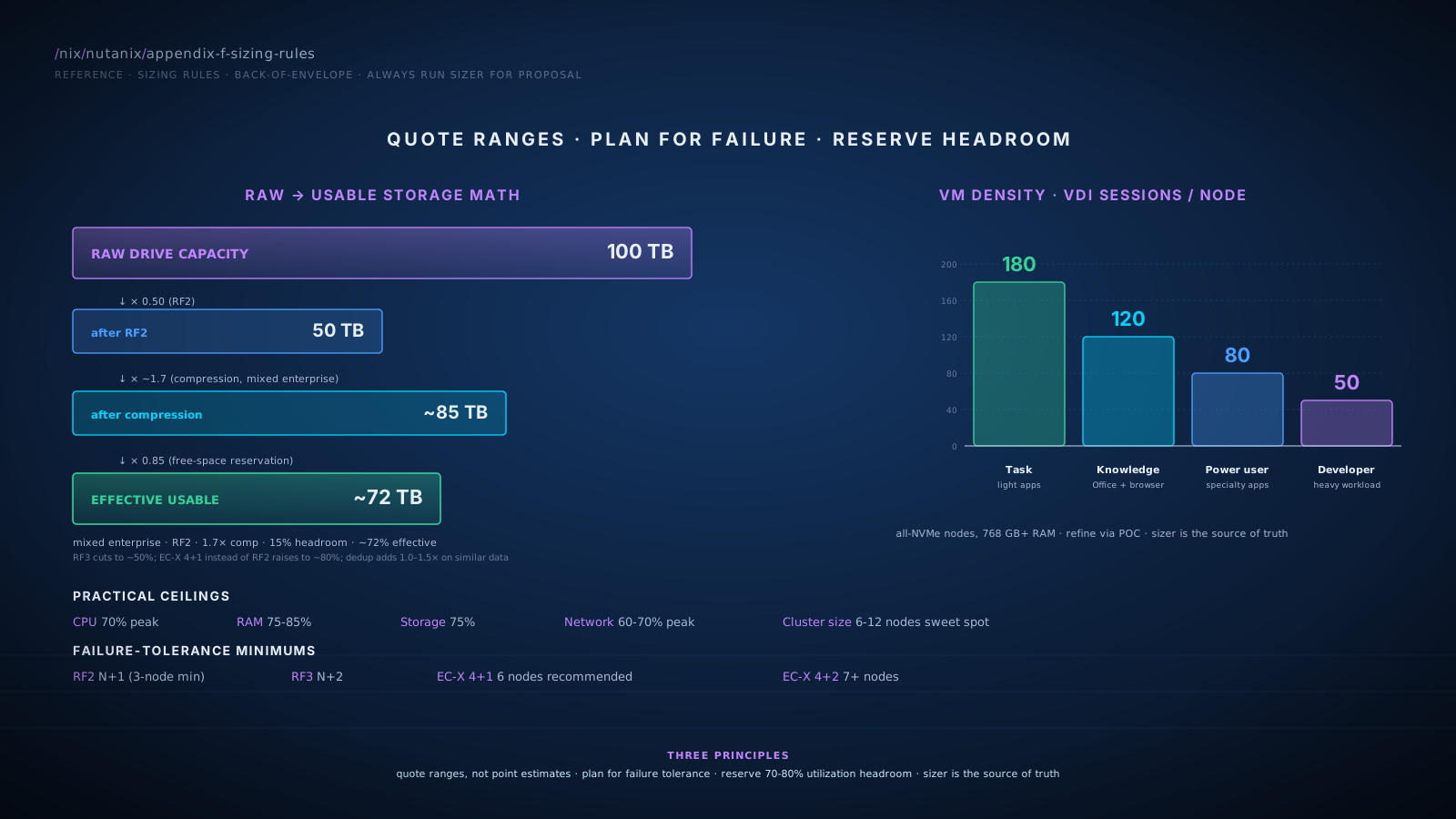
Cluster Sizing Fundamentals
Minimum and Recommended Cluster Sizes
- Production minimum: 3 nodes. RF2 is supported; rebuild after a node loss runs at degraded redundancy.
- Production recommended baseline: 4-5 nodes. Provides N+1 redundancy with margin during rebuild.
- Production sweet spot: 6-12 nodes for typical mid-market workloads. Performance scales linearly; rebuild times stay reasonable; failure tolerance is solid.
- Larger clusters: 16-32 nodes for enterprise. Beyond ~32 nodes, evaluate splitting into multiple clusters for blast-radius management.
- ROBO / edge: 1-node and 2-node clusters supported with specific licensing and feature limitations. Used for retail stores, branch offices, edge sites where datacenter-class redundancy isn't required.
Failure-Tolerance Math
| Scheme | Failures Tolerated | Minimum Nodes | Notes |
|---|---|---|---|
| RF2 | 1 | 3 (N+1) | Rebuild at degraded redundancy; second failure during window can cause data loss |
| RF3 | 2 simultaneous | 5 (N+2) | Survives one more failure during rebuild |
| EC-X 4+1 | 1 | 6 recommended | Stripe technically requires 5 nodes; Nutanix recommends 6+ for rebuild headroom (per TN-2032) |
| EC-X 4+2 | 2 | 7+ | Two-failure tolerance with capacity savings vs RF3 |
Compute Sizing
VM Density per Node
Typical mid-market mixed VMs (2 vCPU, 8 GB RAM average):
- All-NVMe nodes with 32-48 cores, 768 GB-1 TB RAM: 50-100 VMs per node depending on density assumptions
- Account for the CVM tax (8-16 vCPU, 32-64 GB RAM consumed per node)
- Practical ceiling: target 70% CPU utilization at peak; leave 30% for spike absorption and rebalancing
Heavier VMs (4-8 vCPU, 16-32 GB RAM): 20-40 VMs per node typical. More memory-bound than CPU-bound for typical mixed workloads.
VDI density:
- Persistent: 80-150 desktops per node depending on user profile
- Non-persistent / pooled: 100-200 per node
- Driver: RAM, not CPU, for typical knowledge-worker desktops
CVM Tax Planning
Every Nutanix node runs a Controller VM. Reserve compute for it:
| Workload Profile | CVM vCPU | CVM RAM |
|---|---|---|
| Light (low IOPS, small cluster) | 8 | 32 GB |
| Standard (typical enterprise) | 12 | 48 GB |
| Heavy (high IOPS, larger cluster) | 16 | 64 GB |
| Very heavy (dense IOPS, large cluster) | 20+ | 96+ GB |
Headroom Recommendations
| Resource | Practical Ceiling | Reasoning |
|---|---|---|
| CPU | 70% peak utilization | Spike absorption, rebalancing, growth |
| RAM | 75-85% | Memory ballooning is degraded performance |
| Storage | 75% | Capacity for snapshots, growth, rebalancing |
| Network bandwidth | 60-70% peak | Replication and rebuild traffic compete |
Storage Sizing
Raw to Usable Conversion
The path from "how much disk are we buying" to "how much can the customer actually store":
| Step | Multiplier | Example (100 TB raw) |
|---|---|---|
| Raw drive capacity | 1.00 | 100 TB |
| Replication Factor 2 | 0.50 | 50 TB |
| Replication Factor 3 | 0.33 | 33 TB |
| EC-X 4+1 (instead of RF2) | 0.80 | 80 TB |
| EC-X 4+2 (instead of RF3) | 0.67 | 67 TB |
| Compression (typical 1.5-2.0× effective) | 1.5-2.0× | 75-100 TB after RF2 |
| Dedup (workload-dependent, 1.0-1.5×) | 1.0-1.5× | additional savings on high-similarity data |
| Free-space reservation | 0.85 | reduce by 15% for headroom |
Compression Reduction Ratios
Quote ranges, not marketing peaks:
| Workload Type | Typical Compression Ratio |
|---|---|
| OS images (Windows, Linux) | 1.5-2.5× |
| General application data | 1.2-1.8× |
| Already-compressed (video, images, encrypted) | 1.0-1.1× |
| Database (varies) | 1.3-2.0× |
| Backup data | 1.0-1.2× (already-compressed by backup software) |
| Logs | 2-4× |
Deduplication Ratios
| Workload Type | Typical Dedup Ratio |
|---|---|
| VDI persistent profiles | 2-3× |
| VDI non-persistent (similar OS images) | 3-5× |
| General-purpose VMs | 1.0-1.3× |
| Application data | 1.0-1.2× |
| Backup data | 1.0× (already deduped by backup software) |
Network Sizing
Link Speed Recommendations
| Cluster Profile | Recommended Link |
|---|---|
| Small ROBO (1-3 nodes, light workload) | 10 GbE |
| Mid-market production (4-8 nodes) | 25 GbE |
| Enterprise production (8+ nodes) | 25 GbE minimum, 100 GbE for high-density |
| All-NVMe / very-high-IOPS | 100 GbE |
| VDI at scale | 25 GbE acceptable, 100 GbE for >2,000 sessions |
Bond Mode Selection
| Bond Mode | Use Case | Switch Coordination |
|---|---|---|
| active-backup | Simplest; good for most ROBO and small production | None |
| balance-slb | Active-active without LACP; good throughput, no switch config | None |
| balance-tcp / LACP | Best throughput and load distribution | Required (LACP on switch side) |
| active-active LACP | Maximum performance, MC-LAG capable | Required, advanced switch features |
Replication Bandwidth Estimation
For DR planning, estimate WAN bandwidth needed for replication:
Async replication (1-hour RPO):
- Sustained bandwidth ≈ daily change rate / 86,400 seconds × 8 (for bits)
- Typical mid-market environment changes 2-5% of total capacity per day
- Example: 50 TB cluster, 3% daily change = 1.5 TB/day = ~150 Mbps sustained
- Plus 50% headroom for catch-up after WAN outages
NearSync (sub-15-min RPO): bandwidth must support continuous change rate plus burst handling. Typically 2-3× the Async sustained number. Plus low-latency requirement (<5 ms RTT typical).
Metro Availability: synchronous; must support write throughput in both directions. Plan for full peak write bandwidth, not average.
Workload-Specific Sizing
VDI
Baseline density assumption: 100 sessions per node for typical knowledge workers, all-NVMe configuration with 768+ GB RAM.
| Profile | Sessions per Node |
|---|---|
| Task worker (light apps, browser) | 120-180 |
| Knowledge worker (Office, browser, light specialty) | 80-120 |
| Power user (specialty apps, multiple tools) | 50-80 |
| Developer / heavy workload | 30-50 |
Storage: persistent profiles 30-80 GB per user before dedup; non-persistent share base image plus delta. Plan capacity for the full population, not the concurrent count, if persistent.
Databases
SQL Server / Oracle (typical OLTP):
- All-NVMe required for predictable performance
- Plan p99 read latency under 2-3 ms; validate during POC
- RF2 typical; RF3 for compliance-mandated tier-0
- Storage IOPS: 5,000-50,000 per database typical, validate against current array metrics
| DB Size | Cluster Size Suggestion |
|---|---|
| Up to 5 TB | Fits in any production cluster |
| 5-20 TB | 6+ nodes for I/O distribution |
| 20-50 TB | 8+ nodes; consider dedicated database cluster |
| 50+ TB | Dedicated database cluster; specialty design |
Containers and Kubernetes
- 3-5 worker nodes for small Kubernetes clusters
- Scales to 100+ worker nodes for large platforms
- Storage via Nutanix CSI driver (persistent volumes)
- Containers vary widely; size by total CPU/RAM/storage demand from the workload, then add 20-30% for Kubernetes overhead
AI / ML Training
- AHV supports GPU passthrough
- Density: 1-8 GPUs per node typical
- Network bandwidth becomes critical for distributed training (100 GbE recommended)
- Storage: balance fast scratch (local NVMe) with capacity (DSF for datasets)
Files / Objects / Volumes Sizing
Files
FSVM count and capacity:
| File Server Size | FSVM Count | Notes |
|---|---|---|
| Up to 50 TB | 3 FSVMs | Default baseline |
| 50-200 TB | 3-5 FSVMs | Scale per workload |
| 200 TB+ | 5+ FSVMs, possibly multiple File Servers | Scale and isolation |
Reservations and overhead: DSF storage container backing Files uses the same RF and compression rules as general DSF. Plan 20% overhead for snapshots, file system metadata, growth headroom.
Use cases:
- User home directories: many small files; dedup may not help; size by capacity
- Application file shares: varies by application
- Backup repositories: large sequential writes; compression helps; consider Objects instead
Objects
- Minimum 3 Object Service VMs per Object Store for HA
- More Object Service VMs = more concurrent S3 throughput
- Capacity bounded by underlying cluster's available storage container space
By use case:
- Backup target: capacity-driven sizing; throughput is moderate
- Active application data (logs, intermediate results): throughput-driven; more Object Service VMs
- Archive: capacity-driven; minimal Object Service VMs sufficient
Volumes
- Per LUN: up to 64 TB practical (verify against current Nutanix limits at design time)
- Per Volume Group: multiple LUNs grouped; limits are generous
- Per cluster: thousands of LUNs supported
- Multi-pathing: plan multiple iSCSI portal IPs (one per node typical) for path redundancy
DR Cluster Sizing
Primary-to-DR Sizing Relationship
| DR Pattern | DR Cluster Size |
|---|---|
| Cold DR (rebuild from backup) | None / minimal |
| Warm DR (Async replication, restart on failover) | 50-100% of primary capacity |
| Hot DR (active-passive Metro) | 100% of primary capacity |
| Active-Active Metro | Both sites size for full load if other fails |
Replication Bandwidth Quick Calculation
Step 1: Estimate daily change rate. Typical mid-market: 2-5% of total capacity per day.
Step 2: Convert to per-second sustained bandwidth.
Daily change (TB) × 8,000 (Gbits per TB) / 86,400 (seconds per day) = sustained Gbps
Step 3: Apply replication-mode multiplier:
| Mode | Multiplier on Sustained |
|---|---|
| Async (1+ hour RPO) | 1.0× plus 50% catchup headroom |
| NearSync | 2.0-3.0× for burst handling |
| Metro | Sized for peak write throughput, not average |
Step 4: Add WAN compression benefit if applicable. Native compression in Nutanix replication often provides 1.3-1.7× effective bandwidth multiplier.
Worked example:
- 50 TB cluster, 3% daily change = 1.5 TB/day
- Sustained: 1.5 × 8,000 / 86,400 = 0.139 Gbps = 139 Mbps
- Async with catchup headroom: 200 Mbps
- After native compression: ~130-150 Mbps effective
Prism Central Sizing
Single PC vs Scale-Out
X-Small PC VM (introduced for smaller environments):
- Suitable for up to 5 clusters, 50 hosts, 500 VMs
- Lowest footprint option; appropriate for ROBO, edge, and small-environment central management
- Strict scale ceiling: exceeding the X-Small limits results in an unsupported configuration
Single PC VM (Small / Standard): typical mid-market through enterprise deployments. Single VM; simpler operations. Single point of failure for management plane (clusters continue running if PC is down).
Scale-out PC (3 VMs): required for the largest deployments and production-grade PC HA. Distributed across hosts. Recommended for enterprise deployments at scale.
PC VM resource specs (verify against current Prism Central sizing guide; numbers evolve):
| PC Mode | vCPU | RAM | Storage |
|---|---|---|---|
| X-Small | 4 | 18 GB | 100 GB |
| Small | 6 | 26 GB | 500 GB |
| Large (3-VM scale-out) | 6 per VM (× 3) | 28 GB per VM (× 3) | 500 GB per VM |
When to Use These Rules vs Sizer
Use these rules
- Discovery and early proposal conversations
- Whiteboard sessions
- Rough TCO estimates for first-pass evaluation
- "Will this fit on 8 nodes or 12?" judgment calls
Switch to formal Sizer when
- Customer wants a binding proposal
- Specific performance targets need validation
- Workload has unusual patterns (specialty databases, AI training, HPC-adjacent)
- Multi-cluster or multi-site designs need coordination
- DR sizing where bandwidth matters
The Sizer workflow
- Customer provides workload data: VM list, resource consumption, growth assumptions.
- Sizer produces node count, model recommendations, capacity calculations.
- Output is the basis for the proposal BoM.
- Sizer output gets validated during POC and refined before order.
The rules in this appendix accelerate the conversation; Sizer produces the number that goes in the contract. Don't conflate the two.
Common Sizing Mistakes to Avoid
- Sizing for the average, not the peak. Workloads have spikes; size for peak with headroom.
- Ignoring the CVM tax. Reserve compute for the CVM; it's not free.
- Forgetting failure-tolerance math. RF2 needs N+1; RF3 needs N+2.
- Quoting marketing compression ratios. 1.5-2.5× is the honest range for mixed workloads.
- Skipping the headroom reservation. 100% utilization is theoretical; 70-80% is the practical ceiling.
- Underestimating replication bandwidth. Async DR is rarely the smallest WAN bill.
- Missing growth headroom. Size for 18-24 months; expand cluster after.
- Trusting customer's "typical" without validation. Their typical is often a peak; their peak is often catastrophic. Measure during POC.
- Forgetting that Files, Objects, Volumes consume the same DSF capacity. Size the cluster for total demand, not per-service.
- Skipping PC sizing. Prism Central is part of the design, not an afterthought.
References
The sizing rules in this appendix are heuristics for early conversations; the authoritative source is Nutanix Sizer for binding sizing, and the public sources below for tier-by-tier specifics:
- Module 2 · CVM resource sizing. Backs the CVM tax table.
- Module 5 · RF / EC / compression / dedup math. Backs the storage-sizing section. TN-2032 confirms the EC 4+1 recommended minimum of 6 nodes.
- Module 6 · Bond modes, link-speed recommendations. Backs the network-sizing section, including Nutanix's official caution on LACP coordination.
- Module 7 · Async / NearSync / Metro replication, change-rate planning. Backs the replication-bandwidth section.
- Module 8 · Files, Objects, Volumes sizing constraints. Backs the FSVM count guidance (single-FSVM exception per TN-2041).
- Resource Requirements for Prism Central (Nutanix Community). Authoritative current PC vCPU / RAM / disk per tier.
- Introducing X-Small Prism Central (Nutanix Tech Center). X-Small PC ceiling: 5 clusters / 50 hosts / 500 VMs.
- Limitations of Prism Central Deployment (Nutanix Portal v7.3). Strict-ceiling-equals-unsupported framing.
Cross-References
- Modules: Each section links back to the module where the topic is taught in depth.
- Glossary: Appendix A defines the terms used.
- Comparison Matrix: Appendix B helps with competitive sizing comparisons.
- Reference Architectures: Appendix I has fully-sized reference designs.
- POC Playbook: Appendix J has the validation steps that confirm sizing during proof-of-concept.
- Nutanix Sizer: the official tool for binding sizing. Always run Sizer for the proposal.