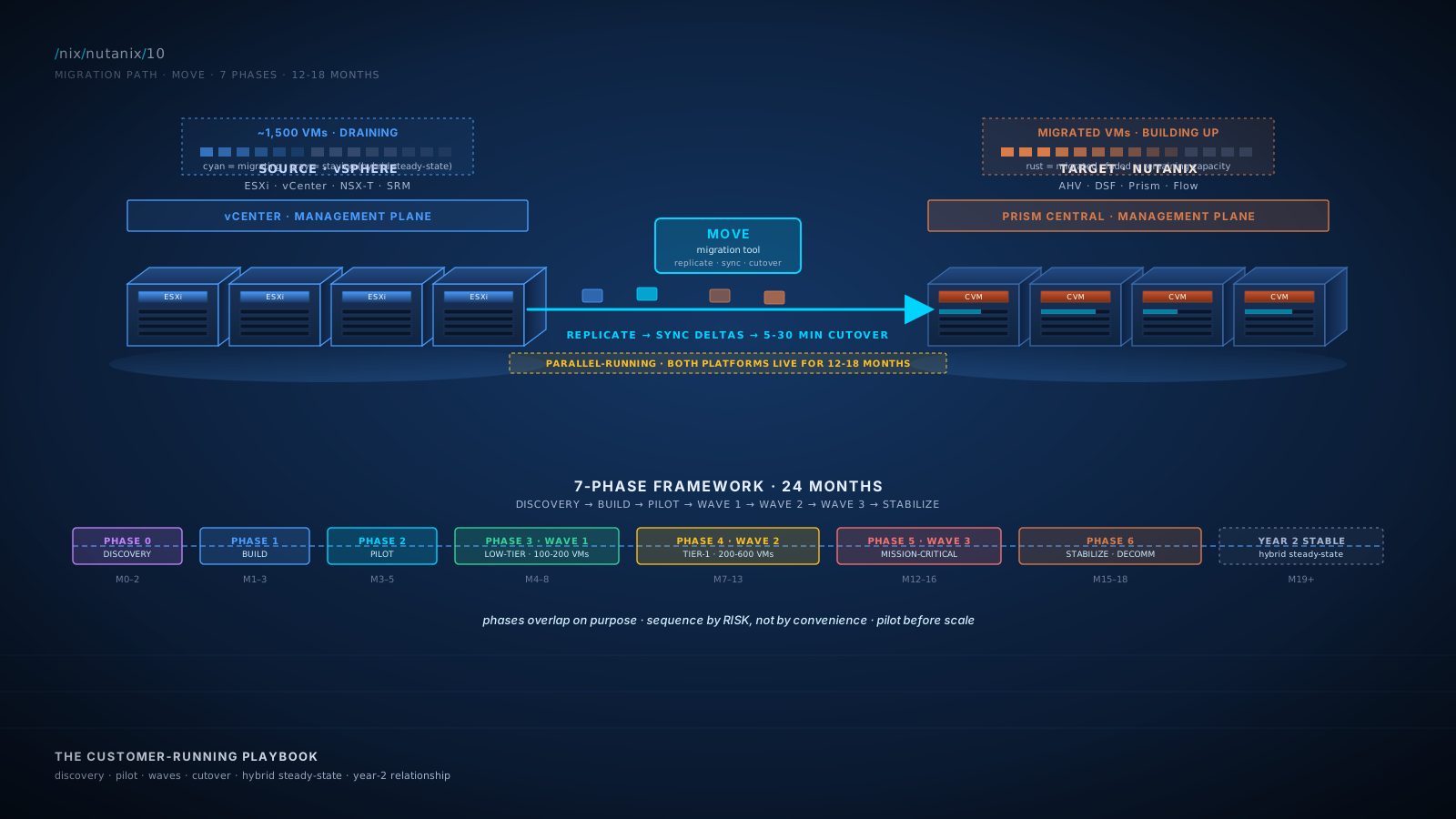
The Promise
By the end of this module you will:
- Run a 12-18 month customer migration engagement end to end. Discovery, dependency mapping, platform build, pilot wave, production waves, cutover, decommissioning. The shape is consistent across customers; the specifics vary. You should be able to walk into a customer kickoff and lead the conversation.
- Use Move (the Nutanix migration tool) confidently. What it migrates, what it doesn't, what to plan for, what tends to require manual cleanup.
- Sequence migrations by risk, not by convenience. Pilot first (low-risk, internal), then low-tier production, then Tier-1, then mission-critical. Many customer projects fail because they invert this sequence; BlueAlly SAs lead customers to the right order.
- Design the hybrid steady-state honestly. Some workloads will stay on VMware for legitimate reasons (NSX-T routing complexity, NetApp ONTAP-specific workflows, SRM-orchestrated complex DR, third-party-vendor dependencies). The right answer for many customers is hybrid permanently. Position this as a successful outcome, not a failure.
- Communicate with executives, IT teams, and end users at the right level for each. Migration is as much a communication exercise as a technical one. The cadence and framing differ for each audience; you should know all three.
- Maintain a working risk register and act on it. Migrations have predictable risks (dependency surprises, application performance regressions, network reconfiguration issues, team capacity constraints). The risk register is how you stay ahead of them.
- Know what year-2 stable state looks like and have the conversation about BlueAlly's continuing role: managed services, upgrades, expansion, periodic optimization. Migrations end; relationships continue.
This is the final module. After this, the curriculum hands you the appendices. The technical and commercial depth is in your hands. What remains is the engagement skill, which this module gives you a framework for.
Foundation: What You Already Know
You have done migrations. Maybe vCenter version upgrades. Maybe storage-array swaps with Storage vMotion. Maybe a datacenter consolidation with cross-site moves. Possibly a hypervisor migration (Hyper-V to ESXi, or vice versa). You know the patterns:
- Discovery is more time than you budget for. Customers don't have current inventories. Dependency surprises are the rule, not the exception.
- Pilot waves expose the real problems. Theory dies in contact with the customer's actual environment.
- Mission-critical workloads come last. Practice on dev/test, build confidence, then move toward Tier-1.
- Communication failures cause more pain than technical failures. End users blindsided by an outage will not forgive you for being technically right.
- The team gets tired. Migrations are marathons. Plan for fatigue.
- Cutover is the moment, not the project. The 18 months around cutover are the project. The cutover itself is brief if everything else is right.
You also know what the VMware-to-Nutanix migration is not:
- It is not Storage vMotion. That works between VMFS datastores; it does not cross hypervisor boundaries.
- It is not vMotion. vMotion crosses ESXi hosts within a vSphere cluster, not between vSphere and AHV.
- It is not a backup-and-restore operation. Backup-and-restore is a fallback path, not the primary tool.
- It is not a single weekend's work. Realistic migrations take 6-18 months for typical enterprise environments.
The migration tool is Move. The framework is the phased-wave approach. The discipline is sequencing by risk. The communication is to multiple audiences with different framings. Hold all of those in mind.
Core Content
Move: The Migration Tool
Move is Nutanix's cross-platform VM migration tool. It supports several source-to-target paths:
- VMware ESXi to AHV. The primary use case for customers consolidating from VMware. Move connects to vCenter, accesses source VMs, migrates them to a target Nutanix AHV cluster.
- Hyper-V to AHV. Less common but supported. Useful for customers consolidating mixed VMware + Hyper-V environments.
- AWS EC2 to NC2 (or to on-prem AHV). For customers moving cloud workloads.
- AWS EC2 to AHV on-prem. Cloud repatriation.
- Azure to NC2.
- AHV to AHV across clusters (utility for cross-cluster migrations).
The architecture:
- A Move appliance (a VM, deployed on the target Nutanix cluster typically) coordinates the migration.
- An agent (often agentless on ESXi) connects to the source environment.
- The Move appliance reads source VM data (disks, configuration, network attachments).
- During migration, Move performs initial replication of VM data to the target cluster, then incremental sync of changes, and finally a brief cutover (the source VM is shut down, final delta is replicated, target VM starts).
- Cutover downtime is typically 5-30 minutes per VM, depending on size and final delta. For most workloads, this fits within scheduled maintenance windows.
What Move handles automatically:
- VM disk migration (the bulk of the data).
- VM configuration translation (CPU, RAM, NICs in best-effort).
- Power state preservation (VM running on target after migration).
- Some network mapping (Move asks you to map source port groups to target virtual networks).
- VMware Tools removal and NGT (Nutanix Guest Tools) installation in some scenarios.
What requires manual handling:
- Complex networking. Distributed switches with advanced port-group policies often require manual reconfiguration.
- Application-specific configurations. SQL Server cluster configurations, Oracle ASM disk layouts, anything that depends on storage paths or hypervisor-specific features.
- NSX-T microsegmentation. Requires re-implementing on Flow (or coexistence with NSX-T).
- Custom guest OS modifications. Customizations that depend on VMware Tools or VMware-specific drivers may need attention.
- Snapshots and backups. Old snapshot chains in VMware do not migrate cleanly; consolidate or accept that historical snapshots do not transfer.
- Storage policies. vSAN-specific storage policies (FTT, stripe count) don't have direct equivalents in DSF. The DSF replacement (RF, EC, compression, dedup) is configured at the Storage Container level.
Diagram: Move Tool Architecture
The 7-Phase Migration Framework
Successful migrations follow a phased structure. Each phase has clear entry and exit criteria.
Phase 0: Discovery and Dependency Mapping (4-8 weeks)
Inventory everything. Map dependencies. Classify workloads by risk and tier. Identify integration points (AD, network, monitoring, backup, DNS, load balancers, ITSM).
Deliverables:
- VM inventory with: name, OS, vCPU/RAM, storage, network attachments, dependencies, owning team, business tier, RPO/RTO requirements, compliance flags
- Application affinity groups (which VMs talk to which other VMs)
- Network dependency map (firewalls, load balancers, external services)
- Storage classification (block / file / object usage)
- Customer's existing tooling inventory (backup, monitoring, ITSM)
Common discovery techniques: active discovery tools (Nutanix's discovery utility, Lansweeper, RVTools for VMware), Application Performance Monitoring data, workshops with application owners, network flow analysis. This phase often takes longer than expected. Budget aggressively.
Phase 1: Platform Build and Validation (4-6 weeks)
Deploy the Nutanix cluster. Validate it. Integrate with customer's environment.
Deliverables: Nutanix cluster deployed and validated against POC criteria; AD / SAML / SSO integration; network integration (VLANs, routing, firewalls); backup integration (Veeam / Commvault / Rubrik against Nutanix Objects or vendor-specific); monitoring integration (Prism Central forwarding to customer's SIEM, ITSM); DR site configured if applicable; categories defined (from Module 4, drives policies in subsequent waves).
Phase 2: Pilot Wave (4-8 weeks)
Migrate 5-20 low-risk VMs. Validate the migration tooling, process, and team capacity. This is where theory meets reality.
Pilot VM selection criteria:
- Internal IT-team-owned (so the customer's team is the audience for any issue)
- Low criticality (no customer-facing impact if something goes wrong)
- Representative of common patterns (Linux + Windows mix, typical applications)
- Ideally including one VM from each major tier of complexity
Pilot wave establishes: Move tool installation and operation in the customer's environment; network mapping table (source port group to target virtual network); cutover runbook; communication template; rollback procedures (validated, not theoretical); the customer's team's hands-on familiarity with the new platform.
Phase 3: Production Wave 1 (Low-Tier, 8-16 weeks)
50-200 VMs. Dev/test/UAT environments. General-purpose Tier-3 production. Web tiers behind load balancers (with redundancy that absorbs cutover blips).
This wave is where you scale the team's capacity and validate the operational rhythm. By the end: the customer's team can do migrations without BlueAlly hand-holding; the runbook is mature; common issues are identified and have known mitigations; confidence is built for the next tier.
Phase 4: Production Wave 2 (Tier-1, 12-20 weeks)
200-600 VMs typically. Tier-1 production: customer-facing applications, internal-critical applications, databases (with care), core business workflows.
Tier-1 migrations require: application-owner coordination per migration batch; clear validation criteria per application; rollback plans validated per application; cutover scheduled in maintenance windows; application-aware migration patterns (for SQL Server, use Always On to minimize downtime; for Oracle, planned-failover patterns; for clustered apps, failover to standby, migrate primary, fail back).
Phase 5: Production Wave 3 (Mission-Critical, 8-16 weeks)
The remaining workloads: Tier-0 mission-critical, often with zero-downtime requirements, complex application dependencies, regulated workloads, integration-intensive systems.
Often this wave includes workloads that genuinely require Metro Availability or NearSync (Module 7), mission-critical applications with regulatory compliance constraints, applications with complex external integrations, and workloads that may stay on VMware permanently if business case justifies (the hybrid steady-state question). This wave gets the most engineering scrutiny per workload. Per-VM time investment is highest.
Phase 6: Stabilization, Decommissioning, and Steady-State (4-8 weeks)
Decommission old VMware infrastructure (or formalize the hybrid steady-state). Hand off operational ownership to customer team. Document final state. Conduct retrospective.
Deliverables: decommissioning plan executed (physical removal, contract termination, asset disposal); hybrid steady-state documentation if applicable; final BoM reconciliation; operational runbook handed off; retrospective with all stakeholders; BlueAlly's continuing role defined (managed services, upgrades, future expansion).
Diagram: The 7-Phase Migration Framework
The Cycle, Frame Two: Migration as Phased Risk Management
For a customer's IT operations leader, the durable migration frame is risk management. Each phase has a specific risk being reduced.
| Phase | Primary Risk Reduced |
|---|---|
| Phase 0: Discovery | "We don't actually know what we have." |
| Phase 1: Platform Build | "The new platform doesn't fit our environment." |
| Phase 2: Pilot | "We don't know what we don't know about migrating." |
| Phase 3: Wave 1 | "We can't migrate at scale." |
| Phase 4: Wave 2 | "Tier-1 workloads might break in ways we can't predict." |
| Phase 5: Wave 3 | "Mission-critical workloads have unique constraints." |
| Phase 6: Stabilization | "We never finish; the project never ends." |
Frame each phase as risk reduction. Customers who think in risk-management terms (which is most operations leaders) respond to this framing. The migration is not about VM movement; it's about systematically reducing risk.
The Cycle, Frame Three: Migration as the SA's 12-18 Month Engagement
For BlueAlly, the migration is the engagement. The shape:
- Month 0-2: Discovery + platform build. Heavy SA engagement. BlueAlly visible weekly.
- Month 3-5: Pilot wave. SA is hands-on; the customer's team is learning.
- Month 6-10: Production waves. SA shifts to oversight + coaching; the customer's team is executing.
- Month 11-15: Tier-1 + mission-critical waves. SA is back hands-on for the highest-risk migrations.
- Month 16-18: Stabilization. SA hands off to managed services or to the customer's steady-state team.
The SA's role evolves from technical leader (early) to coach (middle) to specialist consultant (late) to relationship maintainer (after). Recognize the role shift. The customer's team's growing competence is a sign of success, not a threat to your engagement.
The Cycle, Frame Four: Migration as Platform Consolidation
For an executive sponsor (CIO, CTO, sometimes CFO), the durable frame is platform consolidation. The migration is one part of a broader simplification.
| What Customer Has Today | What Customer Has Year-2 Stable State |
|---|---|
| 3-4 separate storage tiers (filer, object, iSCSI, dedup) | 1 unified-storage cluster |
| 4-6 management products (vCenter, Aria Operations, Aria Automation, vSphere LCM, etc.) | Prism Central |
| 2-3 networking products (vSS/vDS, NSX-T, third-party security) | Prism + Flow + select third-party |
| Multiple refresh cycles | Aligned to cluster refresh |
| Multiple support contracts | 1-2 (Nutanix + hardware OEM) |
| Multiple vendor relationships | Consolidated to 2-3 |
Frame the migration as consolidation, not as VM movement. Executive sponsors care about portfolio simplification, not about Move tool mechanics.
Hybrid Steady-State: The Permanent Coexistence
Some workloads will not migrate. Legitimate reasons:
- NSX-T routing complexity. Customers with deep NSX-T deployments (BGP integration, edge services, L2VPN, advanced routing) often keep those workloads on VMware-on-Nutanix or on traditional VMware infrastructure.
- NetApp ONTAP-specific workflows. Customers using FlexClone, FlexCache, or other ONTAP-specific features at high volume may keep file workloads on NetApp.
- SRM-orchestrated complex DR. Customers with mature SRM deployments and complex runbook customization may continue running SRM-on-ESXi-on-Nutanix.
- Vendor-specific certifications. Some applications are vendor-certified only on specific hypervisors. Until the vendor certifies AHV, those workloads stay where they are.
- Regulatory or compliance constraints. Some compliance frameworks audit specific platform configurations; changing introduces audit risk that the customer chooses not to take.
- Application performance characteristics. Some workloads (rare, but real) perform meaningfully better on specific platforms.
Hybrid steady-state is not a project failure. It is often the right architectural answer. The customer migrates the bulk (often 70-90%) to Nutanix, captures most of the consolidation value, and accepts permanent coexistence for the remaining workloads.
The hybrid steady-state has its own design decisions:
- Network connectivity between platforms (typically continuous, since applications often span both).
- Identity integration (single AD / SAML applied to both).
- Backup strategy (often unified through backup vendor; both platforms protected).
- DR strategy (potentially separate per platform, or unified if backup-and-restore-based).
- Operational team structure (Nutanix-team vs VMware-team, or unified-team that operates both).
- License optimization (reduce VMware footprint to actual remaining workload, not legacy quotas).
Diagram: Hybrid Steady-State Architecture
Risk Register: The Predictable Migration Risks
A working risk register tracks identified risks, mitigations, and ownership. Common risks across migrations:
Technical risks:
- Dependency surprises. Discovery missed an application dependency; the migration breaks something downstream. Mitigation: thorough Phase 0 + pilot wave validation + application-owner coordination per batch.
- Application performance regression. A workload runs slower on the new platform than expected. Mitigation: pre-migration baseline metrics + post-migration validation criteria + rollback plan.
- Network reconfiguration issues. Subnets, VLANs, firewall rules don't translate cleanly. Mitigation: detailed network mapping in Phase 0 + dry runs.
- Storage migration delays. Initial replication takes longer than estimated; cutover slips. Mitigation: realistic bandwidth assessment + parallel-running periods that absorb delays.
- Tool failures. Move encounters edge cases; specific VMs don't migrate cleanly. Mitigation: per-VM rollback plans + manual migration alternatives + support escalation paths.
Operational risks:
- Team capacity constraints. Customer's team is too thin to absorb migration work alongside operations. Mitigation: realistic capacity planning + BlueAlly augmentation + phasing that respects team bandwidth.
- Runbook drift. Migration runbook becomes stale as environment changes during migration. Mitigation: regular runbook reviews + version control + dedicated runbook owner.
- Communication failures. Stakeholders blindsided by migrations or outages. Mitigation: communication cadence + named communication owner + structured templates.
Commercial risks:
- Scope creep. Customer adds workloads or requirements mid-engagement. Mitigation: change-control process + scope reviews per phase + clear definitions of "in scope" vs "follow-on engagement."
- Timeline slippage. Phases run long; customer renegotiates contract. Mitigation: realistic phase budgets + early escalation + transparent status reporting.
- License optimization missed. Customer continues paying for VMware footprint that isn't being used. Mitigation: license consumption tracking + decommissioning aligned to migration progress.
Relationship risks:
- Executive sponsor turnover. The CIO who approved the project leaves; the new sponsor questions the rationale. Mitigation: strong written justification + executive briefings throughout + tangible mid-project value demonstration.
- Customer team morale. Migration fatigue sets in around month 9-12. Mitigation: celebrate wins + visible progress milestones + manage workload pacing.
The risk register is reviewed weekly with the customer's project lead and monthly with the executive sponsor. New risks are added as discovered. Closed risks are documented. The register is a living document.
Communication Playbook by Audience
Migrations have multiple audiences, each with different information needs and frequencies.
- Executive sponsor (monthly executive review): 30-minute meeting with a one-page status summary. Progress against milestones, top 3 risks, key decisions needed, financial update. Tone: business outcomes, not technical detail.
- Project steering committee (weekly): 60-minute working session with detailed status. Phase progress, wave-by-wave status, risk register review, change requests, resource needs. Tone: project management, action-oriented.
- Application owners (per migration batch): pre-migration coordination, day-of-cutover communication, post-migration validation. Tone: respectful of their expertise, clear about responsibilities.
- End users (per migration with user impact): notification email + status page + helpdesk readiness. Tone: minimize concern, clear instructions.
- IT operations team (continuous): shared documentation, daily standup during active migration windows, real-time chat. Tone: collaborative, hands-on.
Year-2 Stable State and the Continuing Relationship
Migrations end. The customer's environment stabilizes. What does year 2 look like and what is BlueAlly's continuing role?
Customer's year-2 reality: the Nutanix cluster is the operational platform; the customer's team is competent at routine operations; periodic upgrades (LCM-driven) happen on a quarterly or semi-annual cadence; capacity planning is part of routine work; hybrid steady-state (if applicable) is being managed; the original BoM and TCO assumptions are tracking (or they aren't, and there are conversations about why).
BlueAlly's continuing role options:
- Managed services. BlueAlly operates the platform on the customer's behalf (or co-managed with the customer's team). Common for customers with thin internal teams.
- Quarterly health checks and optimization reviews. BlueAlly reviews the environment quarterly, identifies optimization opportunities, recommends adjustments.
- Upgrade support. BlueAlly leads major version upgrades; the customer team handles minor.
- Expansion projects. Adding clusters, additional sites, NC2 cloud presence, NKE Kubernetes deployments, additional Nutanix products.
- Training and certification programs. BlueAlly delivers ongoing training as the customer's team grows or rotates.
- Strategic advisory. BlueAlly's SA participates in the customer's annual infrastructure planning.
The continuing relationship matters commercially (recurring revenue) and reputationally (reference customers, peer referrals). Plan for it from the beginning of the engagement.
Lab Exercise: Build a Migration Plan for a Realistic Customer
The scenario:
- 16 ESXi hosts (Dell PowerEdge R750) running ~600 VMs
- Mix of workloads: ~50 mission-critical (Tier-0), ~150 Tier-1 (databases, customer-facing apps), ~250 Tier-2 (general-purpose), ~100 Tier-3 (dev/test), ~50 ROBO sites
- NetApp filer (200 TB), Pure FlashArray for iSCSI to bare-metal Oracle (50 TB), Data Domain for Veeam (100 TB)
- VCF subscription, NSX-T (30 VMs use deep microsegmentation)
- SRM with 200 VMs orchestrated
- 4 datacenters (2 production, 1 DR, 1 ROBO consolidation site)
- Customer has 8-person infrastructure team
- Decision to consolidate to Nutanix on Dell XC hardware made; refresh window is 12 months out
- BlueAlly engaged to lead the migration
Build the following deliverables:
- Phase plan with timeline (months 0-18) showing each of the 7 phases, their duration, and key deliverables.
- Discovery checklist for Phase 0: what you need to inventory, who you talk to, what tools you use.
- Pilot wave VM selection: propose 15 specific VMs (by category) that would be in the pilot wave. Justify each selection.
- Wave 1 plan: which 100-200 VMs go in Wave 1 (low-tier production). What's the cutover strategy? What are the validation criteria?
- Wave 2 plan: Tier-1 production. Which 200-300 VMs? What application-specific patterns are needed (e.g., SQL Always On, Oracle planned-failover)?
- Wave 3 plan: Mission-critical. Which 50 VMs? What special handling do they need?
- Hybrid steady-state assessment: which workloads (if any) might stay on VMware permanently? Why? What's the design implication?
- Risk register: top 10 risks for this engagement, with mitigations and ownership.
- Communication plan: cadence and format for executive sponsor, steering committee, application owners, end users, IT team.
- Success criteria: how does the customer know the migration succeeded? Define quantitative and qualitative criteria.
- BlueAlly engagement model: what's the resource plan from BlueAlly side? Lead SA, supporting engineers, project manager. Hours per phase.
- Year-2 stable state proposal: what does steady state look like? What's BlueAlly's continuing role?
What this teaches you:
- The shape of a real migration plan.
- The interconnection between technical sequencing, communication, risk management, and commercial structure.
- The discipline to produce complete artifacts before kickoff.
- The mental model of a 12-18 month engagement.
Customer-demo angle: Plans 1-3 above are what you walk into a customer kickoff with. Practice presenting them. The customer's project lead and executive sponsor are the audience. Time it: a 60-minute kickoff covers items 1-12 at appropriate depth.
Practice Questions
Twelve questions. Six knowledge MCQ, four scenario MCQ, two NCX-style design questions. Read each, answer in your head, then click to reveal.
What is Move?
Why this answer
Move is the cross-platform VM migration tool. It handles the source-to-target VM migration with brief cutover.
Why not the others
- A) That describes vMotion, a VMware feature within vSphere clusters.
- C) Move is for migration, not backup.
- D) Storage vMotion is VMware's intra-vSphere storage migration; Move handles cross-hypervisor migration.
The trap
A and D reflect VMware mental models for live migration. Move serves a different purpose: cross-platform migration with planned cutover.
What is the recommended sequence for migrating workloads from VMware to Nutanix?
Why this answer
The risk-managed sequence. Pilot validates platform and process; subsequent waves scale capacity and confidence; mission-critical comes last because it has the highest risk and the most learning depends on prior wave experience.
Why not the others
- A) Migrating mission-critical first is the failure pattern. Insufficient learning, highest risk, highest visibility for failure.
- C) Random sequencing introduces unnecessary risk.
- D) Single-weekend migration of large environments is unrealistic.
The trap
A is intuitive ("prove value with the highest-stakes win") but it inverts the risk discipline. Memorize the correct sequence.
Which of the following requires manual handling during a VMware-to-Nutanix migration (not automated by Move)?
Why this answer
NSX-T policies don't translate to Flow automatically. The customer must either re-implement on Flow or maintain NSX-T (NSX-T-on-Nutanix-on-ESXi pattern). Move handles the VM but not the security policy associated with NSX-T.
Why not the others
- A) Move automates VM disk migration.
- C) Move translates VM configuration in best-effort.
- D) Move preserves power state.
The trap
A and C may seem like they require manual intervention; in fact Move automates them well. NSX-T is a known manual category.
What is "hybrid steady-state" in the context of a Nutanix migration?
Why this answer
Hybrid steady-state is a permanent end-state where 70-90% of workloads have moved to Nutanix and specific workloads remain on VMware. This is often the architecturally correct outcome.
Why not the others
- A) Hybrid is not failure; it can be the right answer.
- C) Pre-cutover state is parallel-running, not hybrid steady-state.
- D) Hybrid steady-state is by definition long-term, not temporary.
The trap
A reflects the misconception that any incomplete migration is failure. The right framing is hybrid as a viable end-state.
What is the typical duration for a full enterprise migration from VMware to Nutanix?
Why this answer
12-18 months is the typical range for mid-to-large enterprise environments running 500-2000+ VMs with multiple storage tiers, NSX-T, SRM, and complex application portfolios.
Why not the others
- A) Far too short for enterprise scale.
- B) Possible for smaller environments (under 200-300 VMs) without complex integrations.
- D) Only for very large or very complex environments; not the typical range.
The trap
A reflects unrealistic timeline expectations. C reflects the realistic range that BlueAlly SAs should set for customer expectations.
During a migration, an application owner asks who will validate that their application works correctly post-migration. What is the correct answer?
Why this answer
The application owner has domain knowledge of what "working correctly" means for their application. Platform-level validation (VM up, network OK) is BlueAlly + IT. Application-level validation (transactions complete, integrations work, performance acceptable) is the application owner.
Why not the others
- A) BlueAlly doesn't have application domain knowledge.
- C) Automation helps but doesn't replace owner validation.
- D) Application owner involvement is essential.
The trap
A is the impulse to take full responsibility; that costs you on the application-validation side.
A customer's CIO says: "I want all 600 VMs migrated in 3 months. We're under pressure to demonstrate cloud-readiness this fiscal year." What is the strongest BlueAlly SA response?
Why this answer
Honest about the timeline, respectful of the urgency, offers achievable progress in 3 months, and reframes to a realistic outcome the CIO can defend internally. The SA-chair conversation that builds long-term trust.
Why not the others
- A) Sets up project failure. Customer trust evaporates when reality hits in month 4.
- C) Inflexible and unhelpful.
- D) Sends the customer to a competitor.
The trap
A and C are extremes (overcommit and under-engage). B is the disciplined middle.
Which of the following workloads is the worst candidate for a pilot wave?
Why this answer
Tier-0 customer-facing applications are the worst pilot candidates. Pilot waves are for validating platform and process with minimal blast radius; Tier-0 has maximum blast radius. Customer expectations get inverted from "learn together, fix issues" to "perfection on day one."
Why not the others
- A) Internal IT-owned: ideal pilot candidate.
- B) Departmental, low criticality: good pilot candidate.
- D) Test/dev: ideal pilot candidate.
The trap
Customers (and SAs) sometimes propose Tier-0 as the pilot ("prove it works on the real thing"). The discipline is to push back; Tier-0 is for Wave 5, not for pilot.
A customer asks: "What happens if a migration goes wrong during cutover? Can we roll back?" What is the correct response?
Why this answer
Rollback plans are part of disciplined migration management. Every batch has one. They are tested in Phase 2 (pilot wave) and used as needed.
Why not the others
- A) Migrations do go wrong; pretending otherwise costs trust.
- C) Rollback is possible (return to source).
- D) Rollback for a single VM is typically minutes, not weeks.
The trap
A reflects overconfidence. C reflects misunderstanding (Move keeps source intact during initial migration; rollback is a re-cutover to source).
A customer's IT operations manager is concerned that "the team is going to be overwhelmed by 18 months of migration on top of normal operations." What is the strongest SA response?
Why this answer
Respects the operations manager's concern, names the real options, and asks for the data needed to plan capacity. The disciplined SA-chair conversation.
Why not the others
- A) Dismissive. Causes burnout and project failure.
- C) Underestimates the workload.
- D) Combative and unhelpful.
The trap
A and C are common. B is the right discipline.
NCX-style design question. There is no single correct answer; there are stronger and weaker frames. Write your reasoning, then click to compare against the strong-answer outline.
A customer's environment:
- 24 ESXi hosts across 3 datacenters (2 production + 1 DR), ~1,500 VMs
- Mix: 100 Tier-0 mission-critical (financial systems, regulatory), 400 Tier-1 production, 700 Tier-2 general-purpose, 300 dev/test
- VCF + NSX-T + Aria + SRM (heavily customized)
- NetApp filer (300 TB) + Pure FlashArray (100 TB) + Data Domain (200 TB)
- 12-person infrastructure team (mix of senior and junior)
- Hardware refresh timing: production hosts in 9 months, DR hosts in 18 months
- Compliance: SOX (financial), PCI DSS (payment processing), some HIPAA (one application)
- Customer commitment to consolidate onto Nutanix; BlueAlly engaged
The customer asks BlueAlly to design the 24-month migration plan. Cover sequencing, parallel-running, NSX-T strategy, SRM strategy, hybrid steady-state assessment, team capacity, and key risk areas.
A strong answer covers
- Phasing across 24 months. Months 0-3: Discovery + platform build (parallel tracks). Months 3-5: Pilot wave (15-20 internal VMs). Months 5-9: Production Wave 1 (Tier-2 + dev/test, ~700 VMs); aligns with production hardware refresh. Months 9-15: Production Wave 2 (Tier-1, ~400 VMs); database migrations with care. Months 15-19: Production Wave 3 (Tier-0, ~100 VMs). Months 19-22: DR migration + SRM transition; aligns with DR hardware refresh. Months 22-24: Stabilization, decommissioning, hybrid steady-state finalization.
- NSX-T strategy. Discover specific NSX-T features in use. Most VMs likely use only basic distributed firewall (translatable to Flow). For VMs using advanced NSX-T features (BGP routing, edge services, L2VPN), evaluate keeping NSX-T-on-Nutanix-on-ESXi or accepting the migration cost. Estimate: 80-90% of NSX-T policies translate to Flow; remaining 10-20% may justify NSX-T retention.
- SRM strategy. Inventory SRM runbook customizations. Many translate to Recovery Plans (Nutanix Disaster Recovery, formerly Leap); some require careful re-implementation. Plan SRM-to-Recovery-Plans migration in months 12-22 as Tier-1 / Tier-0 workloads move. Coexistence pattern: SRM continues to orchestrate VMware workloads; Recovery Plans orchestrate AHV workloads. Some hybrid customers maintain both indefinitely.
- Hybrid steady-state assessment. Likely outcome: 90-95% of workloads on Nutanix; remaining 5-10% on VMware. Probable VMware-resident workloads: applications certified only on ESXi, NSX-T-routing-dependent applications, certain regulatory workloads if customer's audit team prefers stability. Document the hybrid design from month 6 onward; revisit each phase.
- Team capacity. 12-person team is reasonable for this scale, but migration consumes significant bandwidth. BlueAlly augmentation likely needed in Phase 0 (discovery), Phase 4-5 (Tier-1 + Tier-0 waves), and Phase 6 (decommissioning). Estimate: BlueAlly committed 1-2 lead SAs + 2-3 supporting engineers + 1 project manager for the duration.
- Compliance considerations. SOX: change-control documentation, audit trail for financial-system migrations, separation-of-duties enforcement. PCI DSS: PCI-scope migration with appropriate validation; possibly QSA involvement for re-attestation. HIPAA: one application, validate covered-entity / business-associate-agreement coverage with Nutanix and BlueAlly.
- Top risks. SRM customization complexity (mitigation: detailed SRM inventory in Phase 0). Tier-1 database migration (mitigation: application-aware patterns, application-owner coordination, validated rollback). Compliance audit timing (mitigation: align migration windows with audit cycles). Team burnout (mitigation: BlueAlly augmentation, phasing). Hardware refresh dependency (mitigation: detailed sequencing aligned to refresh).
- What you still need to know. Exact NSX-T feature inventory. Specific SRM runbook customizations. Application owner inventory and engagement model. Compliance audit calendar. Customer's executive sponsor and reporting cadence preference. Existing vendor contracts and termination provisions.
A weak answer misses
- Linear sequencing without phase overlaps.
- No NSX-T strategy (this is a real customer challenge).
- No SRM transition plan.
- No compliance acknowledgment.
- No team capacity discussion.
- No hybrid steady-state assessment.
- No risk register.
Why this matters for NCX
This is the kind of multi-quarter migration design that NCX panels evaluate. Pure-feature answers fail. The right answer integrates technical sequencing, regulatory awareness, team capacity, vendor strategy, and explicit risk management.
NCX-style architectural defense. Respond honestly to the customer's CIO mid-engagement.
You are 11 months into a customer migration. 600 of 1,500 VMs have moved. The customer's CIO calls a meeting. He says:
"This is taking too long, costing more than projected, and the team is exhausted. I'm questioning whether we should finish. Maybe we declare partial success at 600 VMs and stay hybrid permanently with the remaining 900 on VMware. Talk me out of it, or talk me into it. Either way, give me a real recommendation, not a sales pitch."
A strong answer covers
- Acknowledge the concerns are real. "You're right that we're behind original projections. The team is exhausted. The cost has run higher than initial estimates. None of this is in dispute."
- Be specific about why. "The original timeline assumed [specific assumption]. Reality has been [specific reality]. The two main drivers are [specific drivers, e.g., NSX-T complexity and Tier-1 application coordination]."
- Walk through the choice honestly:
- Option A: Continue to full migration. Remaining 900 VMs in 8-10 months at current pace. Continued team load. Continued cost. Final outcome: full consolidation, simpler steady-state, full TCO benefits.
- Option B: Hybrid steady-state at 600 migrated. Stop migrating. Stabilize. The 600 VMs run on Nutanix; the 900 stay on VMware. Operational complexity is permanent. Some TCO benefits captured, not all. License both platforms appropriately.
- Option C: Hybrid steady-state at higher count. Pick a subset of the remaining 900 that are easy/low-risk. Migrate those (maybe 300-400 more in 4-6 months). Stop. The remainder stays on VMware permanently.
- Make a real recommendation. "Looking at the remaining 900 VMs: ~400 are straightforward general-purpose workloads that would migrate in 4-6 months at current pace with acceptable team load. ~300 are Tier-1 with moderate complexity. ~200 are Tier-0 or NSX-T/SRM-dependent and would be the slowest. Recommend Option C: continue the easy 400 (months 12-16), then make the Tier-1 + Tier-0 decision at month 16 with fresh data. This captures most of the consolidation value, respects team load, and gives you a defensible win to report."
- Address the cost overrun. "We need to be transparent about why costs ran higher and what continuing costs would be. Let me bring an updated TCO based on actuals to the next meeting. Decisions like this should be informed by current numbers, not original estimates."
- Address the team exhaustion. "Team load is non-negotiable in this conversation. Whatever path we choose has to respect what the team can sustainably absorb. Option C with a 4-6 month easy-migrations push, then a pause, gives the team a recovery window before the next decision."
- Honor his framing. "You asked for a real recommendation, not a sales pitch. My honest recommendation is Option C with the breakpoint at month 16. Some BlueAlly accounts would push for Option A because more migration is more BlueAlly engagement. That's the wrong answer for you. The right answer for you is the one that maximizes captured value while respecting team capacity and producing a result you can defend internally."
- Concrete next step. "Let me come back next week with: (1) updated actuals-based TCO for Options A, B, C; (2) detailed phase plan for Option C; (3) explicit team-load projection for each option. You make the decision after seeing real numbers."
A weak answer misses
- Defending the original plan instead of acknowledging the concerns.
- Pushing Option A (full migration) without addressing the real costs.
- Not naming hybrid steady-state as a legitimate outcome.
- Not offering a real recommendation when asked.
- Not respecting the CIO's "real recommendation, not a sales pitch" framing.
Why this matters for NCX
Mid-engagement crises are real. The disposition being tested is honest assessment, willingness to recommend against your own short-term commercial interest, and producing actionable analysis when the customer asks for it. The senior-SA conversation that builds 10-year customer relationships.
What You Now Have
You can run a 12-18 month customer migration engagement end to end. Discovery, platform build, pilot, three production waves, stabilization, decommissioning. The shape is consistent; the specifics adapt to each customer.
You know Move's mechanics: cross-platform migration with brief cutover, what it handles automatically, what requires manual planning (NSX-T policies, complex application configurations, vSAN-specific storage policies, snapshot chains).
You know the 7-phase framework with clear entry and exit criteria per phase. You can produce a phased plan in your sleep and adapt it to the customer's environment.
You know the four mental frames for migration: phased risk management, the SA's 12-18 month engagement, platform consolidation, and what customers actually pay for and want.
You can position hybrid steady-state honestly. 70-90% migration with the rest remaining on VMware is often the right architectural answer. You frame it as a successful outcome, not a failure.
You can communicate at the right level for each audience: executive sponsor (monthly, business outcomes), steering committee (weekly, project management), application owners (per batch, technical and respectful), end users (notifications, minimize concern), IT team (continuous, collaborative).
You maintain a working risk register and act on it. Technical, operational, commercial, relationship risks. Weekly review with project lead, monthly with executive sponsor.
You know what year-2 stable state looks like and the continuing relationship: managed services, quarterly health checks, upgrade support, expansion projects, training, strategic advisory. Migrations end; relationships continue.
Curriculum Capstone: What You Have After Ten Modules
Ten modules. The complete picture:
- Technical depth (Modules 1-8): HCI category, platform architecture, AHV hypervisor, management plane, DSF storage, networking and microsegmentation, data protection and DR, unified storage.
- Commercial depth (Module 9): NCI and NCM tiers, hardware sourcing, the Broadcom math, complete BoMs, 5-year TCO with sensitivity analysis, capex vs opex, multi-year subscription mechanics.
- Engagement depth (Module 10): Move tool, 7-phase framework, pilot through mission-critical waves, hybrid steady-state, communication playbook, risk register discipline, year-2 stable state.
- Cert preparation embedded throughout: NCA, NCP-MCI, NCM-MCI, NCP-NS, NCP-US, NCP-MCA, NCX-MCI oral defense via the 20+ NCX-style design questions.
- SA-chair vocabulary embedded throughout: objections handled honestly, discovery questions positioned, customer-demo flows for the highest-impact features, honest gaps named alongside honest strengths, coexistence patterns named for every incumbent comparison.
Appendices A through K complete the reference toolkit (built next).
You are now ready for real customer engagements. The curriculum's job is done. Yours begins.
References
Authoritative sources verified during the technical review pass on this module. Most of Module 10's content is engagement methodology and project framework, which is BlueAlly-and-industry practice rather than Nutanix-product specification; the Move-tool specifics are tied to Nutanix sources verified in Module 03's review.
- Nutanix Move · Product Page. Current product positioning, supported source/target paths, free-tool status.
- Nutanix Move 5.5 · Documentation Hub. Authoritative reference for Hyper-V, ESXi, cloud-source migration paths.
- Nutanix Bible · VM Migration Architecture. Move's CBT-equivalent change-tracking, cutover semantics, downtime envelope.
- TN-2072 · Nutanix Move on AHV. Detailed Move architecture for AHV migrations.
- Accelerate VMware Migrations to AWS with Nutanix NC2 (AWS APN Blog). VMware to NC2 migration use case.
- RVTools (Dell). The standard third-party VMware inventory tool referenced in the discovery phase.
- Lansweeper · Network Discovery. Asset and dependency discovery tool also referenced for migration discovery.
- Nutanix Bible · Disaster Recovery Services. Cross-cluster orchestration patterns relevant to hybrid steady-state.
- Nutanix Cloud Clusters (NC2) on AWS. NC2 as a migration target for cloud-bound workloads.
Cross-References
- Glossary: Move · Pilot wave · Production wave · Cutover · Parallel-running · Hybrid steady-state · Risk register · Dependency mapping Look up in Appendix A
- Comparison Matrix: Move vs other migration tools Look up in Appendix B
- Objections: #41 "Migration is too risky" · #42 "We don't have time for 18 months" · #43 "Our team can't take on a migration" · #44 "What if Move fails on our complex VMs?" · #45 "Can we just do hybrid permanently?" Look up in Appendix D
- Discovery Questions: Q-MIG-01 workload tier inventory · Q-MIG-02 application dependency awareness · Q-MIG-03 NSX-T / SRM footprint · Q-MIG-04 team capacity for migration work · Q-MIG-05 compliance / audit timing · Q-MIG-06 hardware refresh windows Look up in Appendix E
- Sizing Rules: Migration wave sizing · Move concurrency limits Look up in Appendix F
- Reference Architectures: Customer-running migration playbook · Hybrid steady-state design Look up in Appendix I
- POC Playbook: Move tool demo · Pilot wave templates Look up in Appendix J