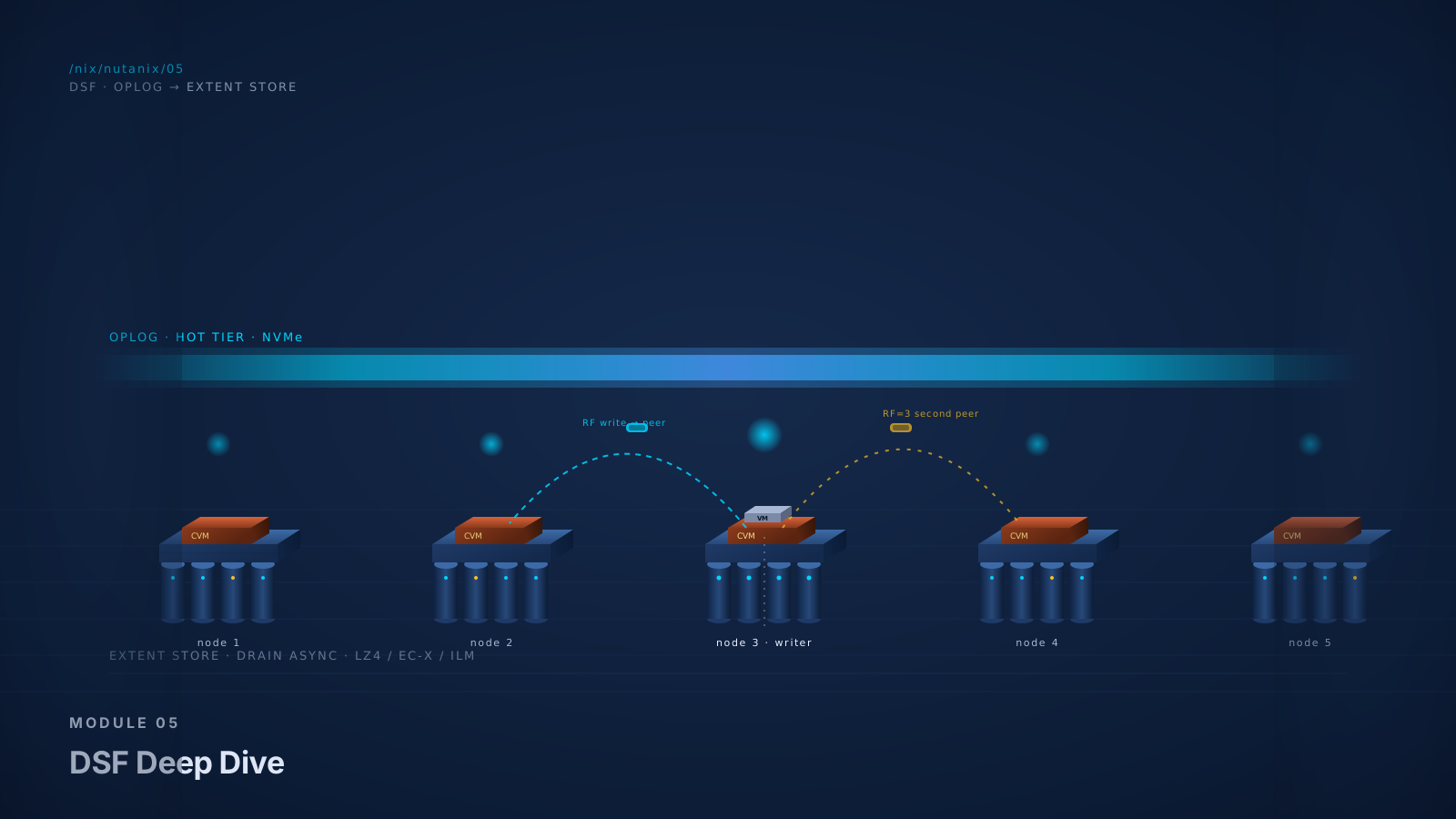
The Promise
By the end of this module you will:
- Trace a VM write through DSF end to end, naming every component it touches. From the guest's
write()call to acknowledged-on-stable-storage, you will know what happens, where it happens, and why. This is the single most-tested concept in NCP-MCI storage. - Recommend RF2 vs RF3 vs erasure coding for a given workload with the math behind the choice. Capacity overhead numbers, performance tradeoffs, failure-tolerance differences. No guessing.
- Pass roughly 28% of NCP-MCI and 30% of NCM-MCI. This is the heaviest single-module weight in the curriculum because storage is the heart of the platform. NCM-MCI lab scenarios disproportionately involve storage troubleshooting.
- Defend the architecture against a senior storage admin who has been engineering arrays for 20 years. Real concerns like tail latency, write amplification, rebuild times, capacity efficiency, and vendor-managed firmware all have real answers. None requires hand-waving.
- Size a cluster correctly for given workload patterns. Capacity reservation, thin provisioning, OpLog sizing, Curator scan duration on large clusters. The math you need for actual customer designs.
- Talk about Stargate, Cassandra, and Curator in their operational roles, not just as service names. When NCC reports "Stargate degraded on node 3" or "Curator scan stalled," you know what that means and what to look at first.
This is the technical core of the platform. The reader who internalizes this module has internalized Nutanix.
Foundation: What You Already Know
You have managed shared storage. SAN or NAS, FC or iSCSI or NFS. You know the vocabulary: LUN, datastore, volume, RAID group, parity, hot spare, cache, write-back, write-through, controller failover, multipathing.
You have also been burned by it once or twice. Maybe a controller failed at 2am and the failover took 90 seconds longer than the customer's RTO allowed. Maybe a RAID rebuild ran for 18 hours during which performance was unusable. Maybe the array's compression algorithm was great in marketing but disappointing in reality. Real stuff.
Hold that experience. You are about to look at storage in a fundamentally different shape.
DSF (Distributed Storage Fabric) is the storage layer that runs across all the CVMs in a Nutanix cluster. There is no array. There is no controller in the traditional sense. There is software on every node that takes the local disks of every node, replicates data across them, deduplicates and compresses, presents one logical pool, and self-heals when nodes fail. The terminology is partly familiar (replication, compression) and partly new (OpLog, Extent Store, Curator, EC-X). The architecture, once you see it, is internally consistent.
The Foundation question for this module: how does a distributed storage layer running on the same hardware as your VMs match (and in some ways exceed) the performance and resilience of a dedicated array?
The honest short answer: by trading one set of architectural costs (extra hardware, separate controllers, FC fabric) for another (CVM resource tax, network round-trips for some operations, software complexity in distributed coordination). Whether the trade is favorable depends on the workload. For most enterprise workloads in 2026, it is. We will get to which workloads are which.
Core Content
The Distributed Storage Fabric (DSF) Overview
DSF is the storage layer that runs across all CVMs in a Nutanix cluster. From a 30,000-foot view it does these things:
- Pools the local disks of every node into one logical capacity pool.
- Replicates writes across nodes for durability (RF2 or RF3).
- Caches reads in CVM RAM (the Content Cache) for performance.
- Compresses, deduplicates, and (optionally) erasure-codes data for efficiency.
- Tiers data between hot (NVMe / SSD) and cold (HDD, where present) based on access patterns.
- Self-heals when nodes or drives fail by re-replicating data to surviving copies.
- Snapshots and replicates for backup and DR (Module 7).
DSF is built around three key services from Module 2: Stargate (the data path), Cassandra (the metadata store), and Curator (the background scrubber). Pithos owns vDisk configuration. Zeus maintains cluster consensus. These five services together implement DSF.
The Storage Hierarchy
Before tracing any I/O, you need the vocabulary. DSF uses a specific hierarchy:
- Storage Pool. The aggregate of all physical disks in the cluster. Each cluster has one Storage Pool by default that includes all node-local disks. You almost never manipulate this directly.
- Storage Container. A logical "datastore equivalent" carved from the Storage Pool. Containers are where you set storage-policy attributes: RF (2 or 3), compression on/off, deduplication on/off, erasure coding on/off, reservations, advertised capacity. A cluster typically has multiple containers.
- vDisk. The virtual disk attached to a VM. From the VM's perspective, a vDisk looks like a SCSI or virtio block device. Internally, a vDisk is a logical entity backed by extents.
- Extent. A contiguous range of bytes within a vDisk, typically 1 MB. Extents are the unit of metadata in Cassandra. Each extent has a metadata record indicating where it is physically stored.
- Extent Group. The physical allocation unit on disk that holds extents. An Extent Group is 1 MB on non-deduplicated containers and 4 MB on deduplicated containers. Multiple extents from one or more vDisks may share an Extent Group.
Diagram: The Storage Hierarchy
The Data Path: A VM Write, End to End
This is the single most important concept in the module. We will walk a VM write from write() syscall to acknowledged-durable.
- The guest VM issues a write. A Linux or Windows VM running on a Nutanix node calls into its storage stack:
write(fd, buf, len). The OS turns this into a SCSI or virtio block command directed at the VM's vDisk. - The hypervisor presents the I/O to the local CVM. On AHV, the VM's vDisk is exposed via a paravirtualized interface that routes to the local CVM. On ESXi-on-Nutanix, the CVM presents an NFS datastore that ESXi mounts; writes traverse to the CVM via NFS. Either way: the I/O lands at the local CVM's Stargate process.
- Stargate accepts the write. Its first decision: is this a sequential streaming write (likely large and benefits from going straight to Extent Store) or a random write (benefits from the OpLog write buffer)? Most database, VDI, and general-purpose workloads are random; Stargate routes them to the OpLog.
- The write goes to the OpLog (local copy). The OpLog is a persistent write buffer on the local node's hot tier (NVMe or SSD). It is essentially a write-ahead log. Writes are appended and acknowledged once durable. The OpLog is where DSF gets its low-latency write characteristic.
- The write is replicated to remote OpLog (RF copies). Simultaneously with the local OpLog write, Stargate replicates the write to one or two other nodes' OpLogs (RF2 or RF3 respectively). The remote OpLog write must complete before the original VM write is acknowledged. This is the cost of strong consistency.
- Acknowledgment to the VM. Once the local OpLog and the required number of remote OpLog replicas have all confirmed durable write, Stargate acknowledges to the hypervisor, which acknowledges to the guest VM. The VM's
write()call returns success. - OpLog drains to Extent Store (asynchronous). The OpLog is a buffer, not the permanent home for the data. As the OpLog fills past thresholds (and during quiet periods), Stargate drains writes from the OpLog to the Extent Store, the persistent backing storage on the local node. The drain is sequential and efficient.
- Compression and (optionally) deduplication apply during drain. Inline compression compresses data as it moves from OpLog to Extent Store. If dedup is enabled, fingerprints are computed and dedup pointers created.
- Erasure Coding (if enabled) is applied later. EC-X is a post-process operation. Curator runs periodic scans and converts qualifying data from RF replication to erasure-coded form.
- Reads. When the VM later reads the data:
- First check: Content Cache. Stargate maintains an in-memory cache of recently-accessed extents in CVM RAM. Cache hits return immediately.
- Second: local hot tier (Extent Store on NVMe/SSD). Local reads are fast.
- Third: remote node (over the network) if the data is not local. Curator may eventually migrate the data to be local for repeat reads.
Diagram: The Data Path
The Cycle, Frame Two: DSF as a SAN, Distributed
Step back. In a traditional all-flash array, an incoming write hits the array's controller, lands in NVRAM (write cache, battery-backed), is acknowledged to the host, and is later destaged to flash. The controller's NVRAM is the latency-critical buffer. Replication for redundancy happens between dual controllers in the same chassis.
DSF replaces the array controller with the CVM, replaces NVRAM with the OpLog (persistent on the local node's hot tier), and replaces dual-controller redundancy with cross-node replication (RF2 or RF3). The write path looks similar in shape: incoming write, durable buffer, acknowledgment, asynchronous destage. The major architectural shift is that the durable buffer and its peer copy are on different physical nodes connected by the network.
This is why network quality matters more in DSF than in a traditional array. Within a SAN array, controller-to-NVRAM is a backplane operation. In DSF, OpLog-to-OpLog crosses the cluster network. A 25 or 100 GbE switching fabric with low jitter is not optional; it is the substrate of write performance.
The Cycle, Frame Three: DSF as Cassandra-Plus-Stargate
Storage architects who appreciate distributed-systems internals will gravitate to this frame. DSF is, in essence, two coordinated systems:
- Cassandra (the metadata store). Tracks every extent: which vDisks reference it, what extent group it lives in, where physically (which nodes, which disks). Every extent operation involves Cassandra metadata reads or writes. Cassandra is built on a fork of Apache Cassandra, optimized for the NoSQL key-value access patterns DSF requires. It runs in a ring across all CVMs.
- Stargate (the data path). Processes the actual I/O. Reads and writes flow through Stargate. Stargate consults Cassandra for "where does extent X live?" and operates on the data accordingly.
The architectural separation is deliberate: metadata is a small, hot, frequently-accessed problem (good fit for a distributed NoSQL store). Data is a large, less-frequently-randomly-accessed problem (good fit for distributed object storage with caching). This is the same pattern that powers Ceph, S3, and other distributed storage systems.
The Cycle, Frame Four: DSF as the Value Layer
For an operations leader or CIO, the durable DSF story is not the data path. It is what DSF enables:
- Snapshots that don't degrade performance. DSF native snapshots are metadata operations.
- Replication as a built-in primitive. Async, NearSync, and Metro replication (Module 7) all leverage DSF's primitives.
- Compression and deduplication without an array refresh.
- Erasure coding as a capacity optimization.
- Capacity portability. vDisks can move between containers and clusters.
- Self-healing. When a node or drive fails, DSF rebuilds without human intervention.
- API-first storage. Storage operations are JSON, not vendor-specific CLI.
The CIO-level pitch: "You are not buying storage. You are buying a software-defined storage layer that grows when your compute grows, self-heals when hardware fails, and has every storage feature your team currently buys separately built in."
Replication Factor (RF) 2 and 3
RF is the per-container setting that determines how many copies of every write are stored across the cluster.
- RF2. Two copies of every write. One local, one on a peer node. Survives any single node failure or single drive failure with no data loss.
- RF3. Three copies of every write. One local, two on peer nodes. Survives any two simultaneous node failures (or two drive failures across nodes) with no data loss.
| RF | Raw multiplier | Effective usable |
|---|---|---|
| RF2 | 2x | 50% of raw (before compression / dedup / EC) |
| RF3 | 3x | 33% of raw (before compression / dedup / EC) |
Capacity reservation (the cluster reserves headroom for self-healing) further reduces effective usable. A typical planning number is 50% effective for RF2 and 33% for RF3, with another 10-15% set aside for reservation. Compression and EC recover meaningful capacity back.
Performance implications:
- RF2 has slightly lower write latency than RF3 (one fewer network round-trip per write).
- RF3 has more network traffic during normal writes and during rebuilds.
- For most workloads the latency difference is small (single-digit percent on modern 25/100 GbE networks).
| Workload pattern | Typical recommendation |
|---|---|
| General-purpose VMs, dev/test, file/print | RF2 |
| Tier-1 production with strong backup story | RF2 (with backup) |
| Tier-1 production without external backup | RF3 |
| VDI | RF2 (boot storms benefit from less write amplification) |
| Mission-critical databases without application HA | RF3 |
| Mission-critical databases with application HA (Always On, replica sets) | RF2 (application provides additional redundancy) |
| Compliance-driven workloads requiring multiple data copies | RF3 |
Erasure Coding (EC-X): The Capacity Optimization
Erasure coding is an alternative to replication for redundancy. Instead of storing two or three full copies, EC stores data plus parity in a way that survives node failures with substantially less capacity overhead. DSF's implementation is called EC-X. It is configurable per Storage Container.
Take a stripe of N data blocks plus K parity blocks across N+K nodes. Any K nodes can fail and the data is still recoverable. The capacity overhead is K/(N+K).
| Configuration | Stripe | Capacity overhead | Failure tolerance | Min cluster size |
|---|---|---|---|---|
| EC equiv of RF2 | 4+1 | 25% (vs RF2's 100%) | 1 node | 6 nodes |
| EC equiv of RF3 | 4+2 | 50% (vs RF3's 200%) | 2 nodes | 7 nodes |
Going from RF2 to EC 4+1 reduces capacity overhead from 100% (50% effective) to 25% (75% effective). On a 200 TB raw cluster, that is the difference between 100 TB usable and 150 TB usable: a 50% increase in effective capacity, with the same failure tolerance.
The catch: EC has performance tradeoffs.
- Write amplification on small writes. Writing a small block requires reading the existing stripe, modifying it, and rewriting parity. Expensive for random write workloads.
- Curator overhead during conversion. EC is applied as a post-process operation by Curator. New writes start as RF2 or RF3 and are converted to EC later when data has cooled. The conversion consumes background CPU and network.
- Recovery is more expensive. Rebuilding from EC parity requires reading from multiple surviving nodes and recomputing. Single-replica rebuilds (from RF) are simpler.
| Workload type | EC recommendation |
|---|---|
| Cold archives, file servers, infrequently-modified data | EC strongly recommended |
| Backup repositories on Nutanix | EC recommended |
| VDI persistent profiles, general-purpose VMs | EC often beneficial; test in your environment |
| OLTP databases, latency-sensitive workloads | EC not recommended |
| High write churn with tight latency budgets | EC not recommended |
Diagram: RF vs EC Capacity and Failure Domains
Compression
DSF supports compression at the Storage Container level. It happens during the OpLog drain to Extent Store (so writes are acknowledged before compression runs; the compression cost is in background drain throughput, not in write latency).
- Inline compression. Applied during drain. The default in modern AOS for most workloads.
- Post-process compression. Applied later by Curator on data that wasn't compressed during drain.
Compression algorithms. DSF uses LZ4 for inline compression on incoming writes (fast, modest ratios, suitable for the latency-critical path). For cold data that has aged onto the cold tier or that Curator processes post-hoc, DSF uses LZ4HC (high-compression LZ4), which trades CPU for tighter ratios. Inline compression is selective: it applies to sequential streams and large I/Os (greater than 64K) to avoid impacting random write performance.
Real-world ratios: mixed enterprise workloads typically achieve 1.5x to 2.5x compression on DSF. Marketing numbers of 4-6x reflect best-case scenarios. Plan capacity using 2x for general workloads, 1.2x for already-compressed data, and let actual performance guide adjustment.
Deduplication
DSF supports deduplication at two levels:
- Cache deduplication. In-CVM-RAM deduplication for hot data. Always on for compatible workloads.
- On-disk deduplication. Configured per Storage Container. Computes fingerprints during drain, deduplicates blocks across the container.
When dedup is valuable: VDI workloads with persistent profiles, server VMs with similar OSes, test/dev environments with cloned VMs.
When dedup is expensive without benefit: already-deduplicated sources, small clusters with low data uniqueness, workloads with high write churn.
Sizing implication: dedup is metadata-heavy. Enabling on-disk dedup increases the CVM's metadata footprint, which means larger CVMs (more RAM) on dedup-enabled clusters. Size accordingly.
Tiering and ILM
On hybrid platforms (NVMe/SSD + HDD), DSF tiers data automatically. Hot data lives on the NVMe/SSD tier; cold data drifts to the HDD tier. Curator drives this via ILM (Information Lifecycle Management) scans.
In 2026, all-flash (or all-NVMe) Nutanix deployments dominate, and tiering is less operationally relevant for most customers. On hybrid platforms (still shipping for cost-optimized capacity tiers like backup or large file workloads), tiering is significant.
ILM operations include: promoting hot data to the fastest tier, demoting cold data to capacity tiers, migrating data for locality after VM moves, rebalancing when nodes are added or removed, and converting data from RF to EC. ILM runs continuously in the background; it does not appear in the synchronous I/O path.
Curator: The Background Worker
Curator is the background scrubbing and rebalancing service. It runs on every CVM. One Curator is master; others are followers. Curator does:
- Periodic scans (full and partial). Full scans every 6-24 hours; partial scans more frequently. Scans walk metadata to identify operations to perform.
- Re-replication after failures. Restores configured RF or EC after a node or drive loss.
- EC conversion. Converts qualifying data from RF to EC.
- Compression and dedup post-process (in some configurations).
- Capacity reclamation. Garbage collection of deleted vDisk space.
- Tiering / ILM operations.
- Rebalancing when nodes are added or capacity is uneven.
Curator is a workhorse. On a healthy cluster you barely notice it. When something is wrong (a stalled scan, a long-running re-replication, a backlog of pending operations), Curator status is one of the first things you check. The CLI command curator_cli and the NCC checks expose Curator state.
Failure Recovery: When a Node Goes Down
Walk through what happens when a node fails:
At the moment of failure:
- The cluster heartbeat (Cassandra and Zeus mechanisms) detects the node loss within seconds.
- Stargate on the failed node stops responding. Other CVMs route I/O around the failed node.
- VMs that were running on the failed node are restarted by Acropolis (AHV) or vSphere HA (ESXi-on-Nutanix). Module 3 covered this.
- Cassandra removes the failed node from the active ring. Operations continue with the surviving nodes.
Curator's response:
- Curator detects the missing replica copies (data that was on the failed node now has fewer than RF copies remaining).
- Curator orchestrates re-replication: reads surviving copies, writes to other nodes, restores configured RF.
- The duration depends on cluster size, data volume, and network bandwidth. For a 4-node cluster with 50 TB on the failed node, re-replication takes hours. For a 20-node cluster, much less.
- During re-replication, the cluster runs at reduced redundancy. A second failure during this window can result in data loss for RF2 clusters.
For RF3 and EC clusters: the cluster tolerates the failure plus one more (RF3) or one more on a subset of nodes (EC 4+2). Re-replication still occurs to restore configured redundancy.
Diagram: Node Failure Recovery (Curator Scan)
Capacity Planning: The Math Customers Need
When a customer asks "how much usable capacity will I get?", the math is more nuanced than just dividing raw by RF.
- Raw cluster capacity. Sum of all drives across all nodes. Example: 8 nodes × 4 drives × 7.68 TB NVMe = 245.76 TB raw.
- Apply RF or EC. RF2: divide by 2. RF3: divide by 3. EC 4+1: 80% of raw. EC 4+2: 67% of raw.
- Apply capacity reservation. AOS reserves headroom for self-healing on node loss. Typically 10-15% on smaller clusters, less on larger ones.
- Apply compression and dedup gains. General compression: 1.5-2.5x. Dedup: variable; conservative planning is 1.0x unless workload-specific data supports a higher number.
Worked example: 8-node cluster, 4 × 7.68 TB NVMe per node, RF2, compression on, no EC, no dedup, general workload.
Raw:                       245.76 TB
After RF2 (÷ 2):           122.88 TB
After 12% reservation:     ~108 TB
After 2x compression:      ~216 TB effective usable
The customer who hears "raw 245 TB, usable 216 TB" in a marketing slide is being told a real number, but only after compression. State all the assumptions when you walk through this.
Storage-Only Nodes
For workloads that need a lot of capacity but not much CPU (some backup repositories, some file workloads, some object backing), Nutanix offers storage-heavy nodes and storage-only nodes.
A storage-only node has minimal compute (just enough for the CVM and DSF responsibilities) but large storage capacity. They contribute to the cluster's storage pool without contributing meaningful compute. They allow asymmetric clusters where a few storage-only nodes provide capacity for storage-heavy workloads while compute-balanced nodes handle the active VMs.
When to use: backup repositories on Nutanix (especially with Mine), some Files / Objects workloads where the storage-to-compute ratio is high, clusters that have outgrown their compute-balanced node sizing on the storage axis.
Tradeoffs: erodes some of HCI's operational simplicity (asymmetric node configurations), still simpler than maintaining a separate dedicated storage tier. Storage-only nodes do not eliminate the storage-imbalanced economics issue from Module 1; they soften it.
Lab Exercise: Storage Container Manipulation and Failure Simulation
- Inventory the existing storage hierarchy. SSH into a CVM:
ncli storage-pool list
ncli container list
ncli vdisk list
- Create a Storage Container with non-default policies. From Prism Element: Storage → Storage Container → Create. Name
lab-rf2-compressed, RF=2, compression on, EC off, dedup cache-only, no reservation. - Create a second container
lab-rf2-no-featureswith all advanced features off. - Provision a VM into each container. Power them on with a small Linux OS.
- Generate I/O:
dd if=/dev/urandom of=/tmp/test.dat bs=1M count=2048for 2 GB random, thendd if=/dev/zero of=/tmp/zero.dat bs=1M count=2048for 2 GB zeros (zeros compress to nearly nothing). - Compare in Prism. The compressed container should show meaningfully less physical space used for the same logical data, especially the zeros.
- Examine the data path components.
nodetool -h localhost ring     # Cassandra ring status
curator_cli get_curator_state  # Curator status
stargate_status                # Stargate health
- Look at vDisk metadata.
vdisk_config_printer
vdisk_usage_printer -vdisk_id <id>
- Failure simulation (lab cluster only). From Prism, place a node in maintenance mode, then shut down the CVM via SSH (
sudo shutdown -h now). Watch alerts fire, Data Resiliency drop, VMs restart, Curator begin re-replication. Power back on, exit maintenance, watch redundancy restore. - Run NCC after recovery.
ncc health_checks run_all.
Practice Questions
Twelve questions. Six knowledge MCQ, four scenario MCQ, two NCX-style design questions. Read each, answer in your head, then click to reveal.
What is the OpLog?
Why this answer
OpLog is the persistent, hot-tier write buffer. Writes land in OpLog (locally and on a peer node for RF2/RF3), are acknowledged once durable, and are later drained to the Extent Store. OpLog is the source of DSF's low-latency write characteristic.
Why not the others
- A) That describes the Content Cache (in CVM RAM), not OpLog.
- C) Acropolis logs are unrelated; OpLog is a storage construct.
- D) Cassandra holds metadata, not OpLog data.
The trap
A is the seductive distractor: customers and learners hear "Op-Log" and think "log of operations." OpLog is specifically the write buffer.
Which correctly describes the relationship between Storage Pool, Storage Container, and vDisk in DSF?
Why this answer
Pool is the physical aggregate. Container is the logical, policy-bearing layer. vDisk is the VM-facing virtual disk. The hierarchy is Pool → Container → vDisk → extents → extent groups.
Why not the others
- A) Inverts the hierarchy.
- C) They are distinct constructs with different purposes.
- D) Mixes Nutanix and traditional-array terminology incorrectly.
The trap
A and D both reflect partial mental models that get the hierarchy wrong. Memorize the order.
Which statement about RF (Replication Factor) is correct?
Why this answer
RF is a per-container setting. A cluster commonly has multiple containers with different RF: an RF3 container for Tier-1 production, an RF2 container for general-purpose, etc.
Why not the others
- A) Cluster-level RF is incorrect; granularity is per-container.
- C) RF and node count are unrelated. RF2 works on any cluster of 3+ nodes; RF3 works on any cluster of 5+ nodes.
- D) DSF and its RF apply uniformly across hypervisors. It is platform-level.
The trap
A is intuitive ("RF must be cluster-wide"). The per-container granularity is a design strength.
An 8-node cluster has 245 TB raw. Configured RF=2 with compression on; mixed enterprise workloads compress at roughly 2x. Approximately what is the effective usable capacity (after RF, ~12% reservation, and compression)?
Why this answer
245 TB / 2 (RF2) = 122.5 TB. Apply ~12% reservation: ~108 TB. Apply 2x compression: ~216 TB. The closest answer is 215 TB.
Why not the others
- A) RF only, before compression.
- C) Raw, before any overhead.
- D) RF3 math, not RF2.
The trap
A is tempting if you stop at "divide by 2." Compression often returns more capacity than RF takes.
Which workload is least suited for Erasure Coding (EC-X)?
Why this answer
EC has higher write amplification on small random writes (read-modify-write of stripe parity). Latency-sensitive databases with random write workloads are the canonical anti-pattern for EC.
Why not the others
- A) Backup repositories are EC's sweet spot.
- B) Cold archives are similarly well-suited.
- D) General-purpose file servers can benefit from EC.
The trap
This question rewards knowing the tradeoff: EC is great for capacity-bound, low-write-churn workloads; bad for high-random-write or latency-critical workloads.
Which DSF service is responsible for re-replicating data after a node failure?
Why this answer
Curator is the background scrubber and orchestrator. After a node failure, Curator detects missing replicas and orchestrates re-replication to restore configured RF.
Why not the others
- A) Stargate is the data path. It routes I/O, not background re-replication.
- B) Cassandra holds metadata. It does not move data.
- D) Acropolis manages VM lifecycle, not DSF data operations.
The trap
D is plausible if you forgot Acropolis's scope is VM lifecycle. Curator owns background storage work.
A 4-node cluster (RF=2 across all containers) has one node fail. What is the cluster's state immediately after?
Why this answer
Canonical RF2 single-node-failure scenario. Self-healing is automatic. The re-replication window is real and the second-failure exposure is real.
Why not the others
- A) RF2 specifically tolerates single-node loss.
- C) Read-only is not a normal AOS state.
- D) Automation handles VM restart (HA) and re-replication (Curator).
The trap
A is a mental model from older redundancy systems. AOS's self-healing is fully automated.
Customer's storage architect: "Our database has a 5ms p99 read latency requirement. Can DSF meet that?" Strongest SA response?
Why this answer
Specific, honest, ends with a concrete proposal. Acknowledges the metric, gives realistic numbers, identifies the variables that affect the answer, and offers the right next step (POC).
Why not the others
- A) Overconfident and generic.
- C) Concedes too much. DSF on all-NVMe with proper sizing competes with all-flash arrays on most metrics.
- D) Dismissive of a legitimate concern.
The trap
A and D are confident-defensive. C is conceding-defensive. B is the honest, specific, productive answer.
Which is true about the relationship between Stargate and the OpLog?
Why this answer
The data path: Stargate writes to local OpLog, replicates to remote OpLog, acknowledges the VM after both succeed. Extent Store drain is asynchronous and out of the synchronous write path.
Why not the others
- A) Reverses the order. Extent Store comes after OpLog.
- C) OpLog is the write buffer; reads are served by Content Cache and Extent Store.
- D) Curator scans periodically; it does not own the OpLog. Stargate writes to OpLog.
The trap
A is a misremembering of the order. The exam tests whether you actually internalized the data path.
An 8-node cluster mixes compute-balanced and storage-only nodes. The customer wants to migrate a backup repository workload (heavy storage, light compute). Which approach is correct?
Why this answer
Storage-only nodes are full DSF participants from a data perspective. They contribute capacity to the Storage Pool. Data is distributed across all nodes per the cluster's RF/EC policies.
Why not the others
- A) Storage-only nodes do hold data; they are not just quorum.
- C) No such restriction.
- D) Mixing in one cluster is the canonical answer.
The trap
A reflects a partial understanding ("storage-only" sounding like "supporting role only").
NCX-style design: storage container topology for a 12-node mixed-workload cluster.
Scenario: A 12-node cluster, all-NVMe (4 × 7.68 TB per node), 25 GbE per node redundant uplinks. Workloads:
- 25 TB SQL Server (random read-heavy, latency-sensitive, with Always On HA across two DB VMs).
- 600 VDI desktops with persistent profiles (~50 GB each), boot storms at 8am.
- 250 general-purpose VMs (mixed read/write, no extreme latency requirements).
- Separate off-cluster backup target (existing dedup appliance).
Challenge: Design the storage container topology. Choose RF and EC settings per workload. Calculate capacity. Justify your choices. Identify what you still need to know.
A strong answer covers
- Three containers, one per workload. Containers are the policy boundary.
- SQL Server container: RF2 (Always On provides app-level HA). Compression on. Dedup off. EC off (random write churn is poor for EC).
- VDI container: RF2 (boot storms benefit from less write amplification). Compression on. On-disk dedup on (persistent profiles share OS pages). EC off (write-heavy profile churn).
- General-purpose container: RF2. Compression on. Dedup cache-only. EC: candidate for EC 4+1 if read-heavy and capacity-prioritized; document the tradeoff.
- Capacity math. 12 × 4 × 7.68 = 368.64 TB raw. RF2: 184.32 TB. ~12% reservation: ~162 TB. 2x compression: ~324 TB effective. VDI dedup may add 20-30% more for that workload.
- Network considerations. 25 GbE adequate; verify redundant uplinks.
- Resilience. RF2 across all three tolerates single-node loss; document the 2-3 hour re-replication window.
- Workload placement. VM-host affinity to keep SQL primary and secondary on different nodes; ADS handles VDI rebalancing.
- What you still need: SQL p99 latency target, VDI golden image / linked clone strategy, growth forecast, customer's appetite for EC on general-purpose, backup window for snapshot scheduling.
A weak answer misses
- Defaulting to RF3 globally without considering Always On.
- Enabling EC across all containers without considering write profile.
- Forgetting compression and dedup in capacity math.
- Not naming the re-replication window as a real concern.
- Treating VDI as similar to SQL (the dedup case is very different).
NCX-style architectural defense: an incumbent storage architect challenges DSF.
Scenario: Customer's senior storage architect (18 years engineering all-flash arrays):
"Software-defined storage running on shared compute hosts means write amplification I can't audit, network round-trips I can't tune, and a vendor that updates the storage stack as part of a hypervisor upgrade. My all-flash array has dedicated controllers, NVRAM I can characterize, replication I can configure precisely, and a firmware cadence I control. Why would I trade that for distributed storage?"
Challenge: Respond. He is making a serious argument. Address it.
A strong answer covers
- Acknowledge what is real. Distributed storage does involve write amplification, network round-trips, and a software-update cadence tied to the platform. Pretending otherwise loses credibility.
- Reframe each concern specifically:
- Write amplification. DSF's write path is well-characterized. OpLog is on local NVMe; replication adds one or two network round-trips. Bounded and measurable. Curator background work is auditable through Curator metrics. Offer to share numbers from a similar customer reference.
- Network round-trips. Local OpLog is sub-millisecond; remote OpLog over 25/100 GbE adds modest single-digit microseconds in normal operation. Network quality matters, which is why design includes proper switching fabric. Offer a network reference architecture.
- Storage stack updates with the platform. Real architectural choice. Benefit: storage and compute upgrade together, no version-skew incidents. Cost: less granular control over storage firmware. Offer to demo LCM in a controlled change window.
- Auditability. DSF exposes more telemetry per workload than a typical array. Per-VM IOPS, latency, read/write split, cache hit rate, compression ratio, dedup ratio. Show him Prism's analytics during POC.
- Reframe the "dedicated controller" comparison. Dedicated controllers are real; downsides too: a single chassis with two CPUs that becomes the cluster's bottleneck at scale, dual-controller firmware paths, rack space and power. DSF distributes that work across N CVMs, scaling horizontally.
- Address "I trade what I have." He doesn't have to trade. Run his existing array workloads on Nutanix-on-ESXi for an evaluation period. Use Move (Module 3) to migrate selected workloads. Measure. Decide.
- Close with a concrete POC proposal. Three workloads (one OLTP, one VSI, one capacity-heavy) onto a Nutanix cluster for 60 days, instrument both sides, let the data drive the decision.
A weak answer misses
- Dismissing the architect's experience.
- Claiming DSF is universally better than all-flash arrays.
- Skipping auditability (his concern about telemetry is real and answerable).
- Not naming the firmware-cadence tradeoff honestly.
- Not closing with a POC proposal.
What You Now Have
You can trace a VM write through DSF end to end: guest syscall, hypervisor passthrough, local CVM Stargate, local OpLog, remote OpLog (RF=2 or RF=3), acknowledgment, asynchronous Extent Store drain, eventual compression and dedup, eventual EC conversion. Every component named.
You know the storage hierarchy: Pool → Container → vDisk → Extent → Extent Group. You know the Container is the policy boundary.
You know RF2 and RF3 in detail: capacity overhead, failure tolerance, when to choose which, the math of the choice. You know Erasure Coding (EC-X): 4+1 vs 4+2, capacity savings, performance tradeoffs, where EC wins and where it costs. You can size a cluster correctly for EC requirements (6+ nodes for 4+1, 7+ for 4+2).
You know compression and dedup honestly: what they cost, what they deliver, when to enable them. You quote ranges, not marketing peaks. You know how Curator works: background scans, re-replication, EC conversion, ILM, capacity reclamation.
You can walk a customer through a node-failure scenario: detection, VM restart, Curator re-replication, the re-replication window, the second-failure exposure, the duration math. You can do capacity planning math: raw, RF, reservation, compression, dedup, effective usable.
You are now ready for networking. Module 6 takes the same depth treatment to AHV networking, Open vSwitch, virtual switches, VLANs, bridges, and Flow microsegmentation.
References
Authoritative sources verified during the technical review pass on this module. Cite these when defending architecture in front of a senior storage admin.
- Nutanix Bible · AOS Storage (DSF). Authoritative source for the storage hierarchy, data path (Stargate, OpLog, Extent Store, Content Cache), Cassandra metadata replication (default 3 copies, configurable up to 5), and compression-algorithm details (LZ4 inline + LZ4HC for cold).
- Polar Clouds DSF Concepts Walkthrough. Independent walkthrough with the 1 MB / 4 MB extent group sizing distinction (1 MB on non-dedup containers, 4 MB on dedup-enabled).
- Erasure Coding Solution Brief (TN-2032). Authoritative source for EC-X stripe configurations, minimum cluster sizes (4+1 needs ≥ 6 nodes; 4+2 needs ≥ 7 nodes), capacity-overhead math.
- Erasure Coding Reference (TN-2002). Original erasure coding tech note.
- Compression Reference (TN-2032 Compression section). LZ4 inline + LZ4HC for cold; inline compression selectivity (greater than 64K and sequential streams only).
- Compression FAQ (KB-17546). Customer-facing FAQ on compression behavior.
- Sequential I/O and the OpLog vs Extent Store (Nutanix Community). The Stargate write characterizer's routing decision (random → OpLog; sustained sequential → Extent Store directly).
- Cassandra on Nutanix (BP-2007). Best-practices reference for Cassandra-on-Nutanix workloads.
- Core Performance Reference (TN-2096). I/O path and performance characterization.
Cross-References
- Previous: Module 4: Prism (Element and Central)
- Next: Module 6: Networking and Microsegmentation
- Glossary: DSF · Storage Pool · Storage Container · vDisk · Extent · Extent Group · OpLog · Extent Store · Content Cache · RF · EC-X · ILM see appendix
- Comparison Matrix: Storage Row · Replication Row · Capacity Efficiency Row see appendix
- Objections: #12 "Tail latency vs all-flash arrays" · #13 "Software-defined storage trust" · #15 "Rebuild times" · #19 "Capacity efficiency vs my array" · #24 "Storage admin role obsolescence" see appendix
- Discovery Questions: Q-STOR-01 through Q-STOR-05 (workload IOPS / latency profile, capacity targets, existing array dependencies, backup integration, compliance / data placement) see appendix