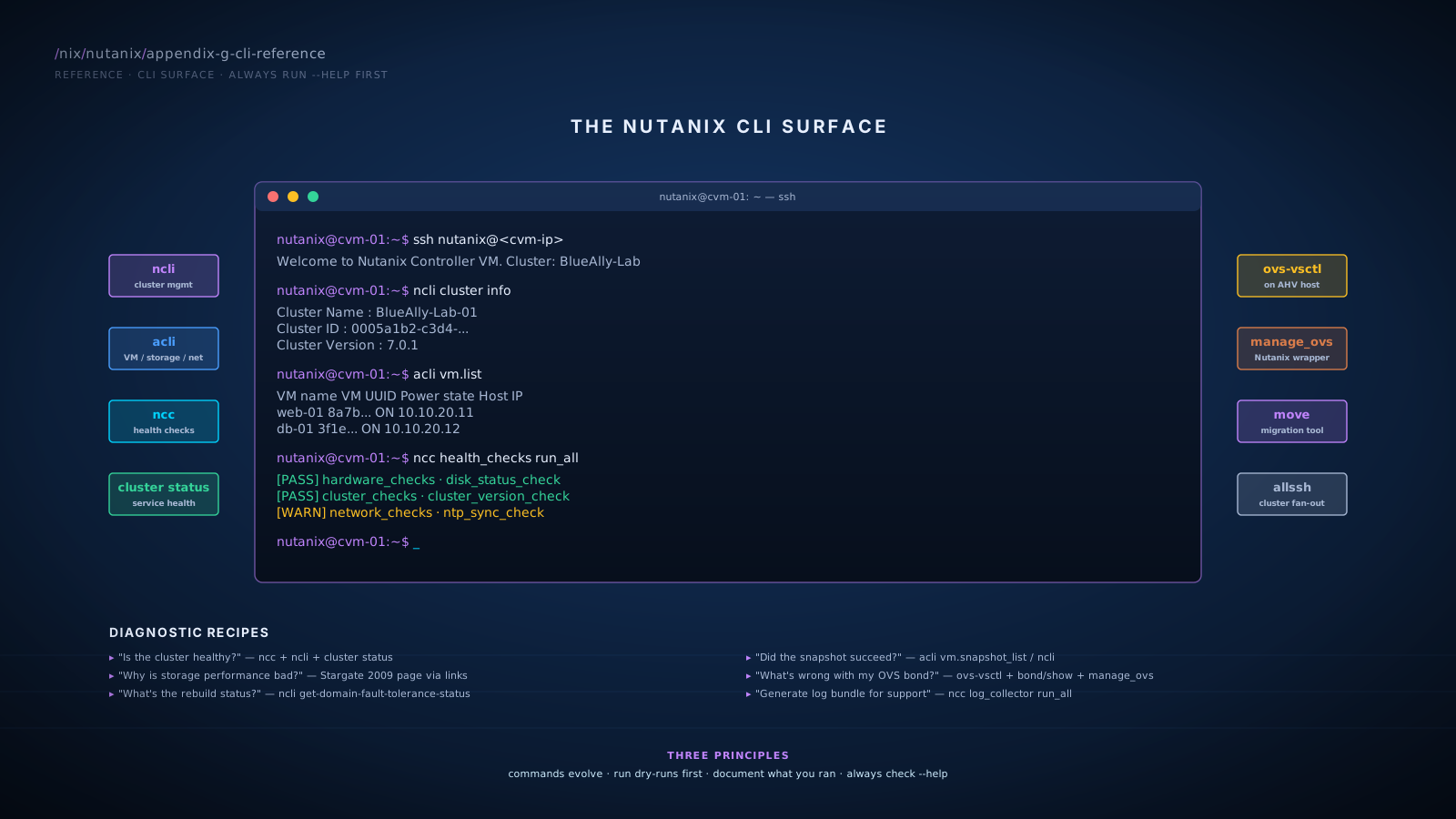
SSH Access
Connecting to a CVM
ssh nutanix@<cvm-ip>
Default user is nutanix. Authentication via SSH key or password depending on cluster configuration. Once on a CVM, you can run cluster-wide commands like ncli, acli, and cluster status.
Connecting to an AHV Host
ssh root@<ahv-host-ip>
Default user on AHV hosts is root. SSH key auth typical. Use this for host-level networking work (OVS, bonds), or when troubleshooting AHV itself.
Running Commands Across All CVMs
From any CVM, use allssh to run a command on every CVM in the cluster:
allssh "ncli cluster info"
For host-level commands across all AHV hosts:
hostssh "ovs-vsctl show"
These wrappers respect cluster-level connectivity and are the standard pattern for fleet-wide queries.
ncli (Cluster Management)
ncli is the primary CLI for cluster-level management. Operations include cluster info, host management, storage container management, network configuration, replication, and licensing.
Common Patterns
Get cluster info:
ncli cluster info
Returns cluster name, ID, version, member CVM IPs, configured storage pool, redundancy factor, and similar high-level state.
List storage containers:
ncli storage-container list
Output shows each container's name, ID, RF, compression state, dedup state, and capacity.
Show fault tolerance status:
ncli cluster get-domain-fault-tolerance-status type=node
ncli cluster get-domain-fault-tolerance-status type=rackable_unit
Reports cluster-wide fault tolerance per component (STATIC_CONFIGURATION, ERASURE_CODE_STRIP_SIZE, METADATA, ZOOKEEPER, EXTENT_GROUPS, OPLOG). The type= parameter is required: use node for node-level FT, rackable_unit for block-level FT. Older docs sometimes show this command without type=; current AOS requires the parameter.
List hosts:
ncli host list
Run a health check (canonical form):
ncc health_checks run_all
The ncli surface used to expose a thin health-check passthrough but the canonical command is the ncc form. Run from any CVM; can take several minutes on large clusters.
Check replication state (legacy Protection Domain):
ncli protection-domain list
ncli protection-domain list-snapshots
For Protection Policies (the modern construct), use Prism Central or the v4 API.
Add or list licenses:
ncli license list
ncli license add file=<license-file>
Key ncli Object Types
| Object | Purpose |
|---|---|
cluster | Overall cluster state |
host | Individual nodes |
storage-container | Datastore-equivalent |
storage-pool | Aggregate of physical disks |
network | Virtual networks |
protection-domain | Legacy DR grouping |
data-services-vip | Volumes-related IP |
vm | Virtual machines (operations) |
health-check | NCC integration |
Run ncli help for the full list.
- Most subcommands accept
--helpfor detailed syntax. - Output is structured; pipe to
grep,awk, orjq(after JSON conversion) for scripting. - Some commands require
nutanixuser and run on any CVM; others require explicit cluster-wide context.
acli (Acropolis Operations)
acli is the AHV-specific CLI for VM lifecycle, storage operations on AHV containers, and network management. It runs on the CVM.
VM Operations
List VMs:
acli vm.list
Get VM detail:
acli vm.get <vm-name>
Shows configuration, attached disks, NICs, host placement, snapshots.
Create a VM:
acli vm.create <vm-name> num_vcpus=4 num_cores_per_vcpu=1 memory=8G
acli vm.disk_create <vm-name> create_size=100G container=<container-name>
acli vm.nic_create <vm-name> network=<network-name>
acli vm.on <vm-name>
Stop a VM:
acli vm.shutdown <vm-name>     # graceful
acli vm.off <vm-name>          # forced
Migrate (live):
acli vm.migrate <vm-name> host=<target-host>
Snapshot a VM:
acli vm.snapshot_create <vm-name> snapshot_name=<name>
Clone a VM:
acli vm.clone <new-vm-name> clone_from_vm=<source-vm-name>
Storage Operations
List containers:
acli storage_container.list
Show container detail:
acli storage_container.get <container-name>
Create a container:
acli storage_container.create <name> rf=2 compression_type=on dedup=off
Network Operations
List virtual networks:
acli net.list
Get network detail:
acli net.get <network-name>
Create a virtual network:
acli net.create <network-name> vlan=<vlan-id>
For IPAM-managed network:
acli net.create <network-name> vlan=<vlan-id> ip_config=<network>/<prefix>
Add a DHCP range:
acli net.add_dhcp_pool <network-name> start=<ip> end=<ip>
- Tab completion works for object names; use it.
acliparses dotted-method syntax:vm.get,storage_container.list,net.create.- For programmatic work, the v4 REST API is usually a better choice than parsing acli output.
NCC (Nutanix Cluster Check)
NCC is the cluster's built-in health-check framework. Hundreds of individual checks across hardware, software, configuration, and performance.
Common Patterns
Run all health checks:
ncc health_checks run_all
This is the first command to run when something is wrong. Output shows PASS, INFO, WARN, FAIL per check, with explanations and recommendations.
Run a specific check:
ncc health_checks <category>_checks <specific_check>
Example:
ncc health_checks hardware_checks disk_status_check
List available checks:
ncc health_checks list
Get cluster log dumps for support:
ncc log_collector run_all
Creates a tarball of logs to attach to support cases.
NCC Categories
hardware_checks(disk, NIC, memory, BMC)network_checks(connectivity, VLAN, OVS state)cluster_checks(cluster-wide consistency)data_protection_checks(replication, snapshots)system_checks(service health, version)metadata_checks(Cassandra, Stargate)
For the full list, ncc health_checks list is the source of truth on the running version.
OVS Commands (Open vSwitch on AHV)
AHV uses Open vSwitch as the kernel-level virtual switch. SSH to the AHV host (not the CVM) to run OVS commands.
Inspecting Bridges and Ports
List bridges:
ovs-vsctl show
Output shows br0 (data bridge), br0.local (management bridge), and the ports on each.
List bridges concisely:
ovs-vsctl list-br
List ports on a bridge:
ovs-vsctl list-ports br0
Show interface details:
ovs-vsctl list interface eth0
Bond Status
Show bond state:
ovs-appctl bond/show <bond-name>
Reports bond mode, member status (active/standby), LACP state if applicable.
Show LACP detail:
ovs-appctl lacp/show <bond-name>
Flow Rules
Dump flow rules on a bridge:
ovs-ofctl dump-flows br0
Shows the OpenFlow rules currently programmed; useful for verifying Flow Network Security policy enforcement.
manage_ovs (next section) for Nutanix-aware operations. OVS commands are read-mostly during normal operations. Modification typically only during troubleshooting under support guidance.manage_ovs (Nutanix OVS Wrapper)
manage_ovs is the Nutanix-aware wrapper around OVS for bond and uplink management. Run on the AHV host.
Common Patterns
Show current bond config:
manage_ovs --bridge_name br0 show_uplinks
Configure a bond mode:
manage_ovs --bridge_name br0 --bond_name br0-up --bond_mode active-backup update_uplinks
Bond modes:
active-backupbalance-slbbalance-tcp(LACP, requires switch coordination)
Add or remove uplinks: refer to current Nutanix documentation for the precise syntax for adding/removing physical NICs from a bond. The flags evolve between AOS versions.
- Run
manage_ovs --helpon the target host for current syntax. - Bond changes affect networking on that host; coordinate with the cluster (live migrations off, etc.) before making changes during production hours.
- Always verify post-change state with
ovs-appctl bond/show.
Move CLI
Move primarily runs as a VM with a web UI. The CLI is for programmatic use, troubleshooting, and bulk operations.
Common Patterns
SSH to the Move VM:
ssh admin@<move-vm-ip>
Show Move version and status:
move version
move status
List configured environments (sources/targets):
move env list
List migration plans:
move plan list
Show plan detail:
move plan show <plan-id>
Trigger plan operations:
move plan start <plan-id>
move plan cutover <plan-id>
move plan cancel <plan-id>
- The web UI is the standard interface; CLI is for automation and edge cases.
- Move log files (under
/opt/xtract-vm/logs/typically) are the source for migration troubleshooting. - For large-scale migrations, scripting against the Move REST API is more typical than CLI.
Diagnostic Recipes
Compound CLI patterns for common troubleshooting questions.
RECIPE"Is the cluster healthy?"
# From any CVM
ncc health_checks run_all
ncli cluster info
cluster status
cluster status reports the state of every Nutanix service on every CVM: Stargate, Cassandra, Curator, Pithos, Zeus, Genesis, etc. All should be UP.
RECIPE"Why is storage performance bad?"
# CVM-level latency observations
ncli cluster get-domain-fault-tolerance-status type=node
ncli storage-pool list

# Stargate vdisk_stats page (per-node I/O metrics)
allssh "links http://127.0.0.1:2009"
The Stargate 2009 page (the vdisk_stats page) exposes per-node I/O metrics including per-vDisk latency histograms, randomness, I/O sizes, and working-set details; hot-spotted nodes show up here. By default the page is locked down to the local CVM via iptables and is not reachable cross-subnet, which is why the recipe uses the links text browser from inside the CVM. The same data is also visible in Prism Element and Prism Central performance views.
RECIPE"Which VMs are running on which host?"
acli vm.list
acli host.list
For VMs on a specific host:
acli host.list_vms <host-name>
RECIPE"What's the rebuild status after a failure?"
ncli cluster get-domain-fault-tolerance-status type=node
ncli storage-pool list
The fault tolerance command reports current redundancy state; a node loss shows up as reduced fault tolerance with rebuild in progress.
RECIPE"Did the snapshot succeed?"
acli vm.snapshot_list <vm-name>
ncli protection-domain list-snapshots
For Protection Policies (modern construct), check via Prism Central or v4 API.
RECIPE"What's wrong with my OVS bond?"
# On the affected AHV host
ovs-vsctl show
ovs-appctl bond/show br0-up
manage_ovs --bridge_name br0 show_uplinks
Cross-check switch-side LACP state from the network team if using LACP modes.
RECIPE"Why is replication bandwidth saturated?"
# CVM-level
ncli protection-domain list
ncli protection-domain get-snapshot-progress

# WAN-level (from CVM, looking at outbound)
allssh "iftop -i eth0"   # if iftop available
Combine with monitoring at the customer's WAN edge for full visibility.
RECIPE"What version of AOS is running?"
ncli cluster info
# Look for "Cluster Version"

# More detail
upgrade_status
upgrade_status shows the LCM-managed component versions cluster-wide.
RECIPE"How do I generate a log bundle for support?"
ncc log_collector run_all
Output is a tarball under /home/nutanix/data/log_collector/ typically. Upload to the support case as instructed.
Common Mistakes with the CLI
- Running mutating commands without dry-run. Many
acliandnclicommands have no undo. Read the help; consider read-only verification first. - Forgetting to
allsshfor cluster-wide queries. Single-CVM queries miss cluster-wide state. - SSH'ing to AHV hosts when CVM is the right target.
ncli,acli, and most cluster operations are CVM-resident. AHV hosts are for host-level networking and the hypervisor itself. - Editing OVS directly when
manage_ovsexists. Direct OVS edits can break Nutanix's expected configuration. - Treating CLI as the primary management surface. Prism is the customer-facing path; CLI is for break-fix, scripting, and verification.
- Skipping
--help. Syntax evolves; the running version is the authority.
References
CLI syntax evolves between AOS versions; the official command-reference docs are the authoritative source for the running version.
- AOS 6.8 nCLI Command Reference (Nutanix Portal). Authoritative ncli reference; backs the cluster, host, storage-container, and protection-domain command sets.
- Nutanix Bible · CLI Reference. Independent walkthrough of the cluster, ncli, ncc, and acli surfaces.
- Nutanix Bible · AOS Administration. Covers the Stargate 2009 page, vdisk_stats access patterns, and other internal status pages.
- Nutanix Stargate 2009 / 2010 Pages (community walkthrough). Background on the access patterns and the iptables / cross-subnet restrictions.
- Advanced Storage Performance Monitoring with Nutanix (Josh Odgers). The 2009 vdisk_stats page in operational use.
- Required Ports for Admin Access and Tools. Cluster-port reference for the management surfaces.
- Nutanix Move Product Page. Move CLI and REST API as the automation surface.
Cross-References
- Modules: Each command set links to the module where the underlying concept is taught.
- Glossary: Appendix A defines the terms used in commands.
- POC Playbook: Appendix J uses many of these commands for validation steps.
- Reference Architectures: Appendix I names the post-deployment validation commands.
- Nutanix Portal: portal.nutanix.com has the authoritative current syntax for every command.